34
2
First Steps
Inserting the Battery and a Memory Card
Insert the battery and memory card as described below.
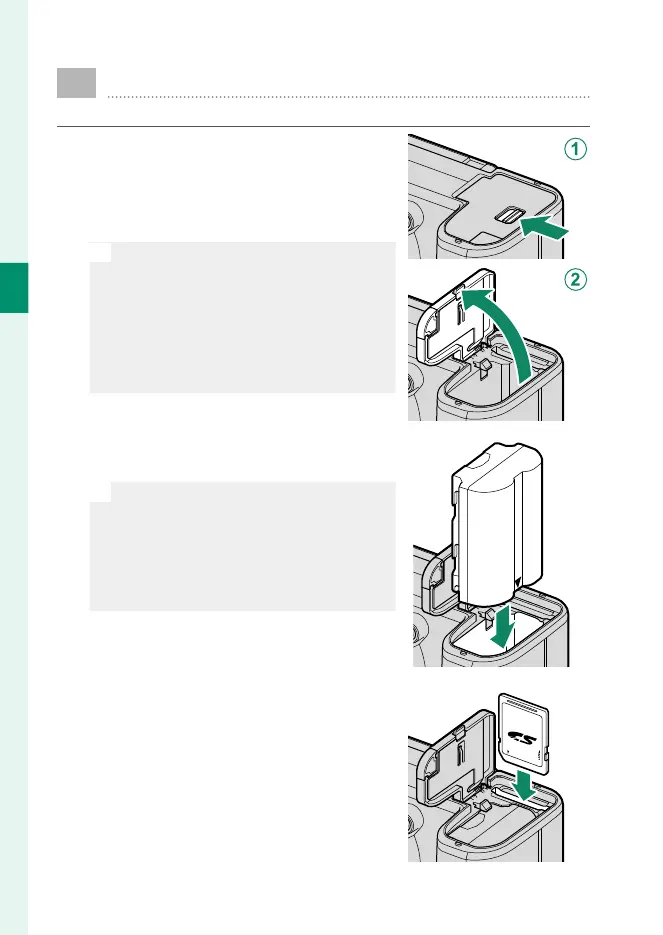
1
Open the battery-chamber cover.
Slide the battery-chamber cover
latch as shown and open the bat-
tery-chamber cover.
O
•
Do not open the battery-chamber
cover when the camera is on. Fail-
ure to observe this precaution could
damage image les or memory
cards.
•
Do not use excessive force when
handling the battery-chamber cover.
2
Insert the battery as shown.
O
•
Insert the battery in the orientation
shown. Do not use force or attempt
to insert the battery upside down or
backwards.
•
Con rm that the battery is securely
latched.
3
Insert the memory card.













 To Next Page