14
1
Before You Begin
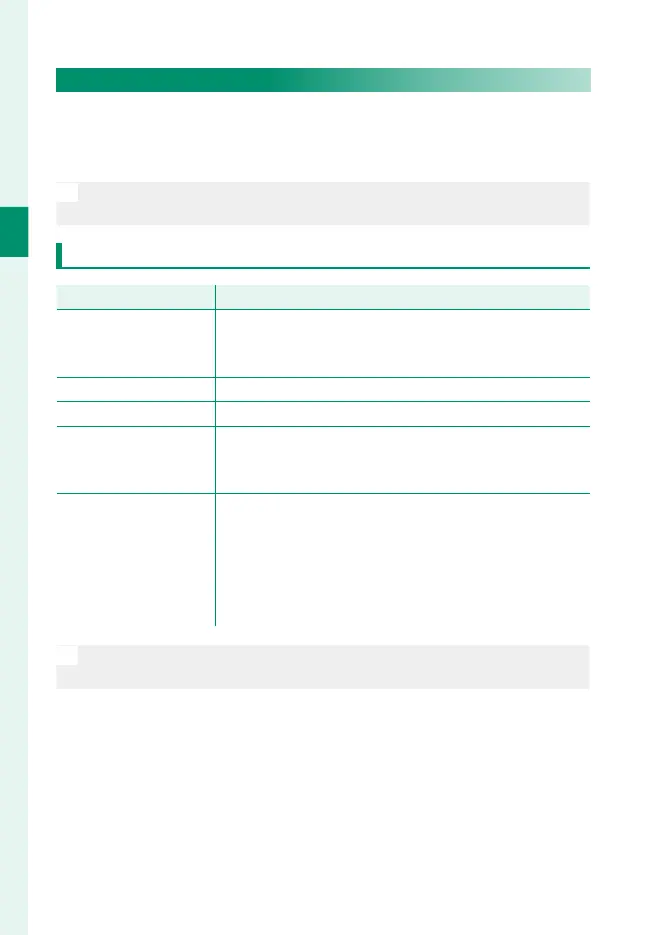
Choosing a Display Mode
Use D SCREEN SET-UP> VIEW MODE SETTING to choose from
the following display modes. You can choose separate display
modes for shooting and playback.
N
You can also assign VIEW MODE SETTING to a function button and
use it to switch between the EVF and LCD monitor.
SHOOTING
Option
Description
E
EYE SENSOR
Putting your eye to the viewfi nder turns the viewfi nder
on and the LCD monitor off ; taking your eye away turns
the viewfi nder off and LCD monitor on.
LCD ONLY LCD monitor on, viewfi nder off .
EVF ONLY Viewfi nder on, LCD monitor off .
EVF ONLY +
E
Putting your eye to the viewfi nder turns the viewfi nder
on; taking it away turns the viewfi nder off . The LCD
monitor remains off .
E
EYE SENSOR + LCD
IMAGE DISP.
Putting your eye to the viewfi nder during shooting
turns the viewfi nder on, but the LCD monitor is used for
the display of images once you remove your eye from
the viewfi nder after shooting. The options selected for
D SCREEN SET-UP> IMAGE DISP. apply to display
in the LCD monitor.
N
Go to D SCREEN SET-UP > VIEW MODE SETTING in the setup menu
and press the Q button to choose the view modes available.













 To Next Page