251
Network/USB Features and Settings
8
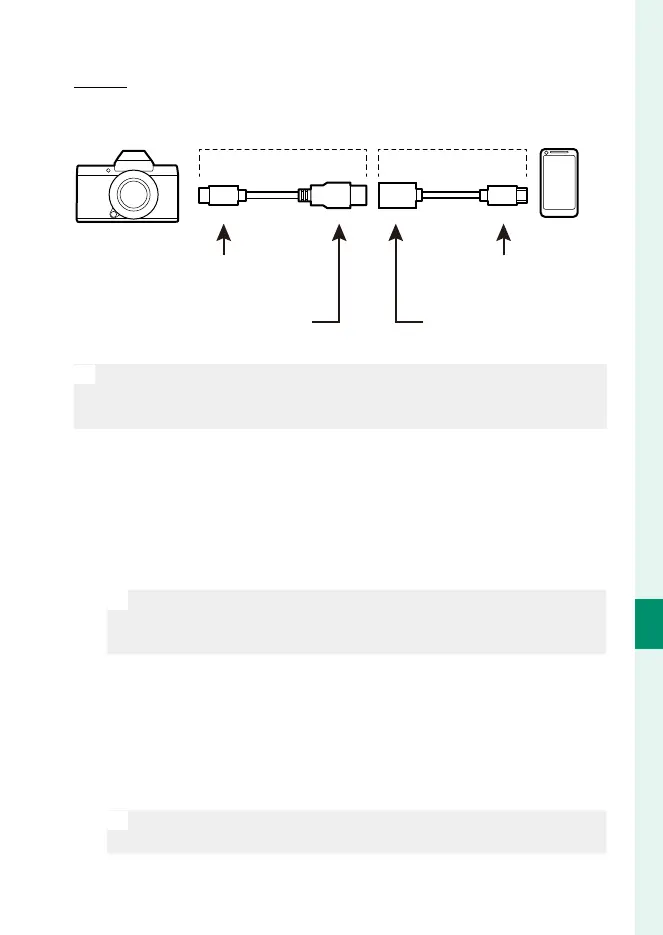
Connecting to Smartphones (USB)
Micro-B
Use a USB on-the-go (OTG) cable.
Third-party USB cable USB OTG cable
Type-C connector (male) Micro-B connector (male)
Type-A connector
(male)
Type-A connector
(female)
O
•
The smartphone must support USB OTG.
•
The desired results cannot be achieved with a USB Type-C–to–
Mirco-B cable. Use an OTG cable.
1
Select either AUTO or POWER SUPPLY OFF/COMM ON for
USB POWER SUPPLY/COMM SETTING in the network/USB
setting menu.
2
Select USB CARD READER for CONNECTION MODE.
3
Connect the camera and smartphone using a USB cable.
N
If the smartphone asks for permission for an app other than the
“Camera Importer” to access the camera, tap “Cancel” and move
on to the next step.
4
On your smartphone, tap the noti cation “Connected to USB
PTP”.
5
From the recommended apps, select “Camera Importer”.
The app will automatically start and allow you to import pho-
tos and movies to your smartphone.
N
If the message “There is no MTP device connected” appears on the
app, please try again from step 3.





 To Next Page