44
2
First Steps
4
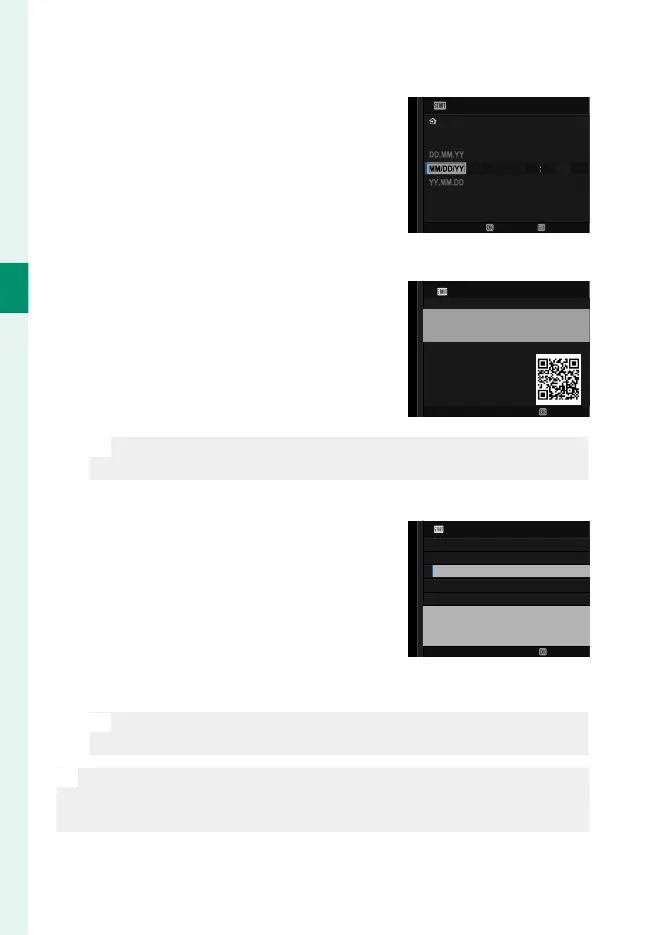
Set the clock.
..
GMT +1:00
2023 31 12 12hAM12 00
NO
SET
DATE/TIME
BERLIN/PARIS
5
View information on the smartphone app.
•
The camera will display a QR code
you can scan with your smartphone
to open a website where you can
download the smartphone app.
•
Press MENU/OK to proceed to the
next step.
SET
APPLICATION
IMAGES CAN BE EASILY TRANSFERRED
TO THE SMARTPHONE.
SCAN QR CODE TO ACQUIRE THE APP.
N
Use the smartphone app to download pictures from the camera
or control the camera remotely (P 247).
6
Choose an AUTO POWER OFF TEMP..
•
The selected setting determines
the temperature at which the cam-
era will turn o automatically.
•
Press MENU/OK to exit to the shoot-
ing display.
AUTO POWER OFF TEMP.
SET
HIGH
STANDARD
SET THE "AUTO POWER OFF TEMP." TO "HIGH" TO EXTEND
THE RECORDING TIME. ONLY RECOMMENDED
WHEN NOT HANDHELD OR WHEN USING TRIPOD ETC.
7
Format the memory card (P 270).
O
Format memory cards before rst use, and be sure to reformat all
memory cards after using them in a computer or other device.
N
If the battery is removed for an extended period, the camera clock will
be reset and the language-selection dialog will be displayed when the
camera is turned on.













 To Next Page