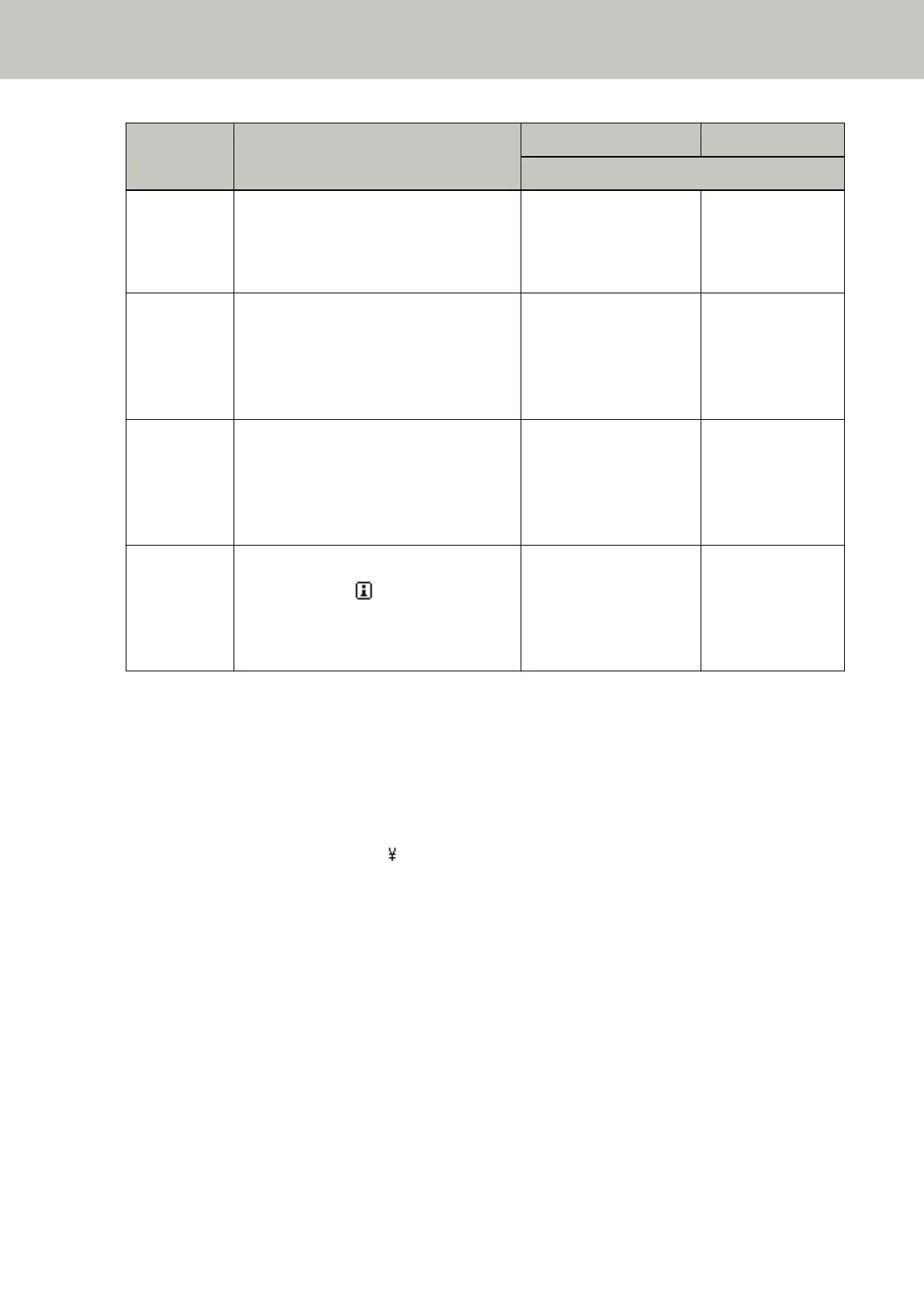
Item Description Setting/Value Factory Default
- : No settings/values
26: Low-speed
Feed Mode
Select whether to perform a slow scanning
speed, in order to protect the documents.
It can also be configured from the Software
Operation Panel.
1: Enable
2: Disable
2: Disable
27: Automatic
Separation
Control
Select whether to control the paper
separation force automatically for each
document type.
It can also be configured from the Software
Operation Panel.
1: Enable
2: Disable
1: Enable
28: Stacking
Control
Set the control for ejecting documents
when scanning documents with a
document length of 138 mm or shorter.
It can also be configured from the Software
Operation Panel.
1: Stackability Emphasis
2: Normal
3: Speed Emphasis
2: Normal
Information [Information] appears as an item in [Main
Menu] only when is displayed on the
LCD.
Message for replacing
consumables / cleaning /
replacing maintenance
parts / regular
maintenance
Only displayed when
there is information
*1:Although there is no factory default setting, it is set to [1: Movable] when you turn on the power. Therefore,
the setting does not change even when you initialize the operator panel.
*2:Although there is no factory default setting, it is set to [4: Lower] when you turn on the power. Therefore,
the setting does not change even when you initialize the operator panel.
*3:Although there is no factory default setting, the settings are configured as follows when you turn on the
power:[2:Multiple sheets] for [No. of sheets scanned], [1: Front Side] for [Print], [1:
(L)ABCDEFGHIJKLMNOPQRSTUVWXYZ[ ]^_`00000000] for [Print Pattern], and [1:Yes] for [Test Print].
Therefore, the settings do not change even when you initialize the operator panel.
*4:[Print:1:Front Side / 2:Back Side] does not appear unless both Front-Side and Back-Side Imprinters are
installed.
*5:Although there is no factory default setting, it is set to [2: No] when you turn on the power. Therefore, the
setting does not change even when you initialize the operator panel.
How to Use the Operator Panel
95



 To Next Page