Hazard Awareness
190-02488-01 Rev. B Pilot’s Guide 5-25
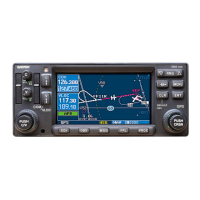
Traffic Display
1
Ownship Icon
Depicts current aircraft position.
• Nose of the ownship is the actual ownship location
• Unlike the configured aircraft symbol on map displays, ownship icon
is always a directional arrow
2
ADS-B Status & Active Applications
• ADS-B indications:
• On means the AIRB and ATAS traffic applications are active
• Off means that air and ground applications are inactive
• Test means the traffic test function is active
• Fail means that ADS-B reports a failure
• Ground station transmitter status icon
• +SURF means that ground targets displays in addition to
airborne targets
• Altitude filter setting (NORM, ABV, BLW, UNR)
3
Page Orientation Label
• Track Up orients page to current aircraft GPS track
• Heading Up orients page to current aircraft heading
(requires heading data source interface)
Collision avoidance and traffic surveillance data display on the
dedicated Traffic page and as overlays on Map.
The Traffic page displays intruding traffic in relation to the
current position and altitude of the aircraft without clutter
from other data.
Traffic Page
1
2
3
7
9
4, 5, 6
8


 To Next Page