1-12 Pilot’s Guide 190-02488-01 Rev. B
System at a Glance
Page Navigation Labels
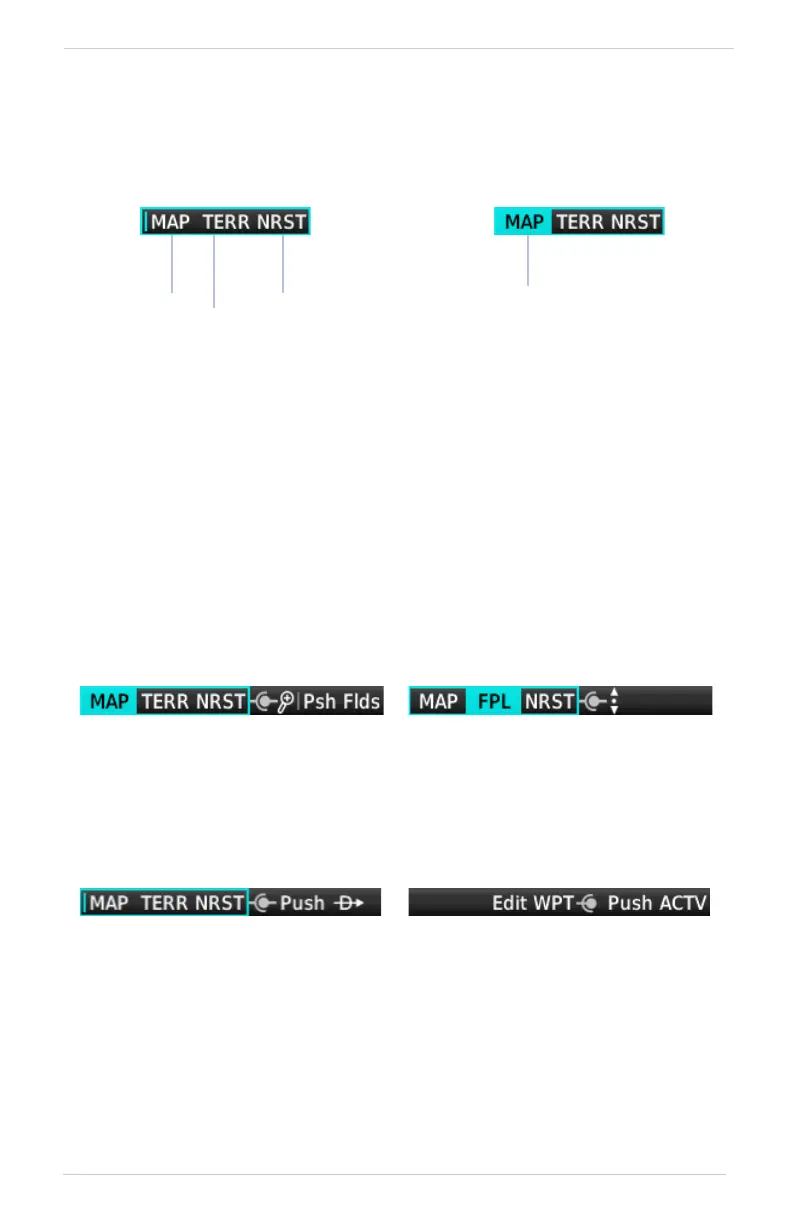
A locater bar works in conjunction with the outer knob, providing quick access to the
indicated page. Turning the outer knob clockwise or counter-clockwise moves the
locater through the available shortcut options.
Knob Function Indicators
Icons to the right of the bar indicate available knob functions. Indications include,
but are not limited to, the following.
GPS 175 & GNX 375
Slot 1 Slot 3
Slot 2
Active Page
Slot 1 is a dedicated Map shortcut.
Slots 2 and 3 are customizable.
Selectable page options are
dependent upon configuration.
A cyan background and border
indicate active page and available
shortcuts.
Map Active Flight Plan Active
Available functions:
• Map zoom
• Toggle user fields on or off
Available functions:
• Flight plan scrolling
Available functions:
• Page shortcut navigation
• Access Direct To window
Available functions:
• Direct-to waypoint editing
• Activate direct-to course
Home Page Active Direct To Window Active



 To Next Page