EasyManua.ls Logo

Garmin GNC 355 - Pilot Settings; CDI Scale

Garmin GNC 355
290 pages
Print Icon
To Next Page IconTo Next Page
To Previous Page IconTo Previous Page
Loading...
2-46 Pilot’s Guide 190-02488-01 Rev. B
Get Started
Pilot Settings
[1] GNC 355/355A only.
[2] GNC 355A only.
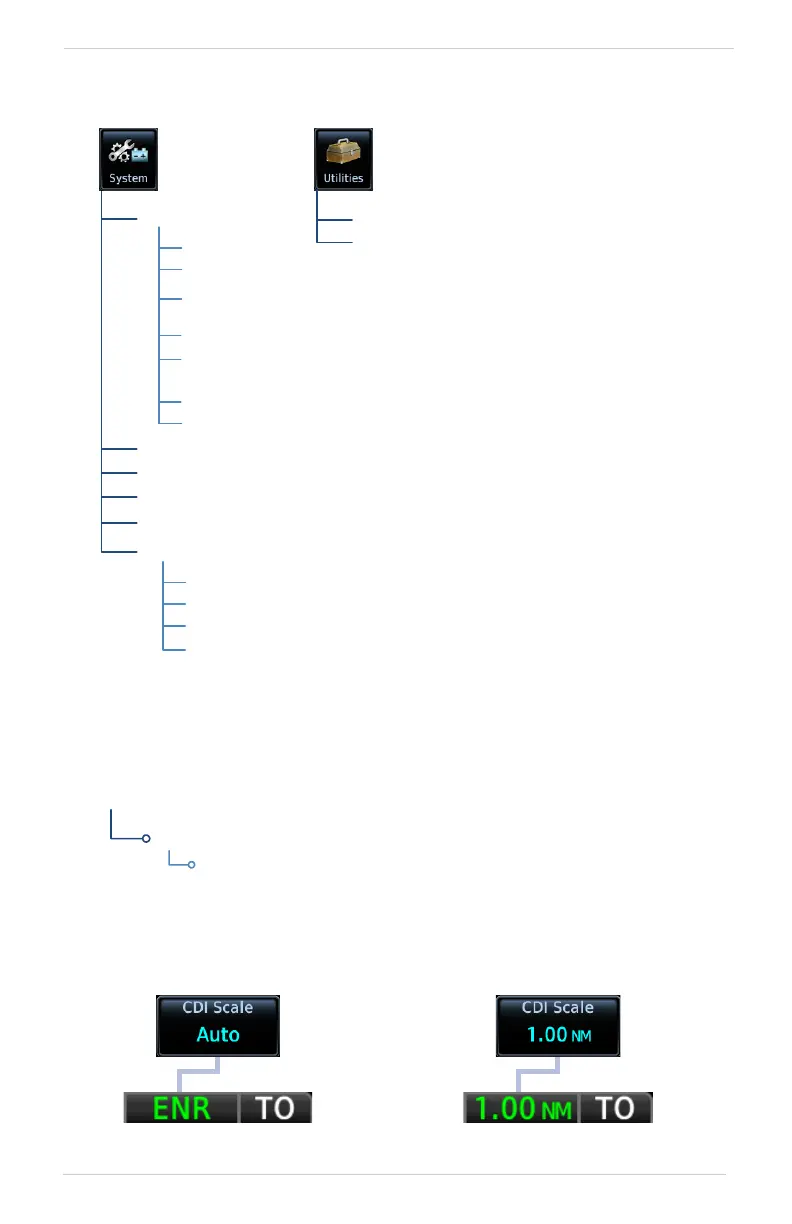
CDI Scale
Scale selections are reflected in the annunciator bar.
Clock/Timers
Scheduled
Messages
CDIOnScreen
AirportRunway
Criteria
Date/Time
Setup
CDIScale
PageShortcuts
ConnextSetup
AirspaceAlerts
Units
ChannelSpacing
ReverseFrequency
Look‐up
SidetoneVolume
[2]
[1]
[1]
Backlight
PairedDevices
DeviceName
BluetoothEnabled
FlightPlanImport
Unit customization options
allow you to:
Set and display the CDI
Specify runway criteria
Set the date and time
Specify COM radio
settings
[1]
Create shortcuts
Set the display units
Adjust display
brightness
Other setup options allow
you to monitor time in flight
and create custom reminder
messages. These settings
reside in the system Utilities.
For details about COM
radio settings and Connext
Setup options, refer to the
respective section.
Set the scale for the course deviation indicator. Scale
values represent full scale deflection for the CDI to
either side.
Options: • 0.30 nm • 1.00 nm • 2.00 nm • Auto

System
Setup
Home
Auto Setting Annunciation Manual Setting Annunciation

Table of Contents

Other manuals for Garmin GNC 355

Related product manuals