EasyManua.ls Logo

GDC SR-1000 - Page 59

GDC SR-1000
137 pages
Print Icon
To Next Page IconTo Next Page
To Previous Page IconTo Previous Page
Loading...
- 58 -
April 22
nd
, 2021
USER MANUAL FOR SR-1000 STANDALONE INTEGRATED MEDIA BLOCK™
6. CONTENT
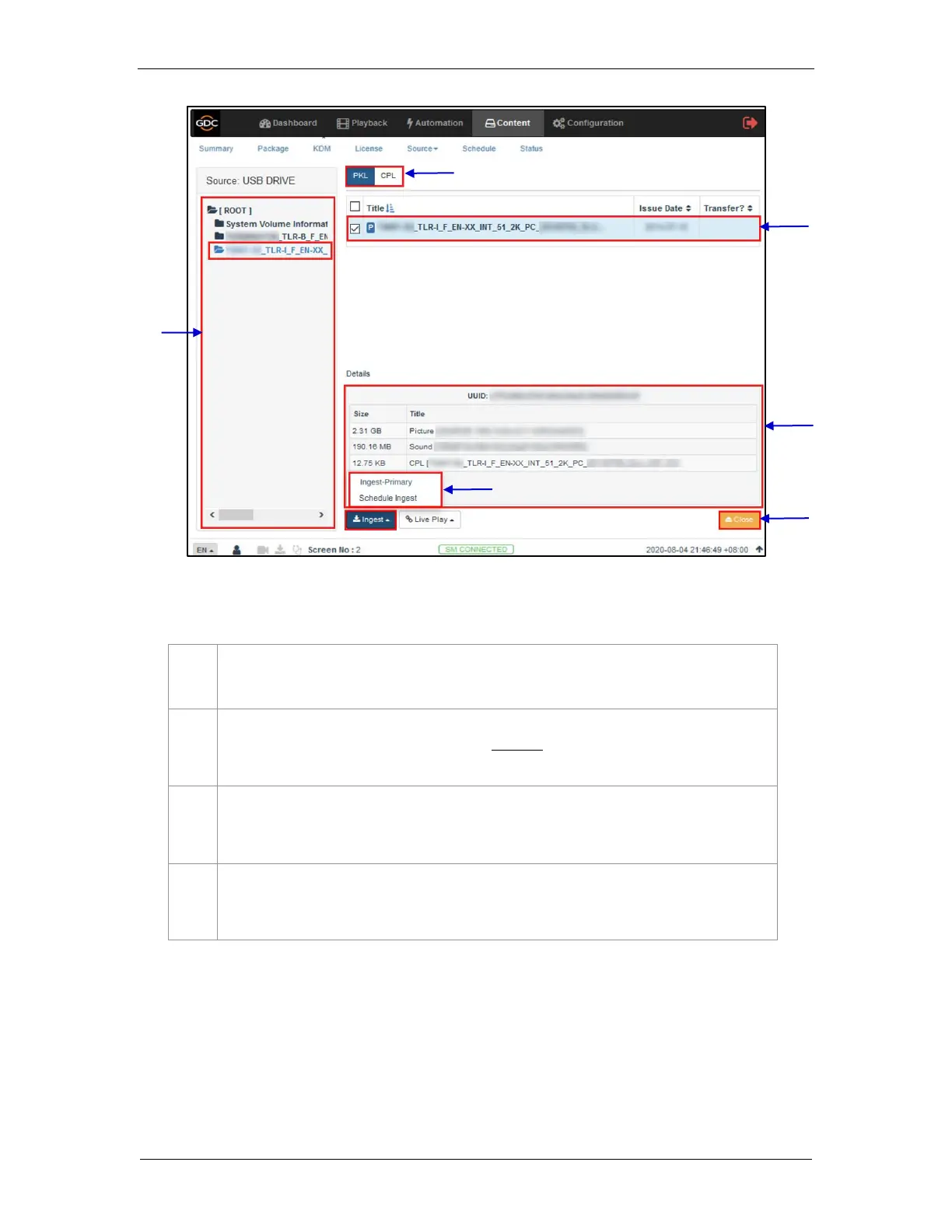
Figure 34: Ingesting content from USB Disk (2)
5
Browse the selected source and select the directory where the package is located. The list of
packages in the directory will be displayed on the top right section of the screen.
6
This button can be used to toggle between the PKL/CPL list displayed in the top right section of
the screen.
7
Select the package or CPL you wish to ingest using the checkbox on the left of that particular
entry in the PKL/CPL list. You can select multiple PKL’s or CPL’s.
8
Information about the selected package or CPL including the file size, is shown in the section
below the PKL/CPL list.
7
5
9
6
8
10

Table of Contents

Other manuals for GDC SR-1000

Related product manuals