GE MEDICAL SYSTEMS
D
IRECTION 2380207, REVISION 7 LOGIQ™ 5 PRO SERVICE MANUAL
Chapter 4 Functional Checks 4 - 25
Section 4-8
Software Configuration Checks
Refer to Chapter 3, Section 3-6 - System Configuration for setting procedures.
Section 4-9
Peripheral Checks
Check that peripherals work as described below:
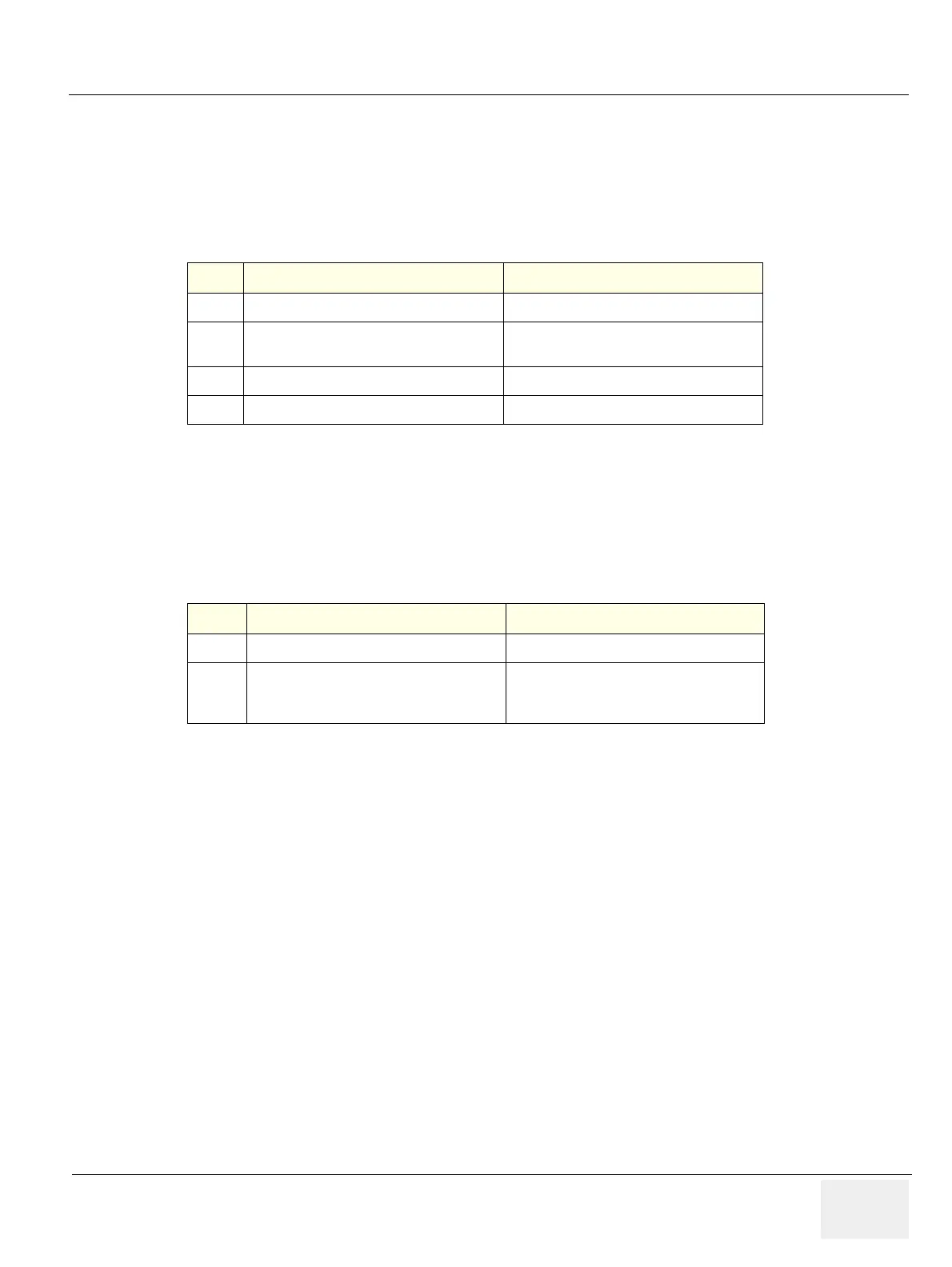
Table 4-23 Software Configuration Checks
Step Task to do Expected Result(s)
1.
Check Date and Time setting Date and Time are correct
2.
Check that Location (Hospital Name and
Department) is correct
Location Name is correct
3.
Check Language setting Language is proper
4.
Check Units setting Units are proper
Table 4-24 Peripheral checks
Step Task to do Expected Result(s)
1.
Press Freeze Stop image acquisition.
2.
Press (P1) or (P4) on the Control panel
The image displayed on the screen is printed
on B&W or Color printer depending on the
key assignment configuration.


 To Next Page