GE MEDICAL SYSTEMS
D
IRECTION 2380207, REVISION 7 LOGIQ™ 5 PRO SERVICE MANUAL
Chapter 8 Replacement Procedures 8 - 149
8-8-3-6-2 Data copy to new HDD.
1.) Go into maintenance mode
2.) Plug the USB service dongle into usb port on the rear panel. There are 2 usb ports on the rear panel.
The right side USB port is recommended for service dongle. Turn on the system and key in the
service password.
8-8-3-6-3 File Copy
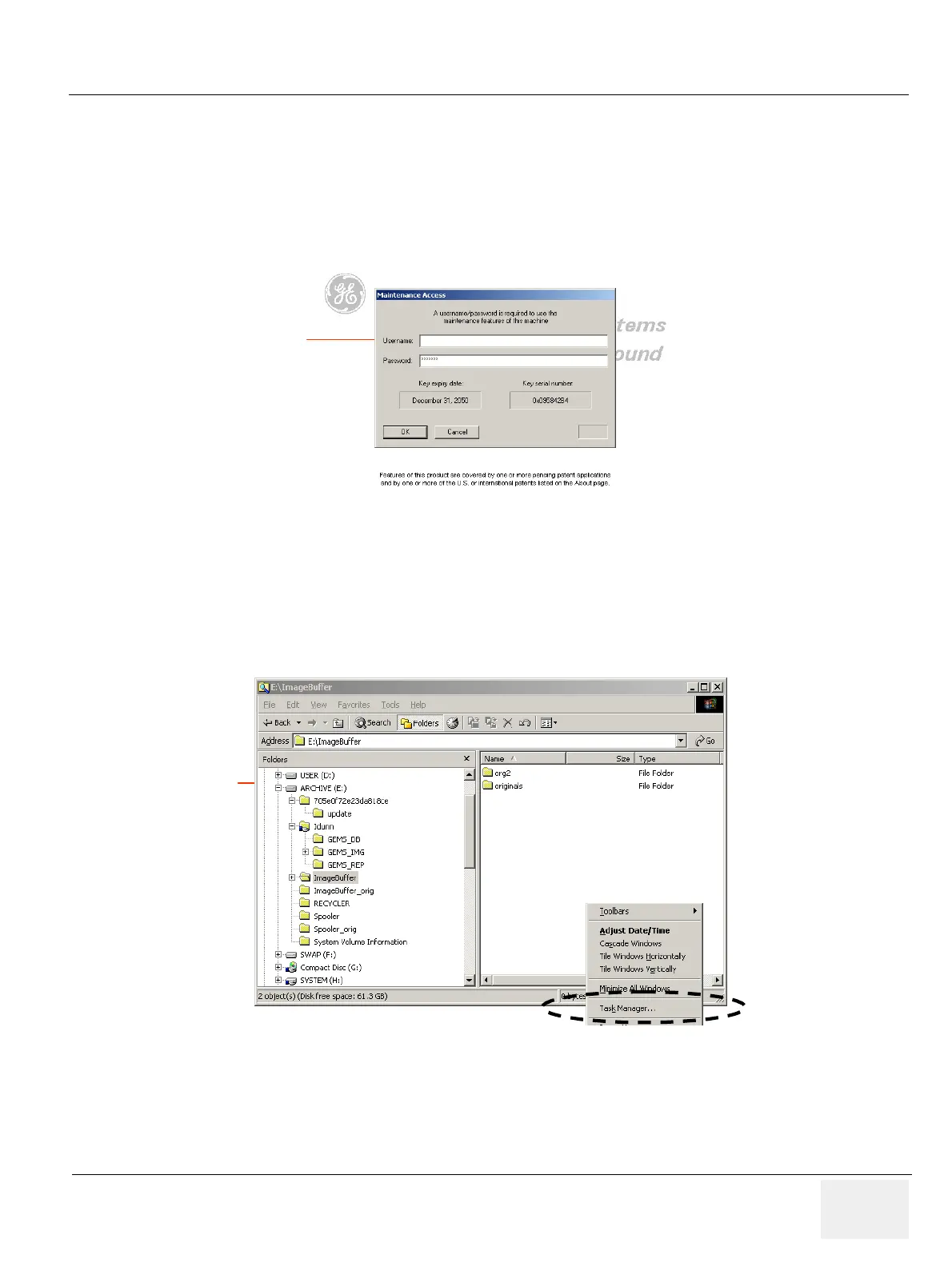
1.) The database control software module should be disabled through task manager The task manager
can be activated by following procedure.
2.) Move the cursor to right-bottom side of screen.
3.) Click the left trackball key and select task manager.
4.) Select then "process" button on the task manager window.
Figure 8-165 maintenance login
Figure 8-166 Run Task Manager


 To Next Page