GE MEDICAL SYSTEMS
D
IRECTION 2380207, REVISION 7 LOGIQ™ 5 PRO SERVICE MANUAL
Chapter 8 Replacement Procedures 8 - 197
8-11-3-2 Setting Computer Name
NOTE: If the "Save" is NOT performed, you can NOT enter Patient screen and NOT perform Export/
Import
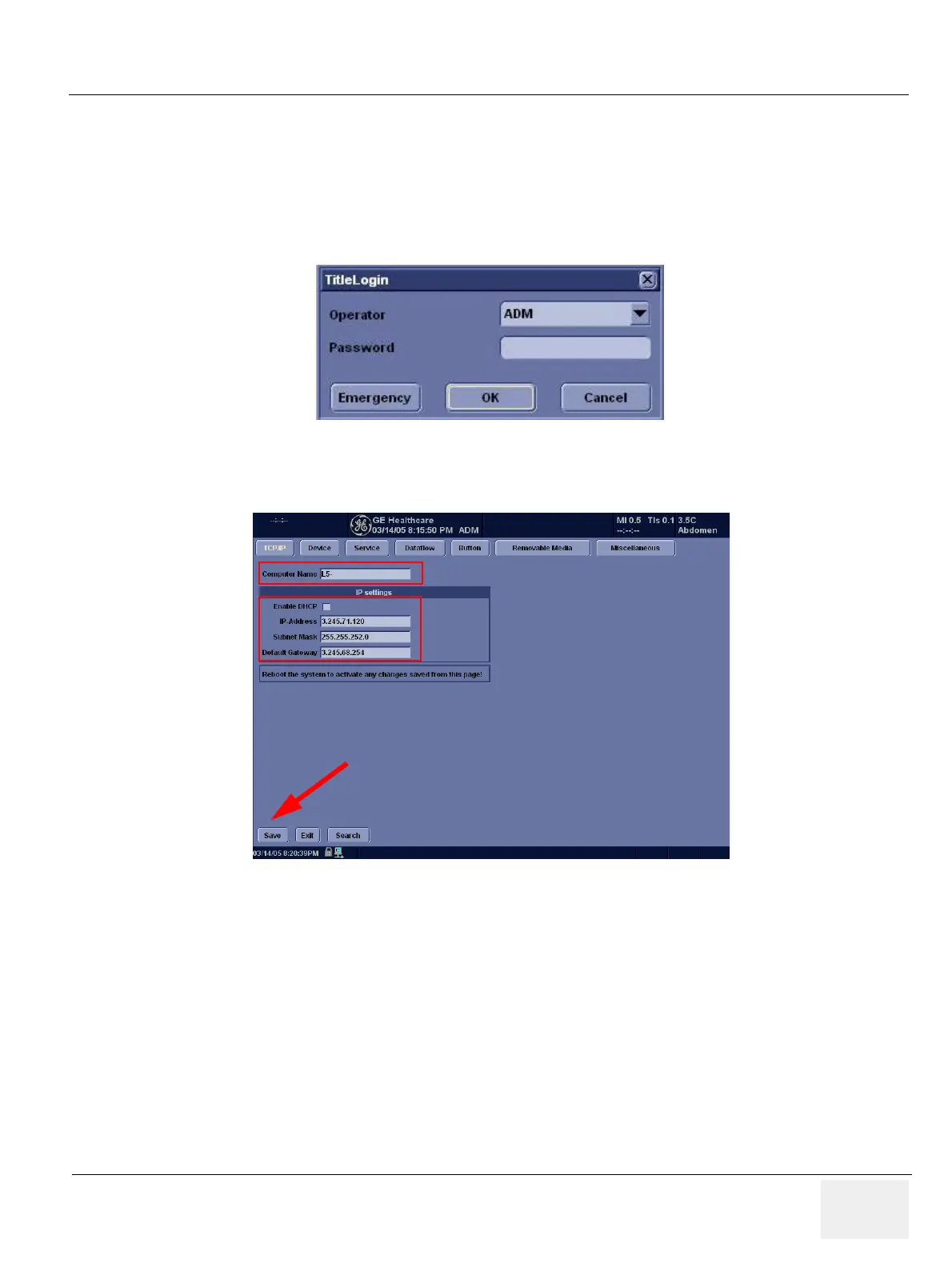
1.) Press Utility-> Connectivity
2.) Operator Login Window appears. Select ADM(Administrator) for operator field.Click OK button
3.) Click on Tcpip tab
4.) Check if Computer Name, IP Address, Subnet Mask, and other parameters are proper
5.) Click on Save button
6.) Click OK for confirmation dialog box
7.) The system will power OFF automatically.
8.) Turn on the system for functional checks
Figure 8-237 Set Computer Name
Figure 8-238 TCPIP tab


 To Next Page