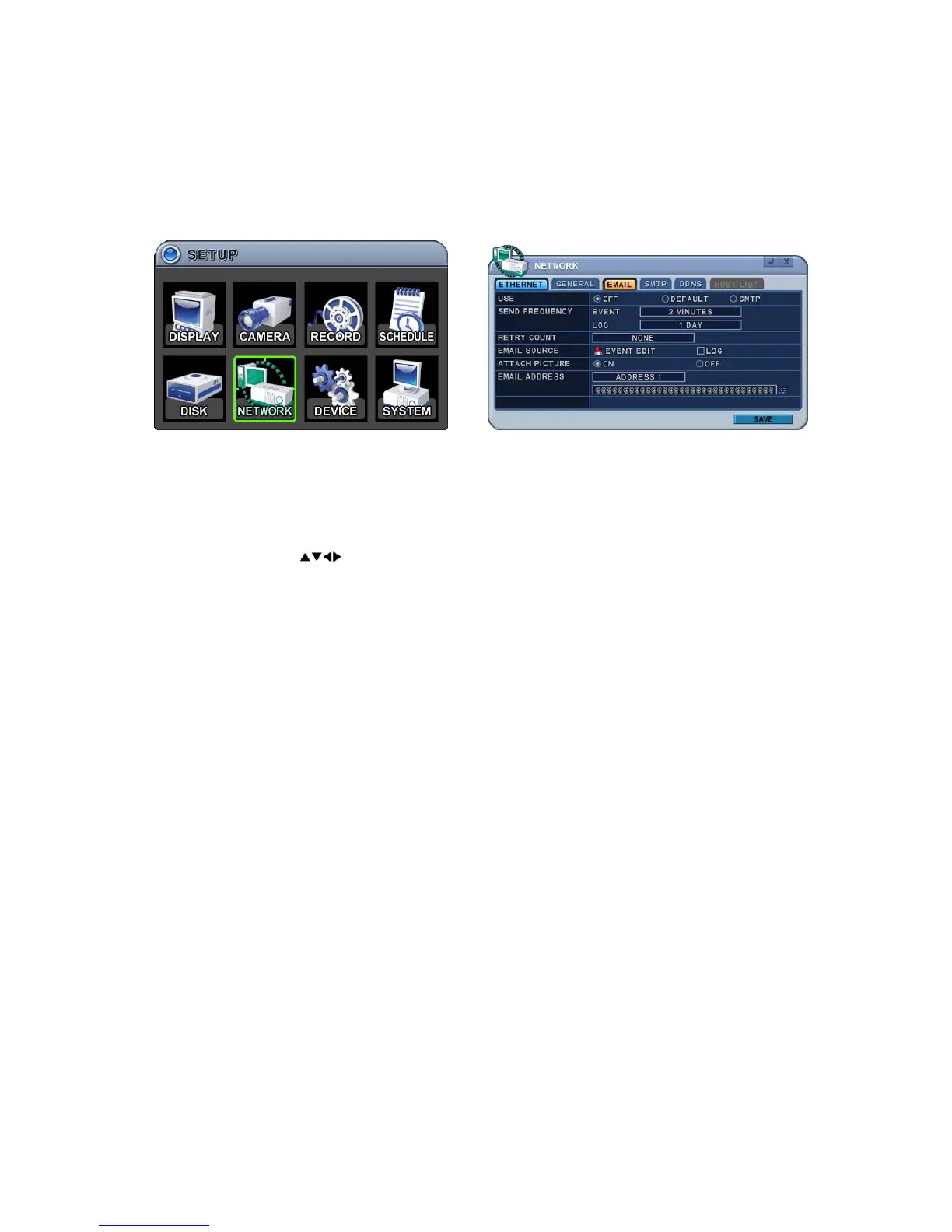
6.3. Email
This DVR allows you to specify the events that generate notifications. Sends
email notification if an event occurs such as alarm or motion is detected etc.
The mail server can use either the DVR mail server or your existing email
settings.
The menus are displayed with options in the left-hand column and settings in
the right hand column. A cursor (highlighted menu) can be moved using the
direction buttons
.
1. Use: Select email notification On or Off. The default is Off. Press the [-,
+] buttons to select. Using a mouse, click the option to select mail server.
1) Default: Default is provided by manufacturer. Mail notification options
and mail address settings are available.
2) SMTP: SMTP Configuration tab is activated to set up your own mail
settings.
2. Send Period: Email will be sent at selected intervals.
1) Event: [Immediately, 10 Minutes, 1 Hour, 1 Day]
2) Log: [1 Day, 1 Week]
3. Retry Count: Select the retry count to send email again after failure.
4. Email Source: Event must be specified using notification options.
1) Event Edit: Notifications can be enabled on each channel for Alarm,
Motion, Video Loss and System (HDD Fail, Record Fail, HDD Full etc).
Press ENTER button to select.



 To Next Page