65 DIGITAL VIDEO RECORDER
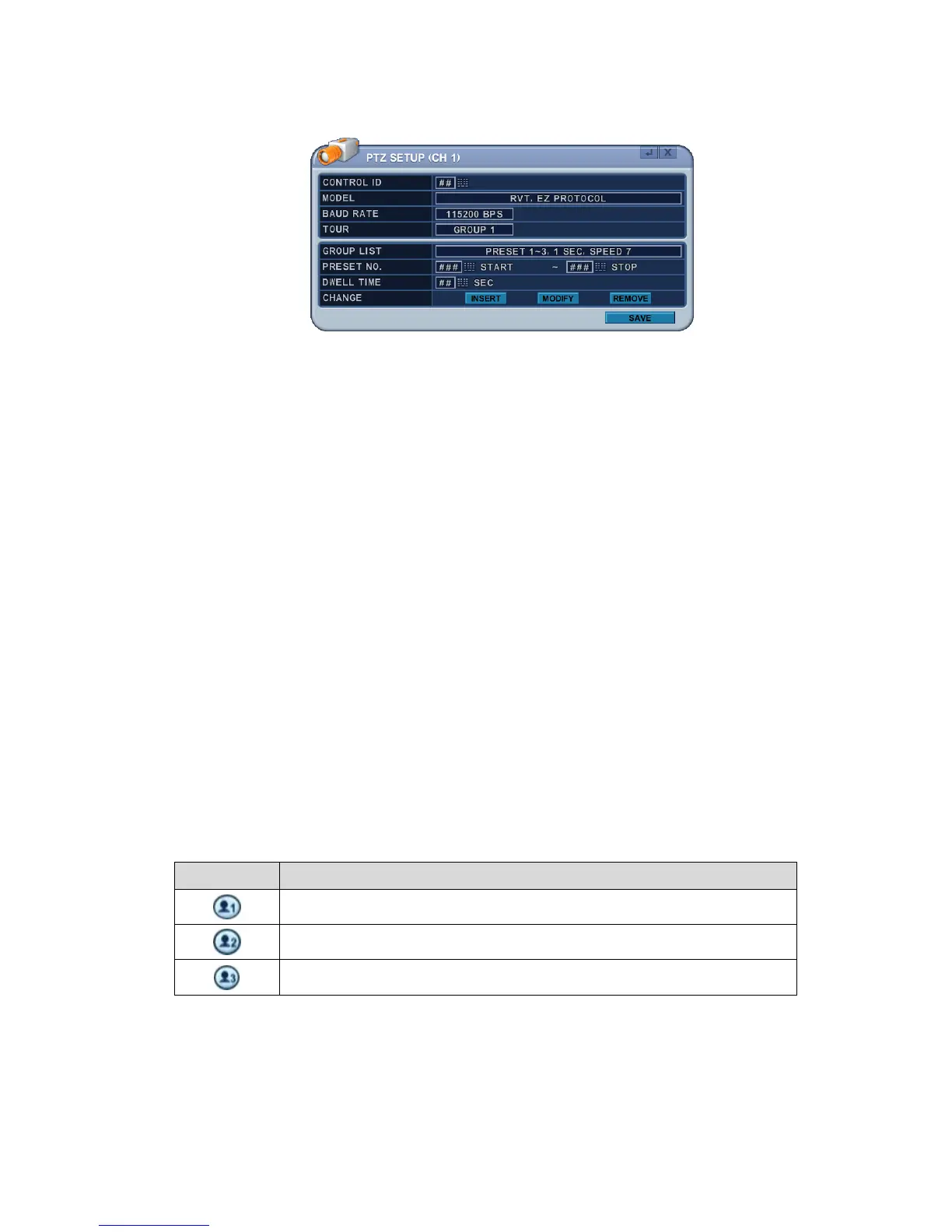
1) Communication Settings: Configure the appropriate protocol, then
enter the corresponding baud rate and PTZ ID (address). Refer to the
PTZ manufacturer’s instruction manual for proper jumper settings to
match the protocols to the DVR.
2) Tour: There are 4 programmable Tours. Use the [-, +] buttons to
change the values [Group 1Æ Group 2 Æ Group 3 Æ Group 4]
3) There’s a sub menu of each Tour group. The menus are displayed with
options in the left-hand column and settings in the right hand column.
a. Group List: Each Tour Group consists of up to 10 Preset positions.
b. Preset No. : Enter the start Preset number and stop Preset number.
c. Dwell Time: Set the pause between end of current Preset and the
start of the next Preset.
d. Change: Add, modify or clear the Tour list using this option.
f. Repeat the procedure in step b to d to add Tour list.
3. Custom Functions
Button Function
PTZ custom function 1; DISPLAY on remote controller
PTZ custom function 2; ZOOM on remote controller
PTZ custom function 3; P/T/Z on remote controller



 To Next Page