57 DIGITAL VIDEO RECORDER
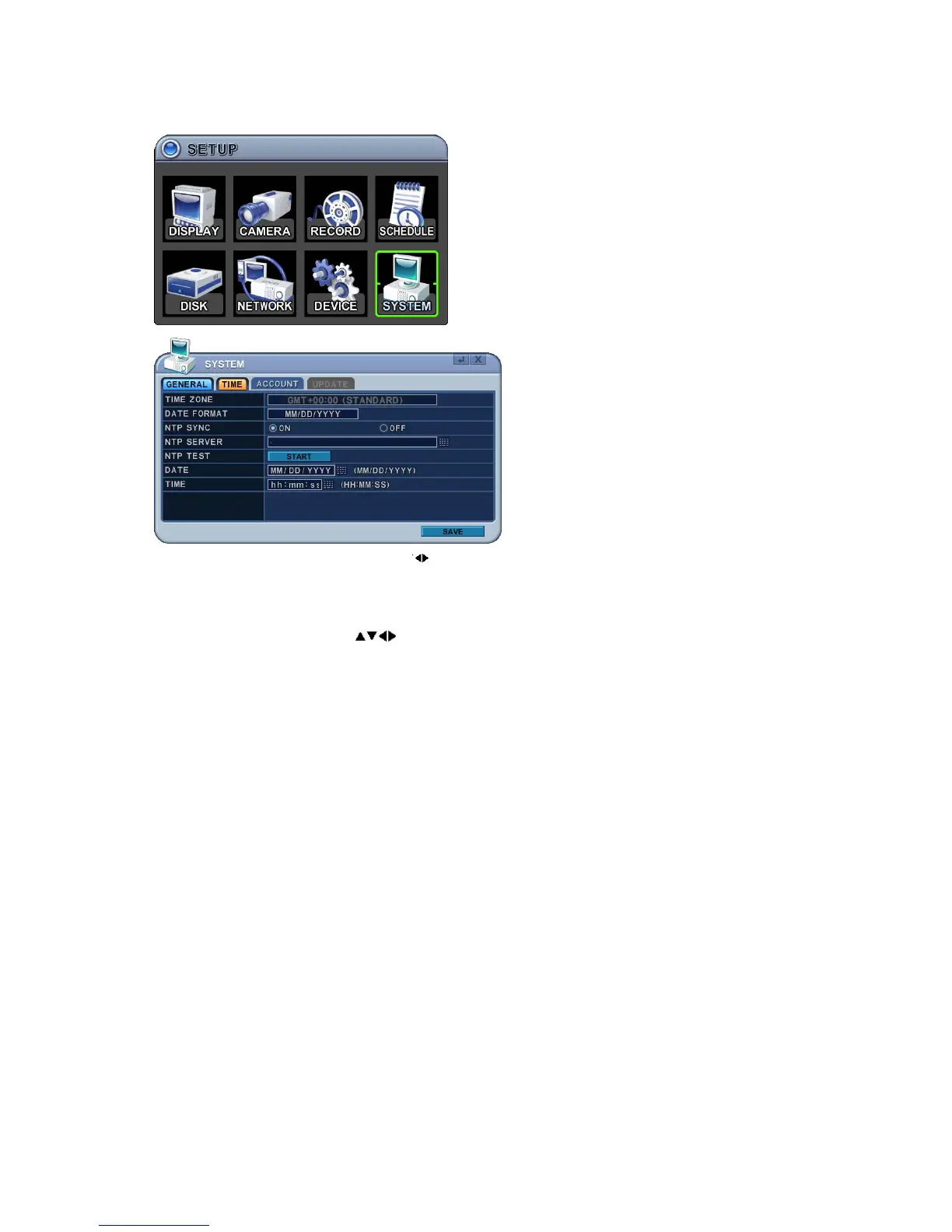
1. Use Left/Right buttons [ ] to select the “Time” tab menu. The menus
are displayed with options in the left-hand column and settings in the
right hand column. A cursor (highlighted menu) can be moved using the
direction buttons
. Press the [-, +] buttons to change values.
1) Time Zone: Refer to <Appendix 1: Time Zone Chart>
Select the Time Zone in which the DVR is located. Time Zone contains
DST (Daylight Saving Time) On. If you choose Time Zone with DST, there
is no change in the system time stamp for recorded data. When the
Daylight saving End date and time occurs the DVR’s time goes back one
hour.
2) Date Format: Select Date display format.
[MM/DD/YYYY Æ DD/MM/YYYY Æ YYYY/MM/DD]
3) NTP Sync: The internal time of DVR can be synchronised with an
external time source using NTP (Network Time Server) Configuration. If
the NTP option is ON, the DATE and Time option is inactivated.
4) NTP Server: Allows you to use a public or private NTP server. Enter the
IP address of the server or domain. The default setting is public
“pool.ntp.org”.
Note: Time Sync. Interval: Min 64 sec. Max 1024 sec.
5) NTP Test: Test whether NTP Server works or fails.



 To Next Page