User Manual
Page 13
For the single Hard Disk Drive installation, please locate the marked SATA 1 or Primary SATA cables
and connector and install the HDD to it.
Upon completion of your hard disk drive installation, please perform the following procedures.
It is critical that you follow this procedure after hard disk installation.
1. Perform the Hard Disk format procedure
2. Check to see if proper size is allocated
3. Perform factory reset procedure
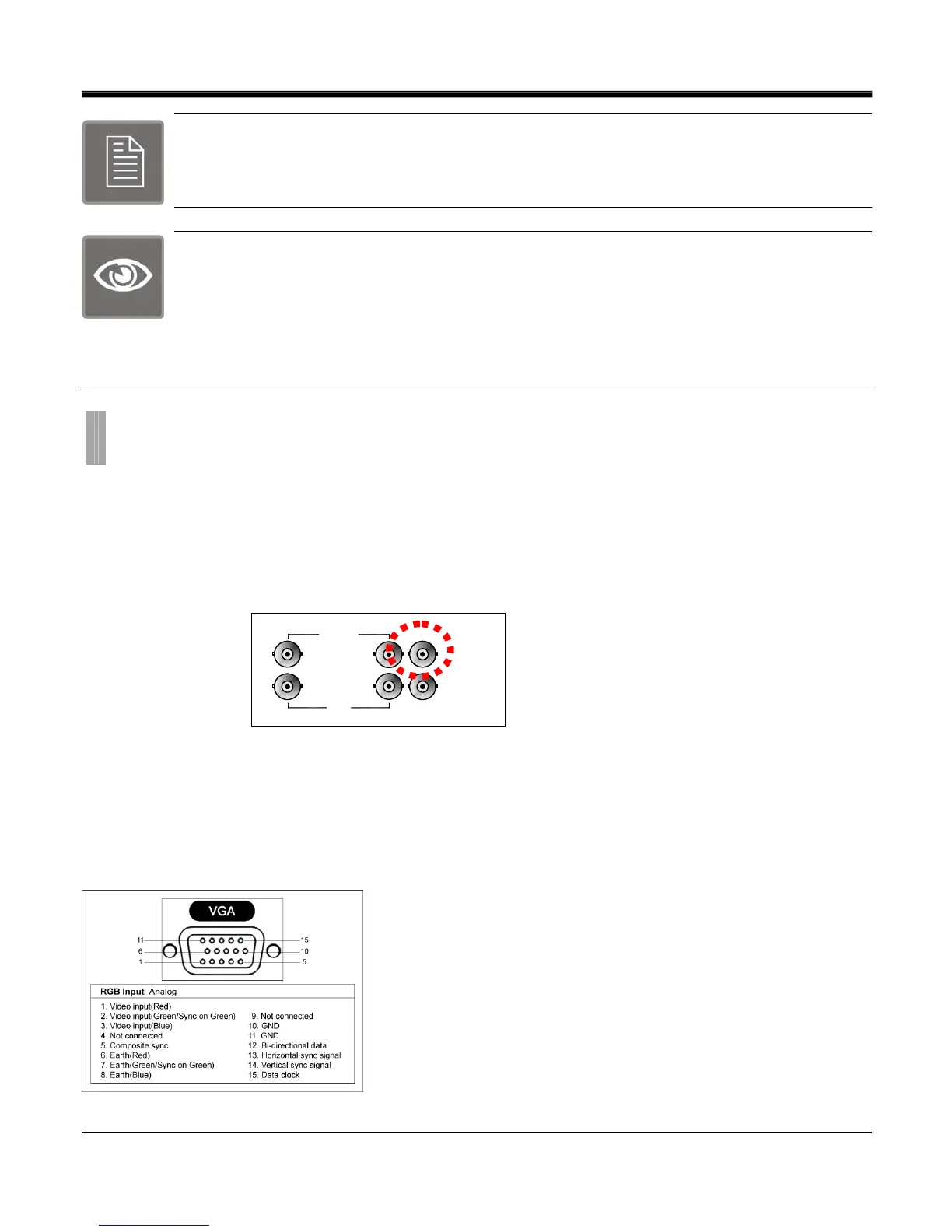
z Monitor
Monitor connection is the main monitor output for composite type monitor. This port is used as primary connection along
with the VGA port. They may be used simultaneously along with VGA port.
Connect a monitor that supports BNC Inputs or use a “BNC Twist Lock” to Composite Video adapter if your monitor only
supports Composite Video Inputs.
Monitor Connection
z VGA
The DVR unit supports multiple array of VGA resolution and refresh rate available to popular LCD Monitor and High
Resolution HD LCD TV. Connect a VGA monitor to the DVR with a standard VGA Cable. Supported resolutions for the
VGA ports are:
640x480 @ 60Hz/75Hz , 800x600 @ 60Hz/75Hz, 1024x768 @ 60Hz/75Hz, 1280x1024 @ 60Hz/75Hz
VGA Pin Description
CHAPTER 2. HARDWARE CONFIGURATION
4. Monitor Connections
LOOP
……
CH1
CH16
MONITOR
CAMERA IN
SPOT



 To Next Page