User Manual
Page 47
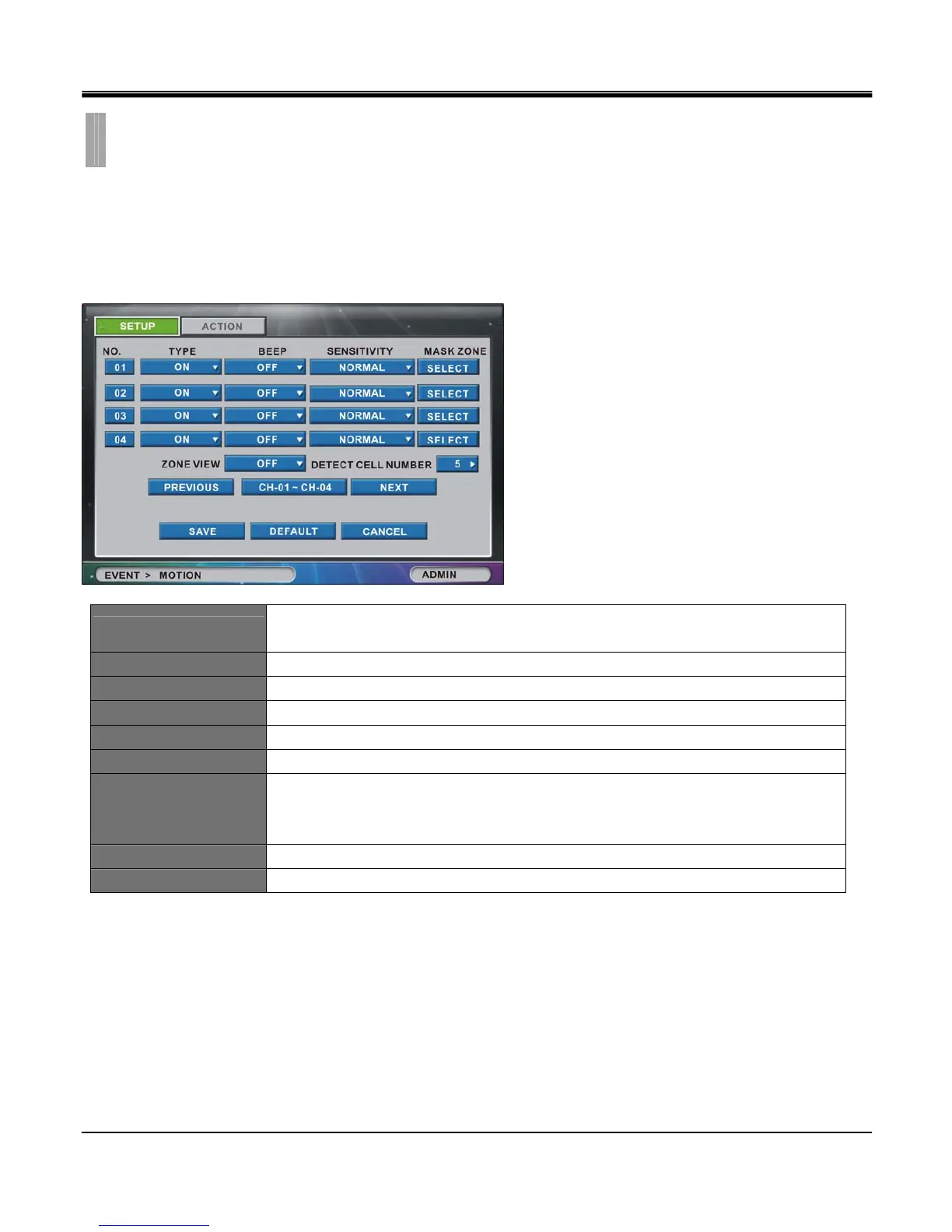
The “MOTION" list option item is selectable from “EVENT" group icon.
By selecting “MOTION" list option item, window with “SETUP" tab and “ACTION" tab appears.
[1]SETUP
Set Motion Detection setting for each channel.
No.
Click the “NO. (Number)” button to show the “COPY SETTINGS” popup menu.
(There are channels 1~4 shown by default) .
Type Set motion mask setting “ON" or “OFF"for each channel.
Beep Set beeping sound “ON” or “OFF” in case motion event occurs.
SENSITIVITY Set sensitivity among VERY HIGH, HIGH, STANDARD, LOW and VERY LOW.
MASK ZONE Click to go to Motion Mask Zone setup window.
ZONE VIEW Motion detected cells will be displayed in red while in live view.
DETECT CELL NUMBER
Set number of cells for Mask Zone from 1 to 180 cells.
Motion detection will only start if more cells are detected than number of cells defined at
DETECT CELL NUMBER selection.
PREVIOUS
Go to previous channel page. (not available in 4 channel DVR)
NEXT
Go to next channel page. (not available in 4 channel DVR)
CHAPTER 7. EVENT
2.MOTION



 To Next Page