User Manual
Page 93
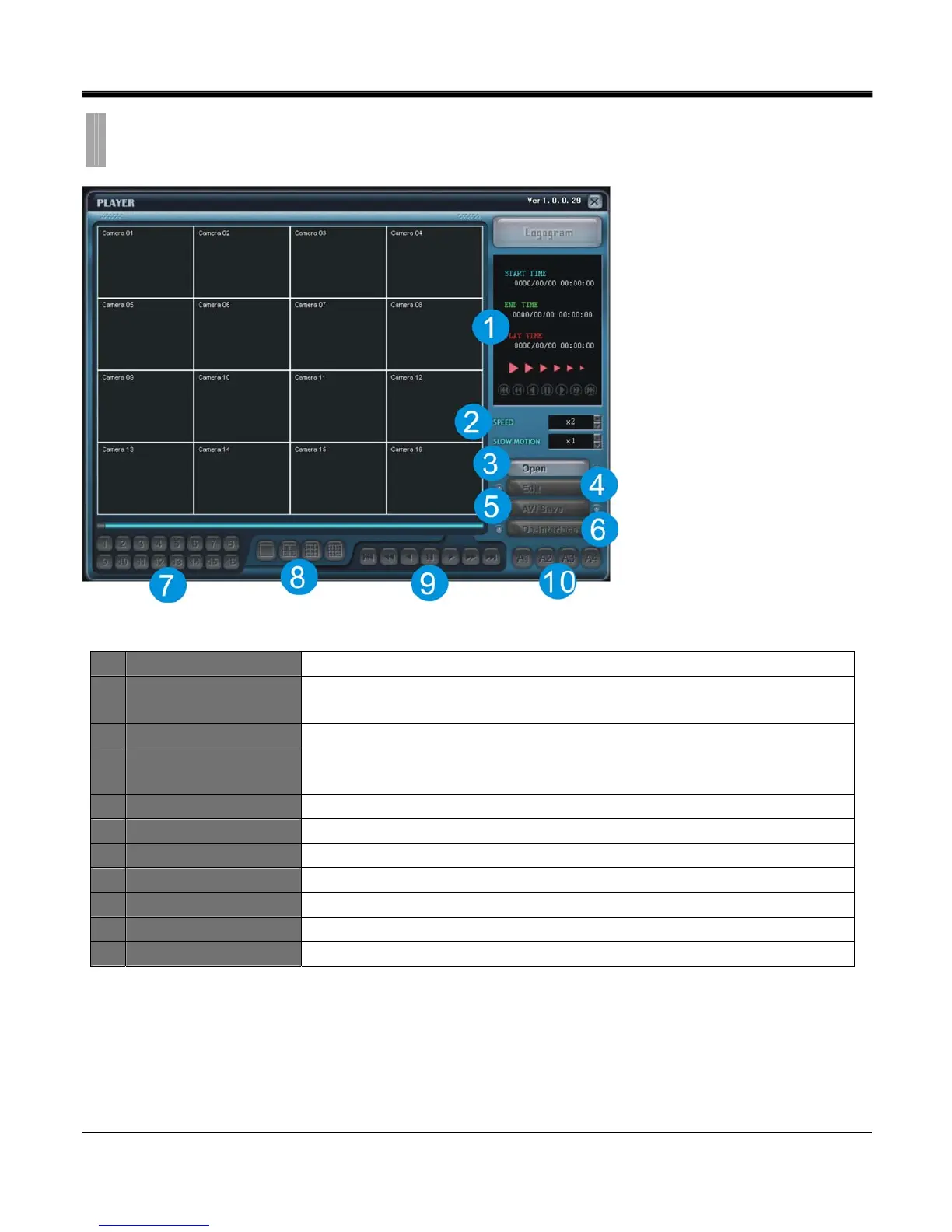
1 TIME Displays start time, end time, current playback time.
2 SPEED/SLOW MOTION
SPEED : Set fast playback speed : 2x, 4x, 8x, 16x 32x
SLOWMOTION : Set slow playback speed : 1x, 1/2x, 1/4x, 1/8x, 1/16x, 1/32x
3 OPEN
Playback backup file on PC.
(System resident file format is called SM4 file format and this file format will only be
play backed using software provided with this DVR)
4 EDIT Edit freeze image in full screen mode.
5 AVI SAVE Save a full screen mode channel in AVI file format.
6 De-interlace De-interlace option enabled for D1 size image.
7 Channel selection Displays selected channel in full screen mode.
8 Screen division Select screen split layout among 1, 4, 9, 16 split
9 Playback function Function bar on playback
10 Audio Channel Select audio channel to turn on.
CHAPTER 12. WEB IRS
5.PLAYER



 To Next Page