User Manual
Page 79
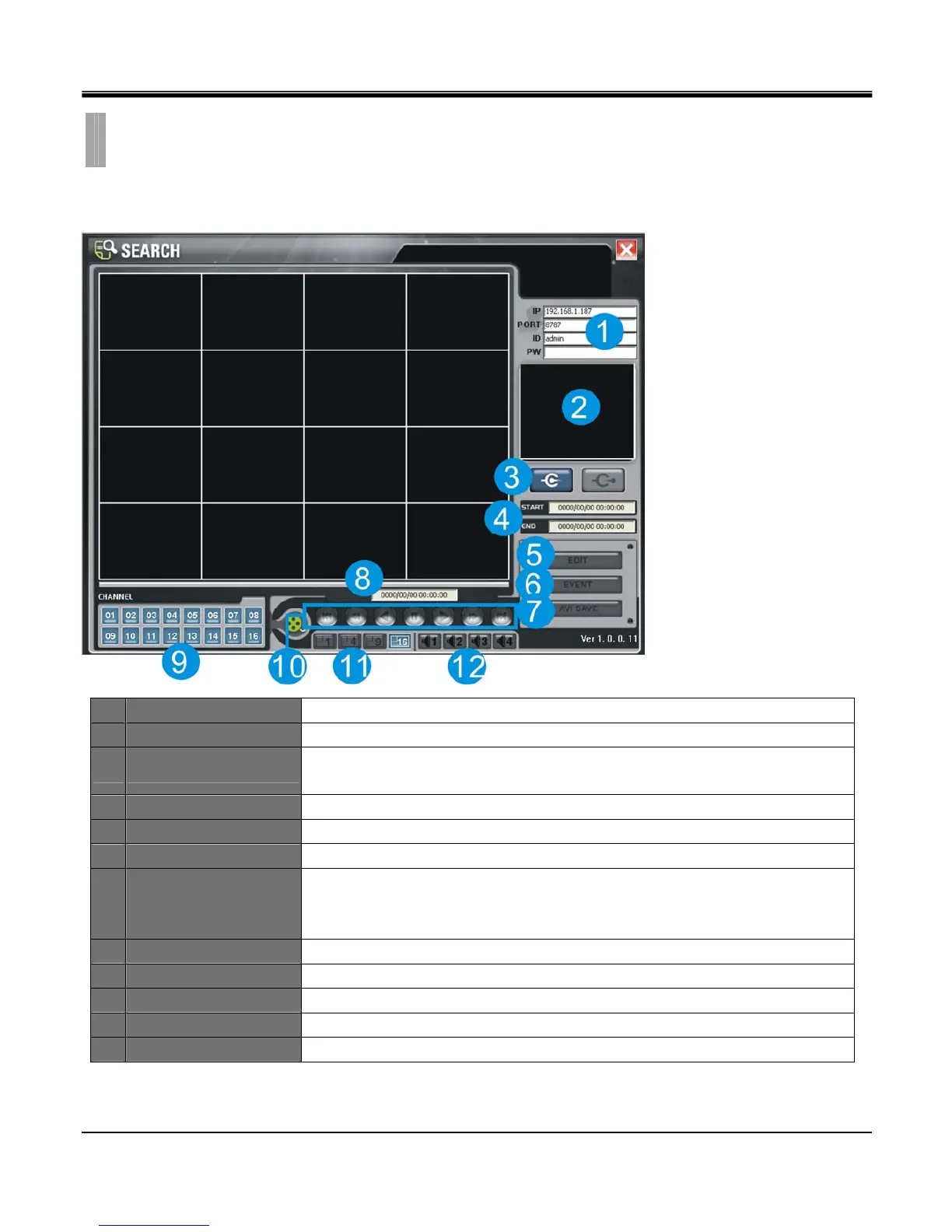
[1.REMOTE SEARCH INTERFACE]
1 DVR connection setup Input IP address, Port number, ID, Password
2 System Information Displays DVR connection and progress status.
3 Connect/Disconnect
Connect: Connect to DVR via network.
Disconnect: Disconnect network connection.
4 Start / End Displays start time and end time of total recorded data.
5 EDIT Edit freeze image in full screen mode.
6 EVENT Click to pop up window for search by date, event and bookmark.
7 AVI SAVE
Save a full screen mode channel in AVI file format.
(AVI save only applicable for single channel view. Select the channel you want to
save as AVI before initiating AVI save)
8 Playback time Current playback time.
9 Channel selection Displays selected channel in full screen mode.
10 Playback function Playback control toolbar
11 Screen division Select layout of split screen.
12 Audio channel Select audio channel to turn on.
CHAPTER 11. REMOTE SOFTWARE
5.REMOTE SEARCH



 To Next Page