User Manual
Page 68
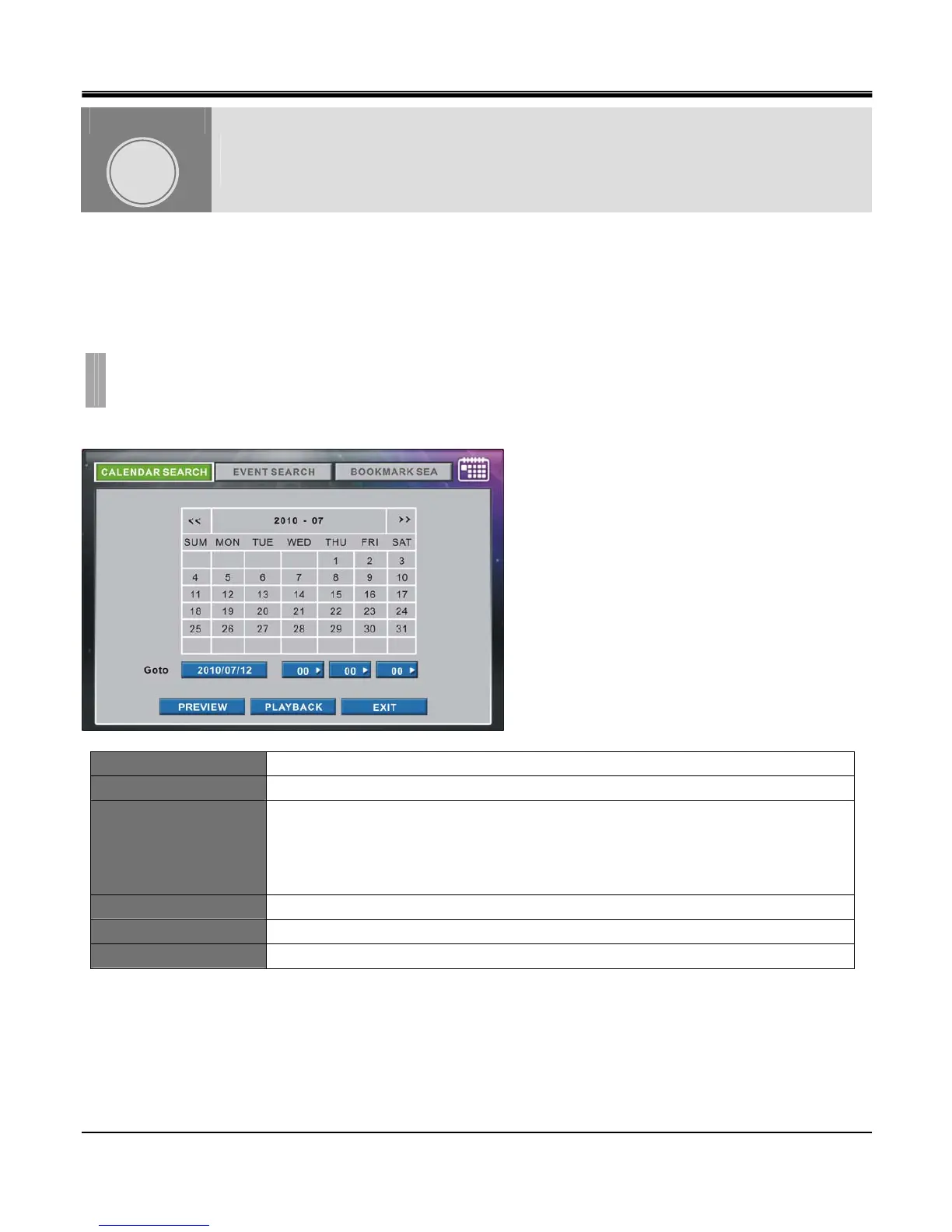
It is to search and playback recorded data in various modes (Schedule, Event, Continuous) easily.
Searched by Calendar, Event list and Bookmark are available.
Pressing right button of mouse will popup MONITORING popup window, and click Search.
Or press [SEARCH] button to enter into Search menu.
Recorded data displays in calendar Search.
<< Shows previous month.
>> Shows next month.
GOTO
Goto 1st box : Shows date in YY-MM-DD format to search.
Goto 2nd box : Shows Hour to search. Change Hour from 0~23 by clicking the box.
Goto 3rd box : Shows Minute to search. Change Minute from 0~59 by clicking the box.
Goto 4th box : Shows Second to search. Change Second from 0~59 by clicking the box.
PREVIEW Playback for 10 seconds from the set date/time and return to calendar search.
PLAYBACK Playback from the set date/time.
EXIT Exit search menu.
SEARCH & PLAYBACK
CHAPTER 10. SEARCH & PLAYBACK
1.CALENDAR SEARCH
CHAPTER
10



 To Next Page