User Manual
Page 84
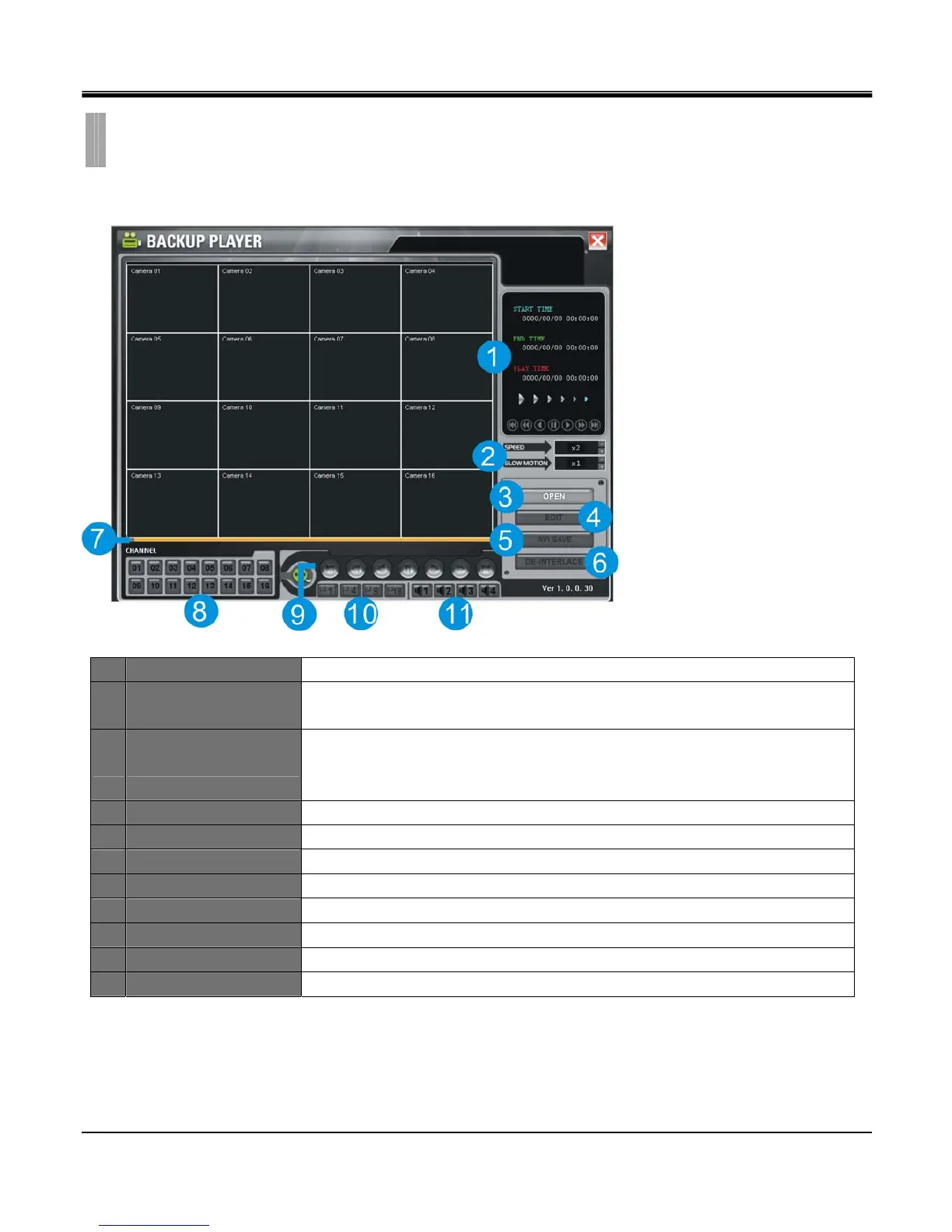
[1.PLAYER]
1 TIME Displays start time, end time, current playback time.
2 SPEED/SLOW MOTION
SPEED : Set fast playback speed : 2x, 4x, 8x, 16x 32x
SLOW MOTION : Set slow playback speed : 1x, 1/2x, 1/4x, 1/8x, 1/16x, 1/32x
3 OPEN
Playback backup file on PC.
(System resident file format is called SM4 file format and this file format will only
playback using software provided with this DVR)
4 EDIT Edit freeze image in full screen mode.
5 AVI SAVE Save a full screen mode channel in AVI file format.
6 De-interlace De-interlace option enabled for D1 size image.
7 Time Bar Enables to search recorded data by using this bar.
8 Channel selection Displays selected channel in full screen mode.
9 Playback function Function bar on playback
10 Screen division Select screen split layout among 1, 4, 9, 16 split
11 Audio Channel Select audio channel to turn on.
CHAPTER 11. REMOTE SOFTWARE
7.BACKUP PLAYER



 To Next Page