User Manual
Page 39
There are three tabs available in “SETUP" list option item in “RECORD" setup group icon.
CHANNEL: Set recording for Continuous recording
EVENT: Set recording for Alarm and Motion detection
PANIC: Set recording for Panic recording
[1]CHANNEL
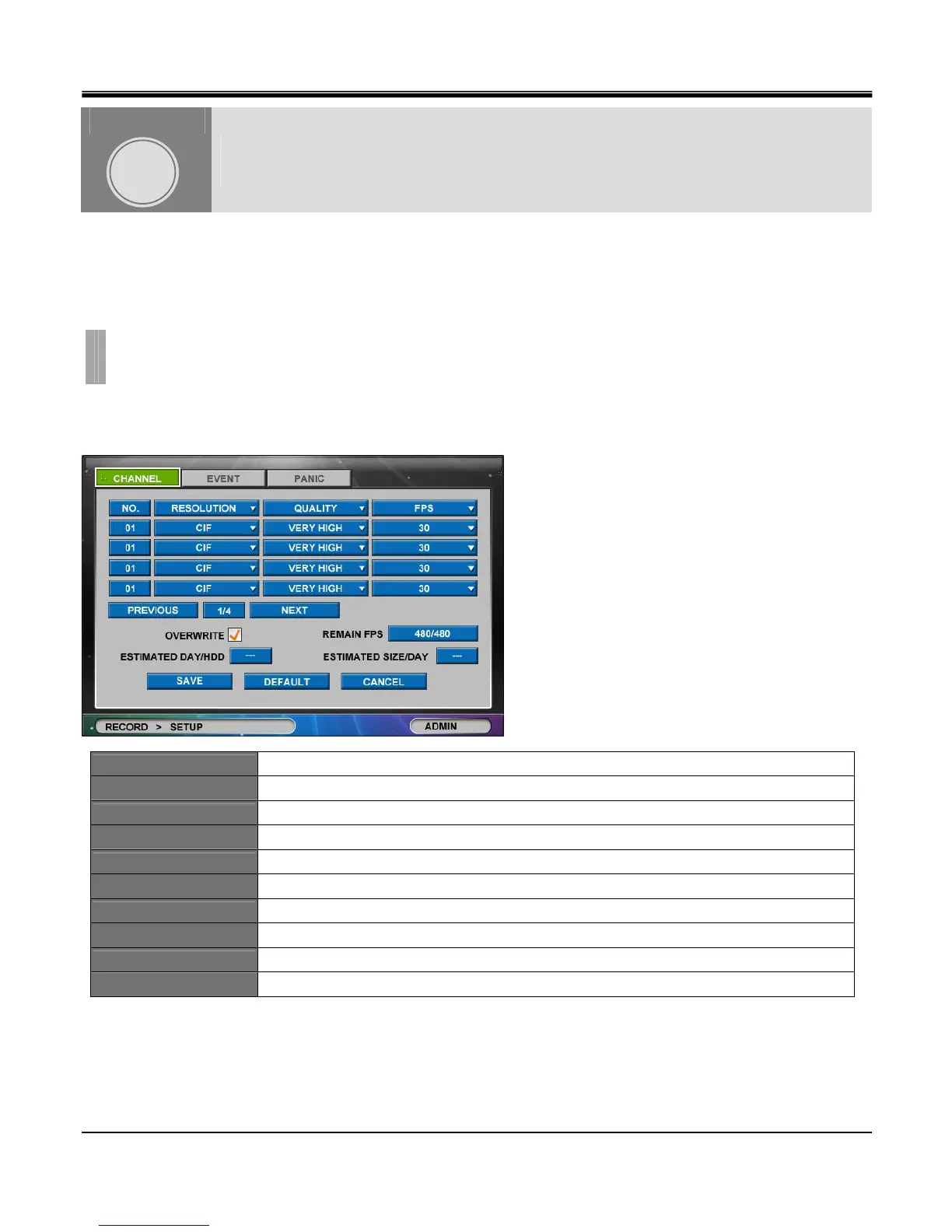
Set continuous recording quality for each channel. (Below is image of a “CHANNEL" tab window).
NO.
Click the “NO. (Number)" button to show the “COPY SETTINGS" popup menu.
RESOLUTION
Set resolution between CIF, H-D1 &D1.
QUALITY
Set recording quality among Low, Normal, High and Very High.
FPS
Set frames per second between 1, 2, 3, 4, 5, 6, 7(8), 10(12), 15(25) & 30. (in fps)
OVERWRITE
Select checkbox to enable hard disk overwrite.
REMAIN FPS
Remaining Frames per Second allowed for configuration.
ESTIMATED DAY/HDD
Estimated remaining days available for recoding.
ESTIMATED SIZE/HDD
Estimated required size of HDD for 24 hour recording based on above settings.
PREVIOUS
Go to previous channel page. (not available in 4 channel DVR)
NEXT
Go to next channel page. (not available in 4 channel DVR)
RECORD
CHAPTER 6.RECORD
1.SETUP
CHAPTER
6



 To Next Page