User Manual
Page 19
n
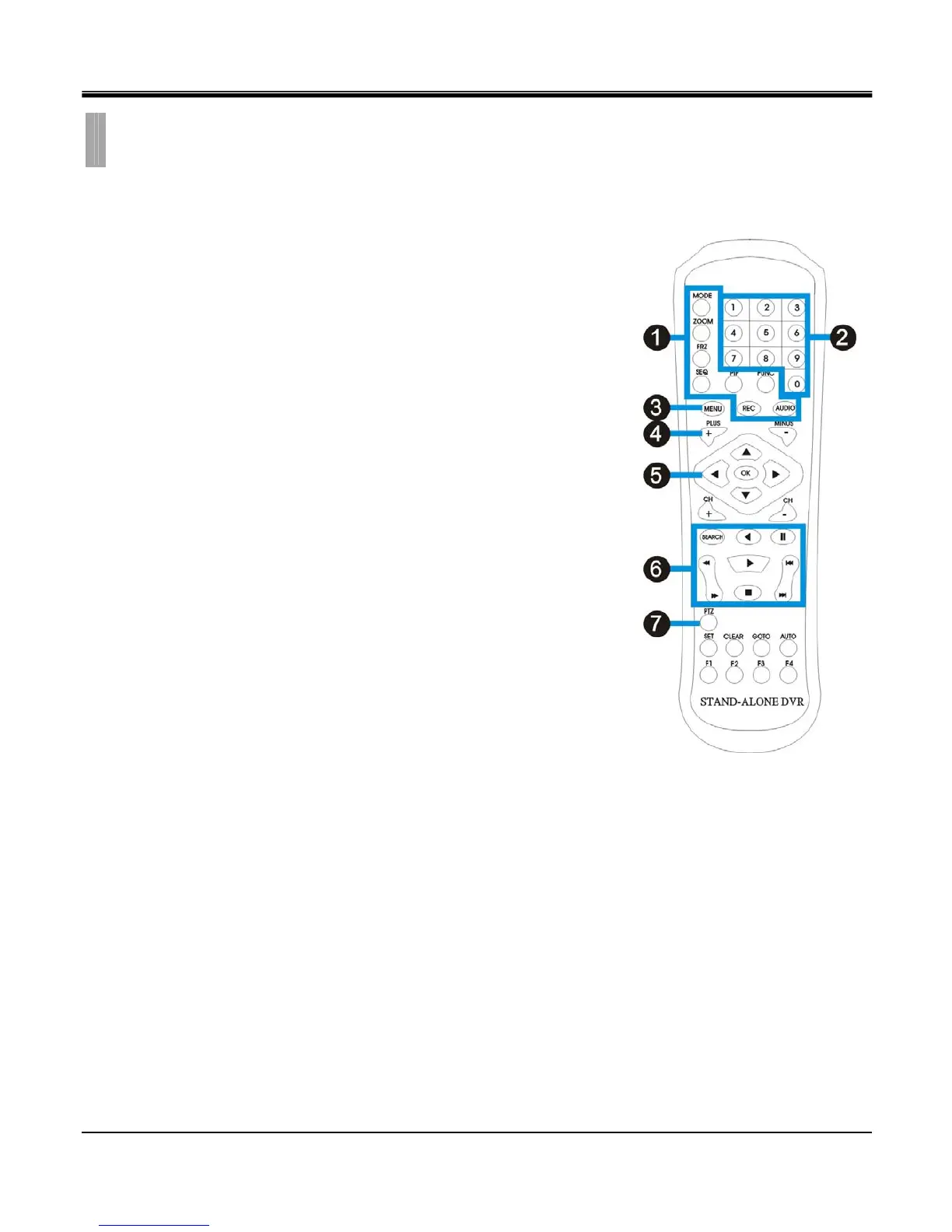
Live view function control
MODE - 4 split display.
ZOOM- To enlarge the display.
The selected area can be moved by the direction buttons.
FRZ - Freeze the display.
SEQ – Automatically change the display channel in sequence.
PIP - Picture in Picture.
Press again to switach in between PIP mode and full screen mode.
FUNC – Enter setup menu.
REC - To activate Emergency Recording.
AUDIO – AUDIO On/Off.
o 0~9 number
Live display channel selection / password entering
p MENU
Enter setup menu / Exit menu.
q - / +
For value adjustment in setup menu.
r OK(ENTER) & Direction keys
Select or adjust options in setup menu.
Navigate the selected item in setup menu.
s Play back Functions
SEARCH- Open the playback search window .
Pause playback.
Stop playback
Move to the beginning.
Move to the end.
Rewind
Playback
Increase rewind speed
Decrease playback speed
t PTZ control
Enter the PTZ camera (speed dome camera) control mode.
z Navigate the menu.
CHAPTER 2. HARDWARE CONFIGURATION
12. IR remote controller



 To Next Page