User Manual
Page 78
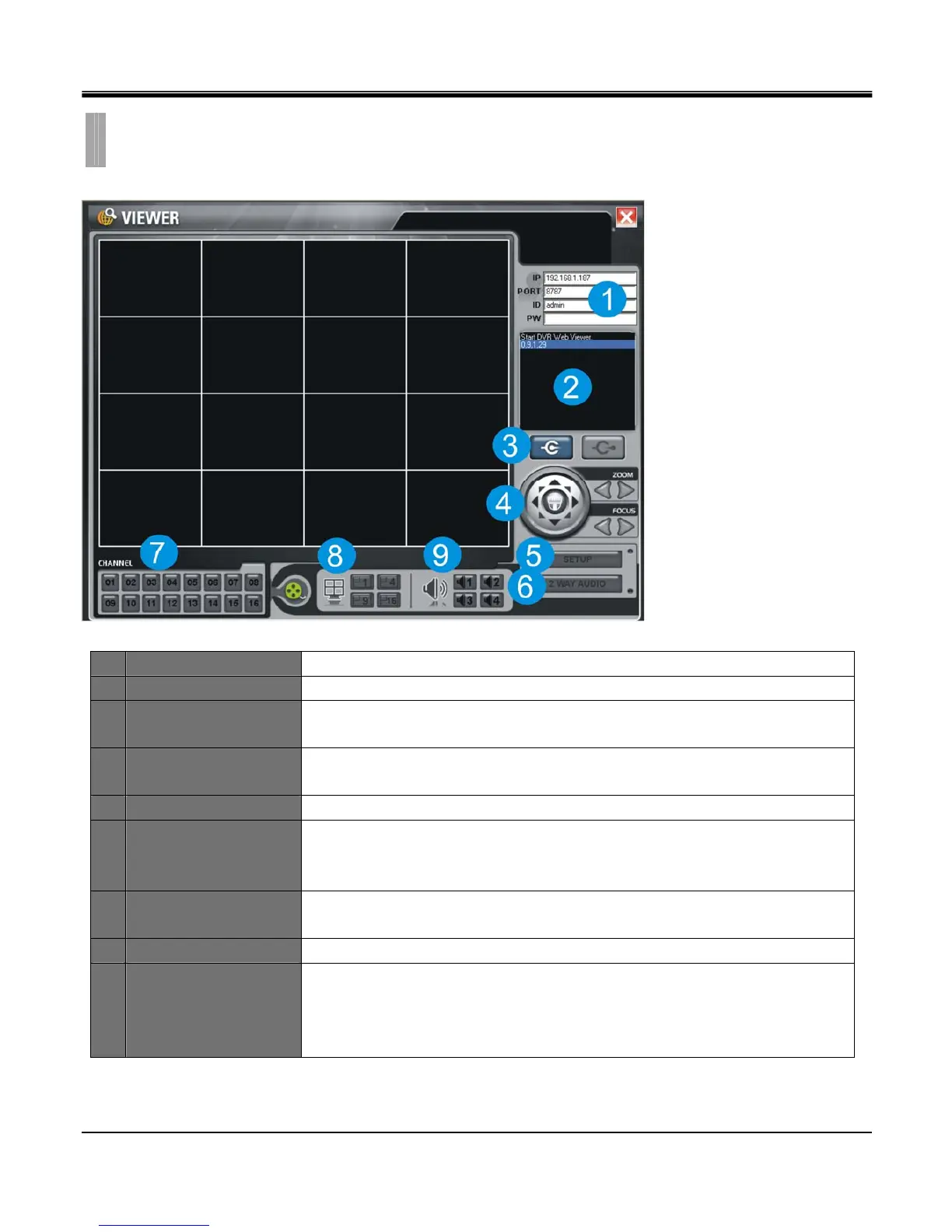
1 DVR connection setup Input IP address, Port number, ID, Password
2 System Information Displays DVR connection and progress status.
3 Connect/Disconnect
Connect: Connect to DVR via network to view live image.
Disconnect: Disconnect network connection.
4 PTZ Control
Control PTZ cameras connected to DVR.
(PTZ setting in DVR must be completed to enable operation of PTZ.)
5 Setup Set quality and frame rate for each camera channel
6 2 Way Audio
Enable 2 way audio system between DVR and Viewer.
(Note that both Refresh Rate and Quality in 5) Setup should be set to ’Low’ while
operating 2 Way Audio, otherwise audio quality may suffer.)
7 Channel selection
Select a channel or a group of channels to display in full screen mode or in 4/9/16
split screen mode.
8 Screen division Select layout of split screen.
9 Audio channel
Select an audio channel to turn on.
(Note that the ’Enable Audio’ checkbox in 5) Setup should be checked as enabled
and both Refresh Rate and Quality should be set to ’Low’, otherwise audio quality
may suffer.)
CHAPTER 11. REMOTE SOFTWARE
4.REMOTE VIEWER



 To Next Page