User Manual
Page 46
The “ALARM" list option item is selectable from “EVENT" group icon.
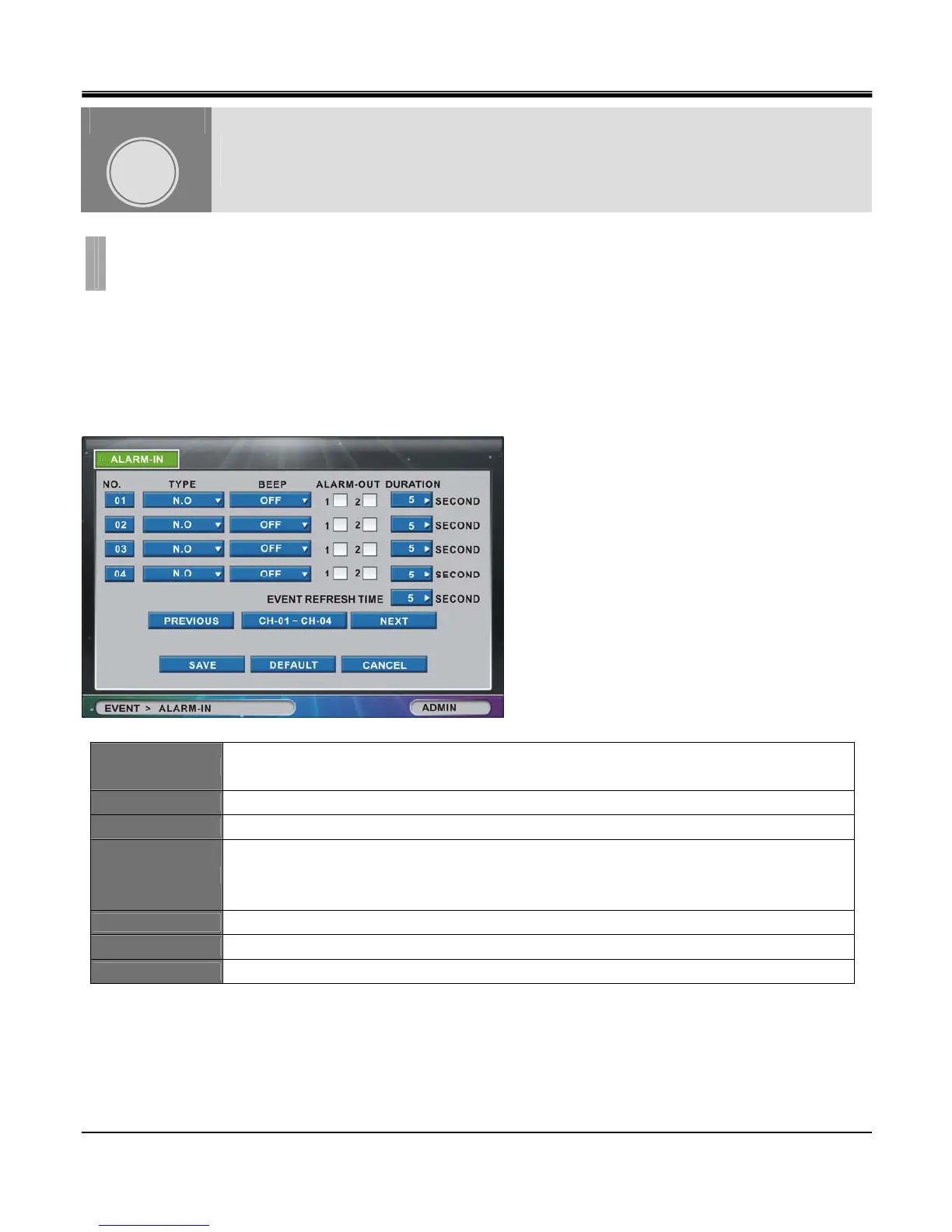
By selecting “ALARM" list option item, “ALARM-IN" tab window appears.
[1]ALARM-IN
Set sensor On / Off and Dwell time for each channel in case external sensor activates.
NO.
Click the “NO. (Number)" button to show the “COPY SETTINGS" popup menu.
(There are alarm channels 1~4 shown by default).
TYPE
Set external sensor input NO/NC/OFF for each camera.
BEEP
Set beeping sound “ON” or “OFF” in the event of triggering of alarm.
ALARM-OUT
Set Alarm-Out On / Off in case sensor input is detected.
※There are two sensor output ports available as shown on the picture above for 16
Channel DVR.
DURATION
Set dwell time configurable from 1 to 99 seconds.
PREVIOUS
Go to previous channel page. (not available in 4 channel DVR)
NEXT
Go to next channel page. (not available in 4 channel DVR)
EVENT
CHAPTER 7. EVENT
1.ALARM
CHAPTER
7



 To Next Page