User Manual
Page 82
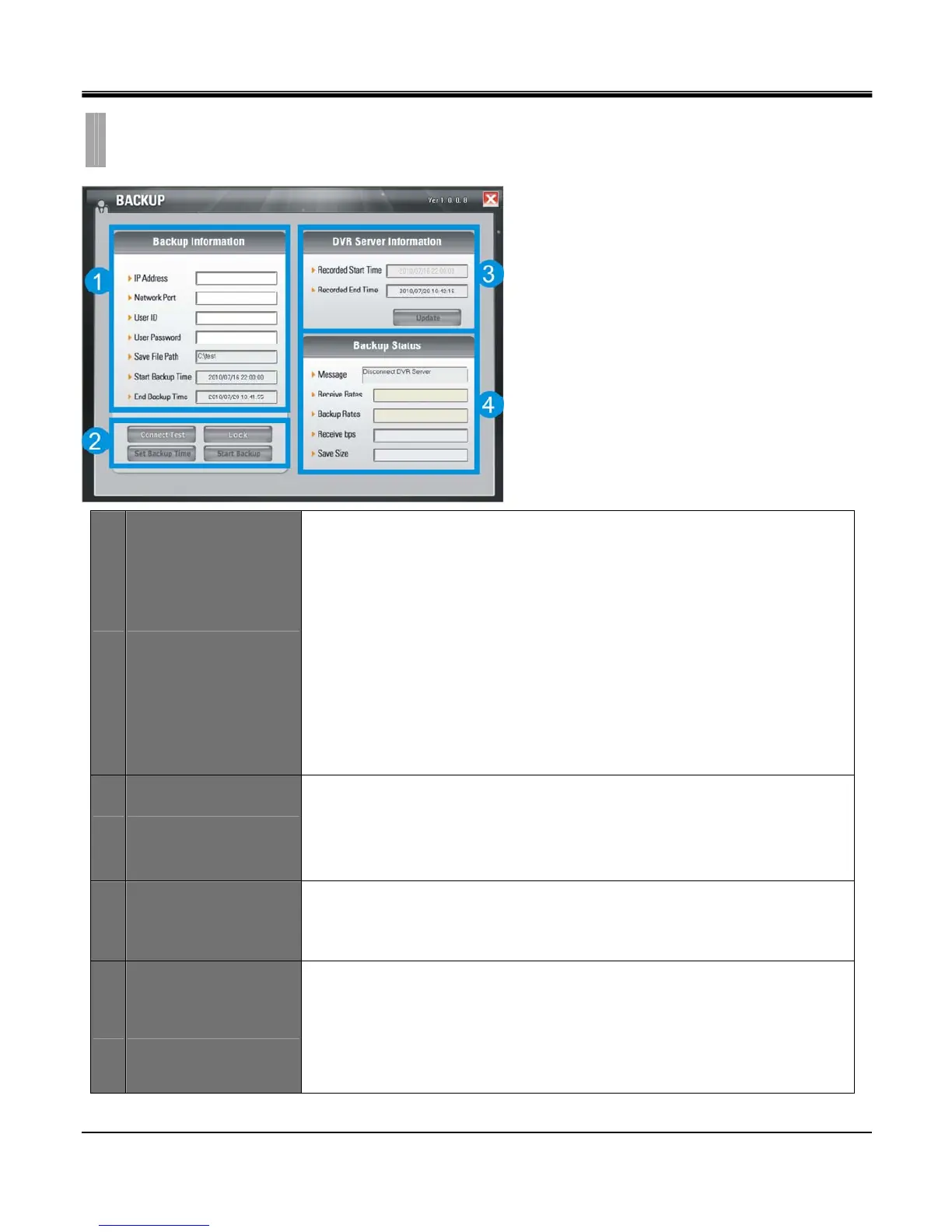
1 Backup Information
IP Address: Enter the IP address of DVR.
Network Port: Enter the port of DVR.
User ID: Enter “Admin”.
User Password: Enter Admin password.
Save File Path: Set a path to save the backup file (This function is active only when
the connection is established)
Start Backup Time: The start time of file backup (This function is only active under
when the connection is established”)
End Backup Time: The end time of file backup (This function is only active under the
connection is established”)
2 Function
Connect Test: To test the connection status.
Lock/Unlock: To get the record start/End time of DVR.
Set Backup Time: Set the start/end time, size and path of file backup.
Start Backup: Active the backup function.
3 DVR Server Information
Recorded Start Time: Indicate the recorded start time.
Recorded End Time: Indicate the recorded end time.
Update: Update the recorded time.
4 Backup status
Message: Indicate the backup status.
Receive Rate: Indicate the percentage of backup image received.
Backup Rate: Indicate the completed percentage of backup image received.
Receive bps: Indicate the bps of backup image received.
Save Size: Indicate the size of backup image saved.
CHAPTER 11. REMOTE SOFTWARE
6.REMOTE BACKUP



 To Next Page