User Manual
Page 60
[2.HOLIDAY]
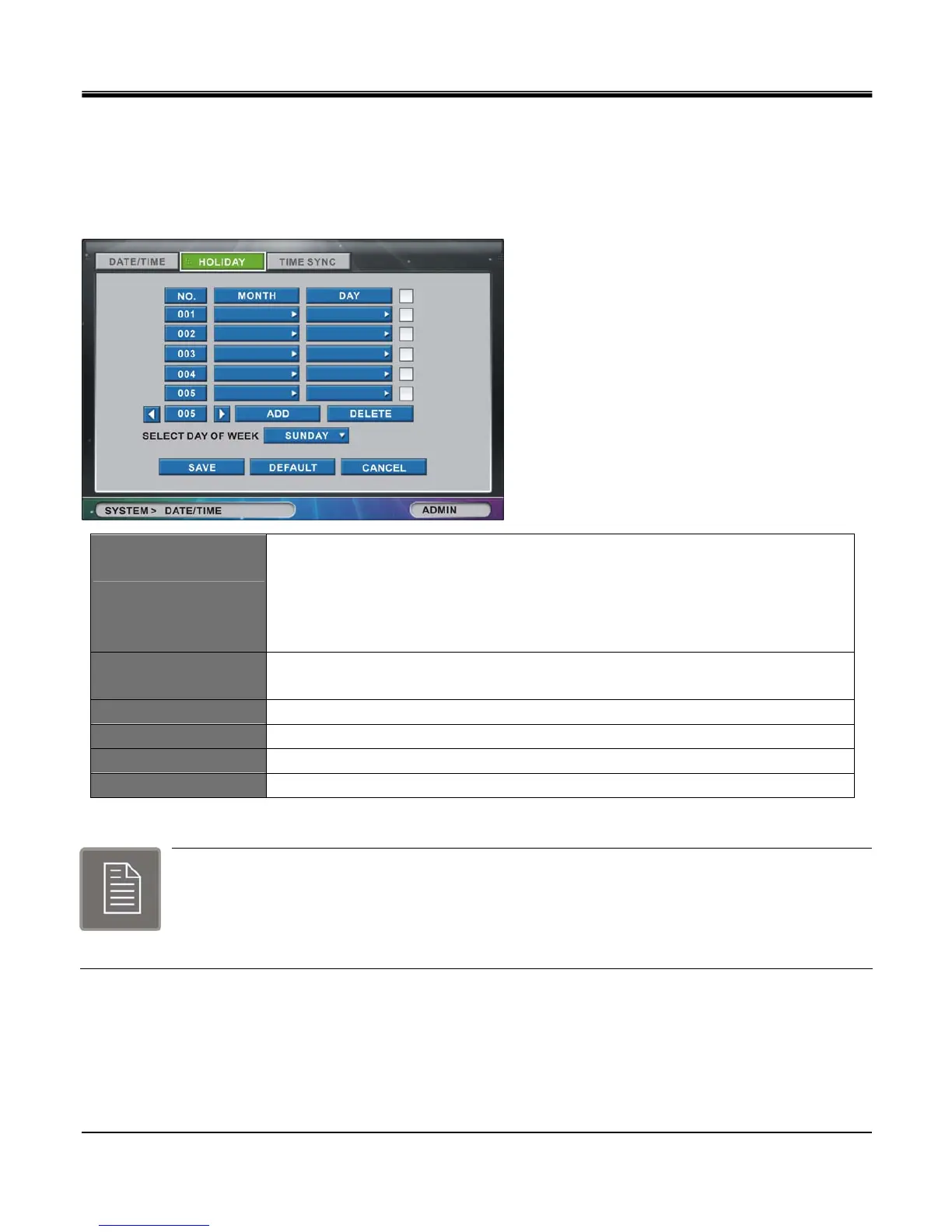
Set national holidays or holidays on calendar to record as setting for Sunday in Schedule Record Setup.
The “HOLIDAY" setting allows the option to preset all Holidays on the DVR calendar. You can then specify to record
with the “HOLIDAY" settings on the “SELECT DAY OF WEEK" in the “SCHEDULE RECORD" setup.
ADD
Click the “ADD" button and today’s month and day will be added on the screen.
Click month and day to change the date of the holiday. (“ADD" option must be selected
first to add and change the month and date. After adjusting all setting “SAVE" button
confirms the changed selection. Without clicking on “ADD" button “MONTH" and
“DATE" parameters are not selectable.)
DELETE
To delete the holiday schedule you must select the check box located on far right hand
side and then click the “DELETE" button.
SELECT DAY OF WEEK Set selected day of week as holiday. (Default is Sunday)
LEFT ARROW BUTTON Previous page.
RIGHT ARROW BUTTON Next page
CHECKBOX Check box of the date to delete. Press Delete button to delete selected date.
Note:
Up to 100 days can be set as holiday.
Holidays that do not fall on the same date each year should be updated once the current year
’
s
holiday has passed.



 To Next Page