-SA -44
9-9
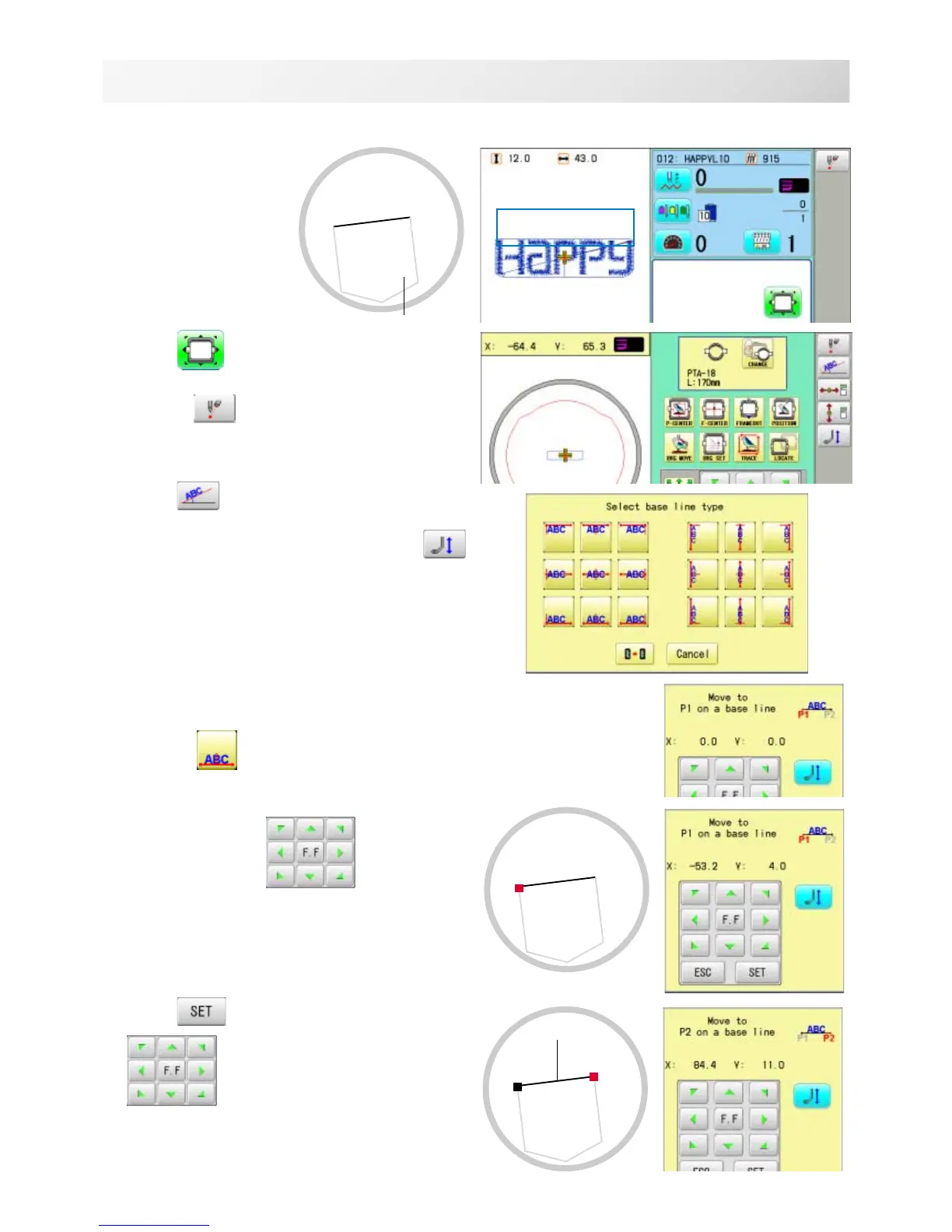
POSITION ALIGNMENT BY DEFINING 2 POINTS
15_2 NB01
P1
P1
P2
Base line
Pocket
1. Hoop a shirt on
embroidery frame.
(Diagonal position of
pocket on frame is
okay.)
Set the frame on the
machine.
2. Press
.
Press and to turn the pointer on when
laser pointer is installed.
3. Press .
lWhen laser pointer is not installed, press
to lower pressure foot and instructing position is
identified easily.
4. Select alignment method
Select in this case.
5. Move frame with and align the
pointer or pressure foot on the left edge
(P1) of pocket.
6. Press
and move frame with
, and align the pointer or pres-
sure foot on the right edge (P2) of pocket.
Line connected between P1 and P2 is base line.
The procedure is explained as an example of embroidering pattern on pocket of shirt.



 To Next Page