360179-A/B 43
Troubleshooting
11.2 Initiate Diagnostic Mode
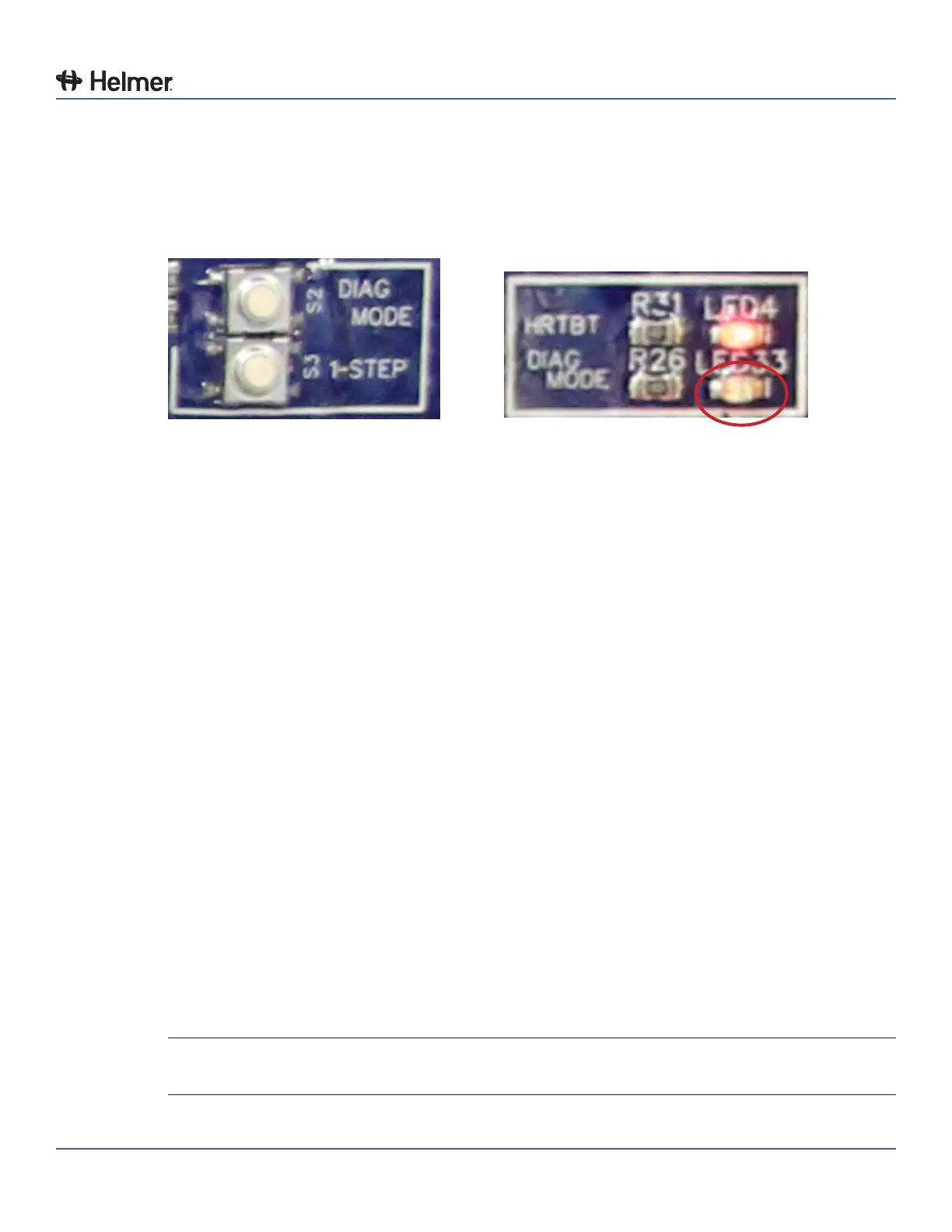
The circuit board includes buttons which initiate a diagnostic mode. While diagnostic mode is initiated,
the functions for each compartment location can be tested. When the circuit board is in diagnostic mode,
the board will not recognize inputs from the BloodTrack
®
touchscreen/computer.
1 Press the “DIAG MODE” button to initiate diagnostic mode.
► The “DIAG MODE” LED33 will turn on (the “DIAG MODE” LED33 is located below the “HRTBT” LED).
DIAG MODE button DIAG MODE LED
2 Press the “1-STEP” button to select Position 1.
► Position 1 corresponds to the compartment location in column “A”, when viewed from the front of
the Compartmental Access Refrigerator™.
► With Position 1 selected, the solenoid powers on, and the red and blue LEDs turn on briey.
► If the optical sensor for Position 1 is interrupted, the red LED will turn o for the duration that the
sensor is interrupted.
3 Wait until the red and blue LEDs turn o, then press the “1-STEP” button again to select Position 2.
► Position 2 corresponds to the compartment location in column “B”, when viewed from the front of
the Compartmental Access Refrigerator ™.
► With Position 2 selected, the solenoid powers on, and the red and blue LEDs turn on briey.
► If the optical sensor for Position 2 is interrupted, the red LED will turn o for the duration that the
sensor is interrupted.
4 Wait until the red and blue LEDs turn o, then press the “1-STEP” button again to select Position 3.
► Position 3 corresponds to the compartment location in column “C”, when viewed from the front of
the Compartmental Access Refrigerator™.
► With Position 3 selected, the solenoid powers on, and the red and blue LEDs turn on briey.
► If the optical sensor for Position 3 is interrupted, the red LED will turn o for the duration that the
sensor is interrupted.
5 Wait until the red and blue LEDs turn o, then press the “1-STEP” button again to select Position 4.
► Position 4 corresponds to the compartment location in column “D”, when viewed from the front of
the Compartmental Access Refrigerator™.
► With Position 4 selected, the solenoid powers on, and the red and blue LEDs turn on briey.
► If the optical sensor for Position 4 is interrupted, the red LED will turn o for the duration that the
sensor is interrupted.
6 After Position 4 check ends, IRACS will exit from diagnostic mode and return the circuit board to
normal operation.
NOTE With diagnostic mode initiated, if 30 seconds elapse without any actions (button presses),
the circuit board will automatically exit diagnostic mode and return to normal operation.



 To Next Page