128
────────────────────────────────────────────────────
9.1 Printer Interface
────────────────────────────────────────────────────
Pin
numbe
Input and
output
Signals
Pin
numbe
Input and
output
Signals
1 Ground GND 11 Output DATA 7
2 12 Output DATA 6
3 Output DATA 5 13 Ground GND
4 Output DATA 4 14
5 Output DATA 3 15 Ground GND
6 Ground GND 16 Output DATA 2
7 17 Output DATA 1
8 Output DATA 0 18 Ground GND
9 Output
STB
19
10 Input BUSY 20 Ground GND
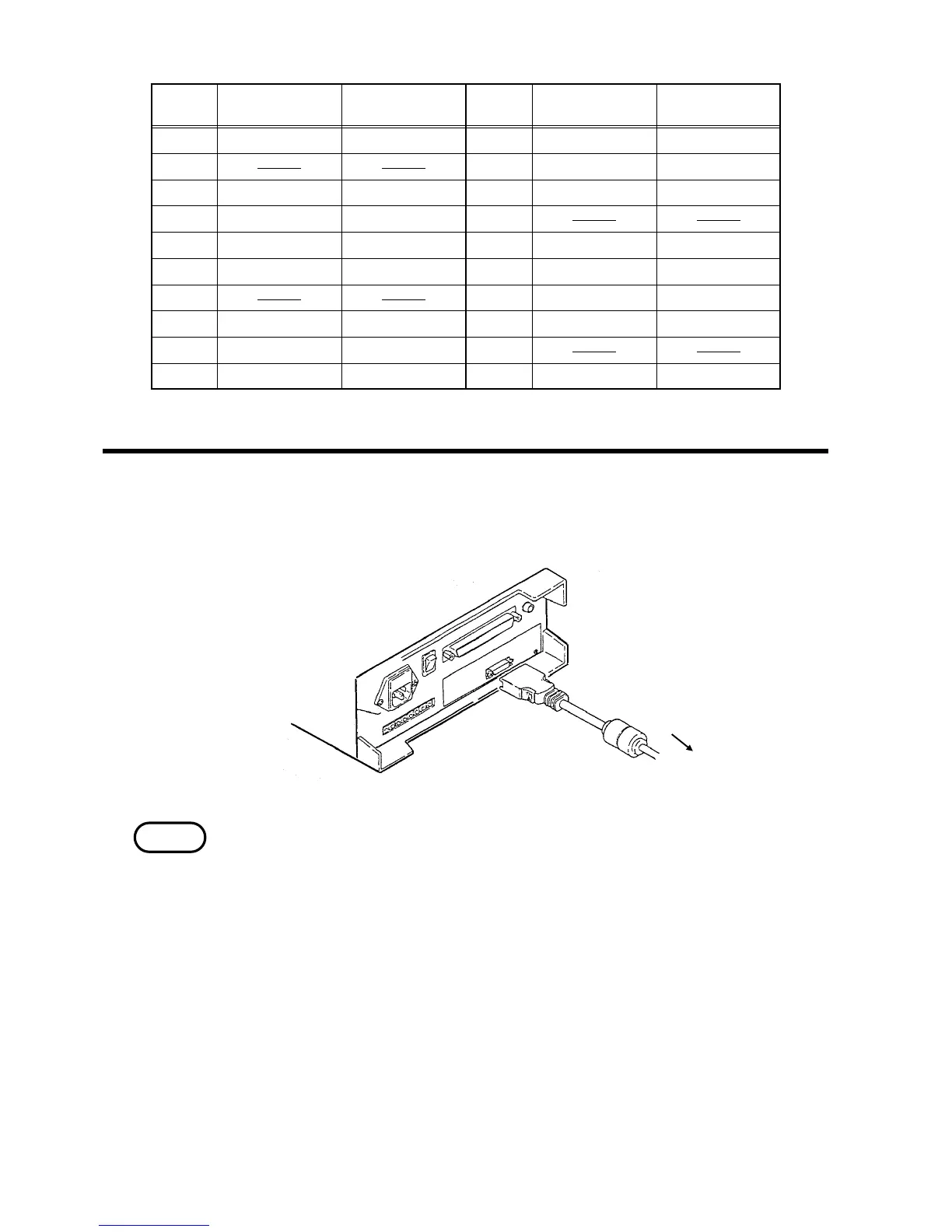
.1.2 Connecting Method
Toward the printe
NOTE
Connect the printer to the 9589 PRINTER INTERFACE with the 9425
CONNECTION CABLE.
・ The printer interface conforms to the centronics. Always use the printer which
is in conformity to the centronics.
・ The printer cable does not belong to the printer interface. The 9425
CONNECTION CABLE is needed.


 To Next Page