2. OPERATION
2-22
⚫ Notes about the case when link down is recorded in the log during OS startup.
While Windows® is starting, the following warnings may be displayed in the event log.
These warnings are recorded by the initialization process of the LAN driver at the startup of
Windows® and will not cause any problems in the system operation.
(*1) How the name is displayed differs depending on the LAN adapter
(*2) The displayed content varies depending on the OS.
You can keep these warnings from being displayed in the event log by changing the LAN
adapter settings as follows.
Note that if you change the settings shown below, log entries such as LAN connection and
disconnection during system operation are also not recorded and that may make failure
analysis difficult when a problem occurs.
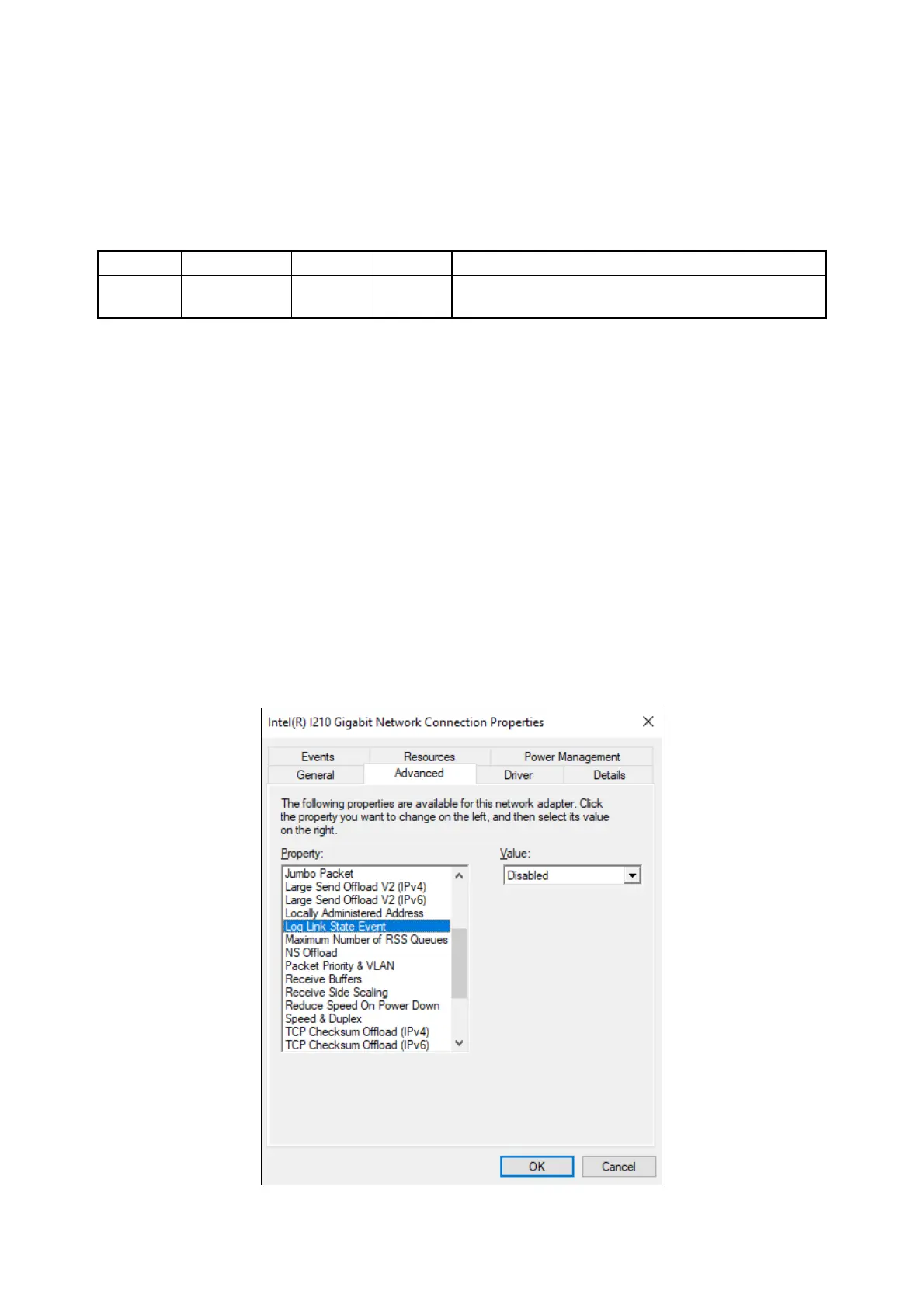
(The display image assumes Windows® 10 but it is similar under other OS.)
1. Execute steps 1 though 5 in “⚫ Setting the network transfer speed” in “2.8 Setting Up
the LAN Interface”.
2. Click the Advanced tab. Select Log Link State Event.
3. Select Disabled from the Value list.



 To Next Page