10. RAID1
10-18
(2) If you replace the HDD while the power to the equipment is turn on
1. Back up the data.
(See “(2) Backing Up Files” in “4. HARD DISKS DRIVES (HDDs)” in
“PRECAUTIONS”.)
2. Terminate all running applications.
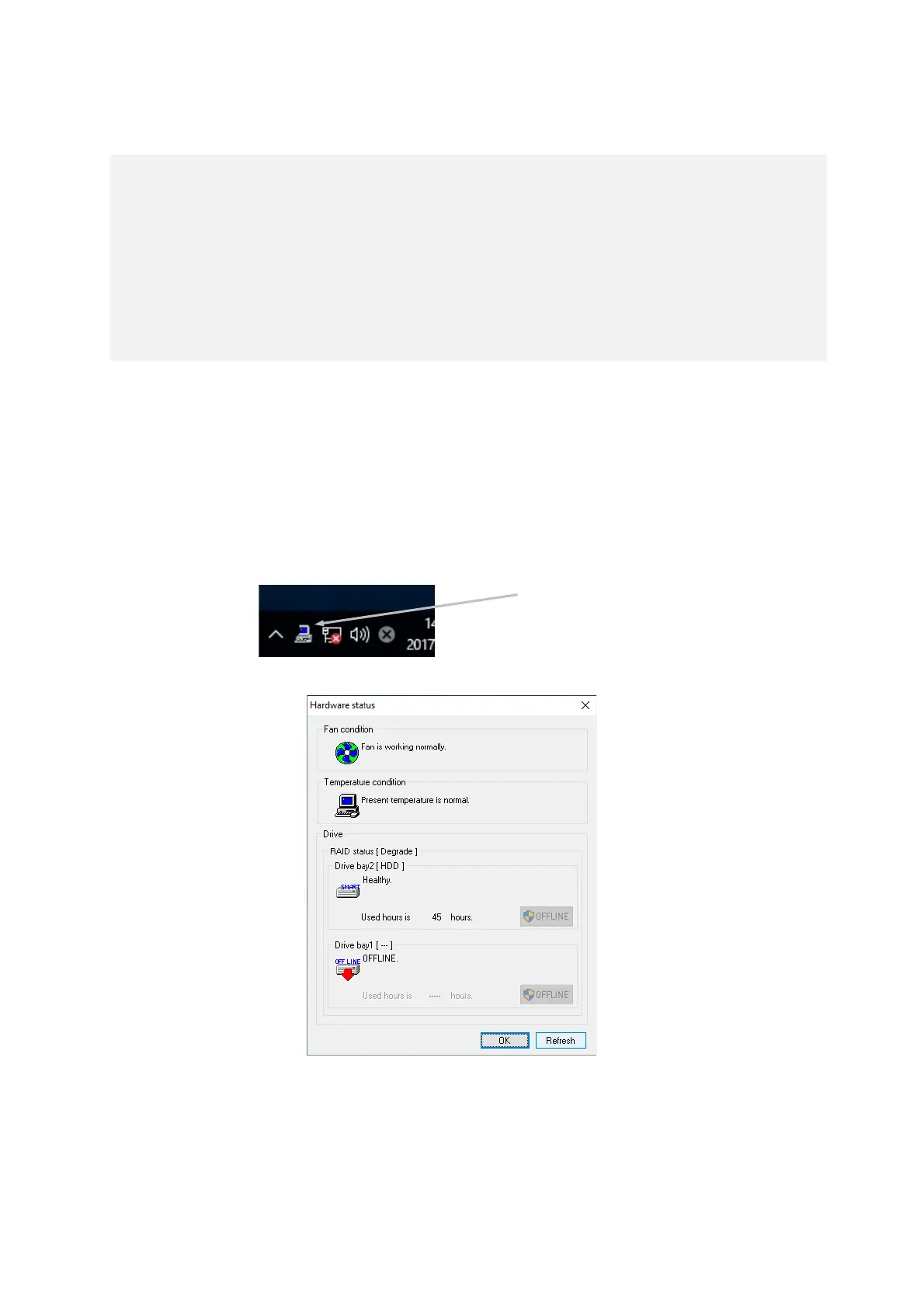
3. Double-click the hardware status icon on the notification area of the taskbar.
The Hardware status window appears. In the Hardware status window, under Drive
bay1, click OFFLINE to set the drive into the offline mode.
Hardware Status Window
Confirm that the HDD1 status lamp is lit.
The HDD1 status lamp might take more than 20 or 30 seconds to light.
4. Execute steps 4 to 7 described in "10.4.2 (1) Replacing a drive with the equipment
turned on" and rebuild the array.
< NOTE >
You need to have administrator privileges to execute step 3. Log on to the
computer using an administrator account and click OFFLINE. If "User Account
Control" (UAC) is enabled, in a confirmation message, click Yes. The User Account
Control window is displayed. Then click Continue.
Note that if "User Account Control" (UAC) is disabled and a user without
administrator privileges clicks the OFFLINE button, the drive is not disconnected.



 To Next Page