2. OPERATION
2-17
⚫ Action to take if the link is unstable at 1.0 Gbps
Depending on the type of the connected hub, the link may not be stable at 1.0 Gbps. If you
want to use the network at 1.0 Gbps, verify the connection with the hub in advance.
If the link is unstable at 1.0 Gbps, it is made stable by taking the following action.
• Use a cable which is 20 to 100 meters long (UTP Category 5e or better).
• Fix the master/slave mode setting to Master (valid only in the 1.0 Gbps setting).
Follow the procedure below to fix the mater/slave mode to Master. The link may not
function depending on the type of the hub. In this case, re-set the setting to Auto Detect.
1. Execute steps 1 though 5 in “⚫ Setting the network transfer speed” in “2.8 Setting Up the
LAN Interface”.
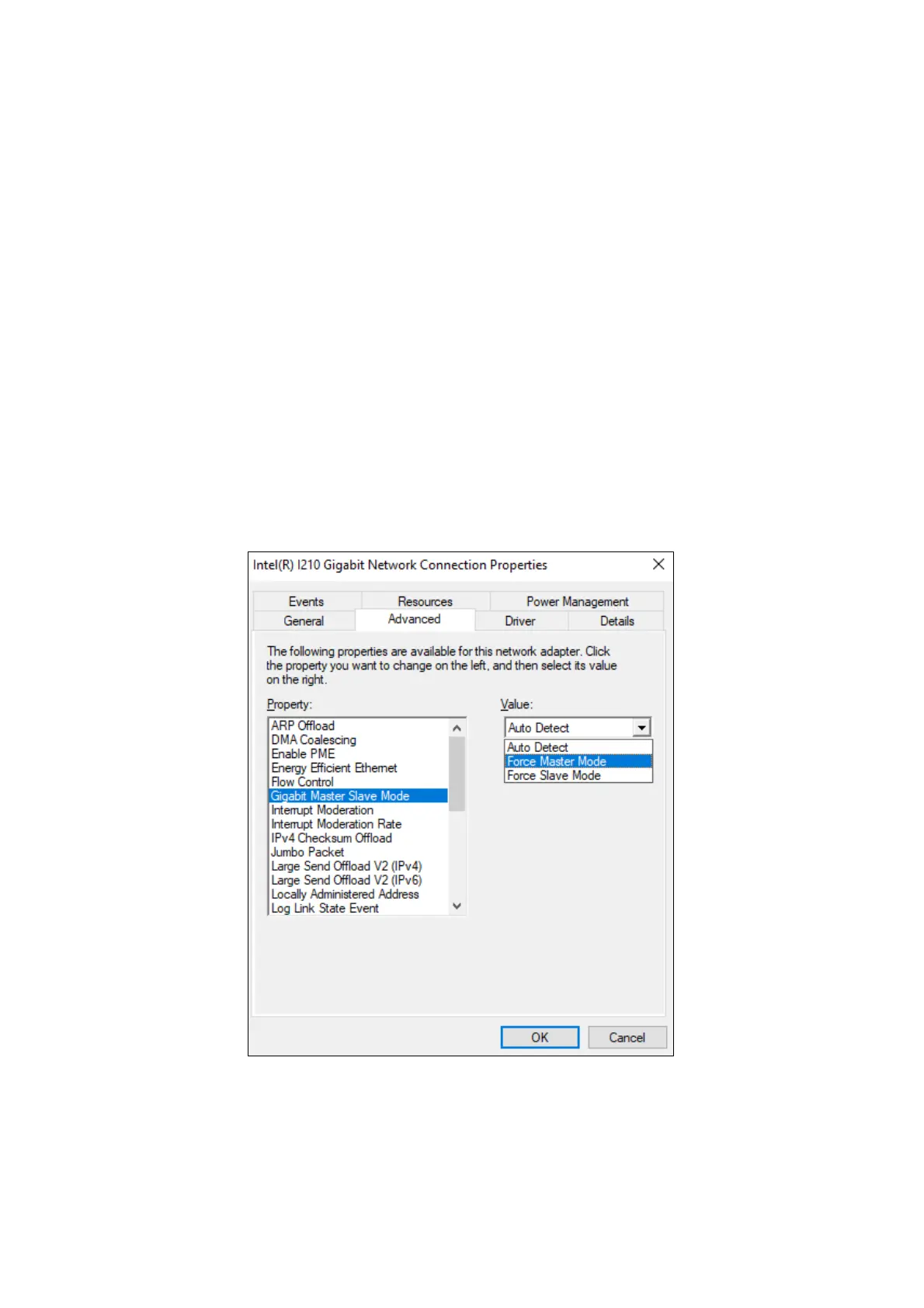
2. Click the Advanced tab. Select Gigabit Master Slave Mode from the Property list.
3. From the Value pull-down menu, select Force Master Mode.
4. Click OK and restart the equipment.



 To Next Page