EasyManua.ls Logo

HITEC OPTIC 6 - Servo EPA (End Point Adjustment); Dual Rates and Exponential Functions

HITEC OPTIC 6
60 pages
Print Icon
To Next Page IconTo Next Page
To Previous Page IconTo Previous Page
Loading...
For more information - www.modelflight.com.au
Sim
p
le
Transmitter
Setu
p
-
Electric
A
ir
p
lane,
5
-Channel
Receiver
(
ACGL
Menu
)
16.
If
the
throttle
stick
operates
the
speed
control
the
wrong
direction,
move
over
to
Channel
3
by
pressing
the
C
ursor
Right
key.
Now
the
3
should
be
flashing
in
the
display.
Activate
the
opposite
direction
for
the
throttle
servo
by
pressing
the
Active/Inhibit
(Clear)
key.
Verify
the
throttle
stick
makes
the
motor
turn
on
and
off
in
the
correct
direction.
17.
If
you
are
using
Switch
SW-1
for
throttle
on-off,
check
that
won't
run
out
of
subtrim
authority.
Remove
all
the
arms
that
are
in
the
way
or
interfere
with
your
pushrods.
Servo
Pushrod
the
switch
operates
the
motor
in
the
direction
you
would
like.
The
UP
position
should
be
used
for
motor
ON,
and
DOWN
for
motor
OFF.
If
it
does
not,
reverse
CH3
using
the
REV
menu
as
described
above.
18.
Now
we'll
set
the
direction
of
the
rudder
servo,
if
used.
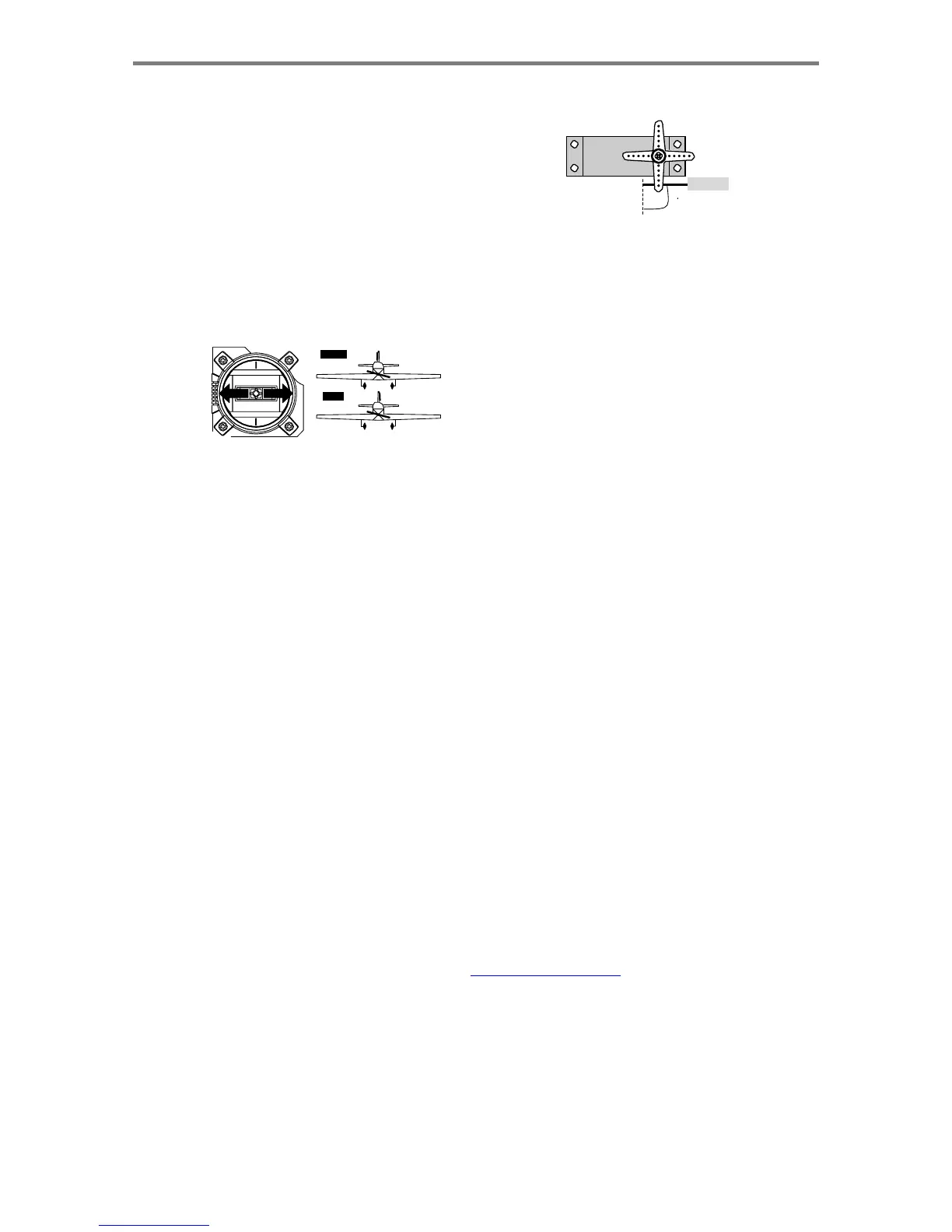
When
you
move
the
left-hand
stick
towards
the
CENTER
of
the
transmitter
(to
the
right),
the
trailing
edge,
or
rear
of
the
rudder
should
move
to
the
right.
Check
to
make
sure!
RIGHT
LEFT
RIGHT
LEFT
Front
View
If
the
rudder
moves
the
wrong
direction,
move
over
to
Channel
4
by
pressing
the
Cursor
Right
key.
Now
the
'4'
should
be
flashing
in
the
display.
Activate
the
opposite
direction
for
the
rudder
servo
by
pressing
the
Active/
Inhibit
(Clear)
key.
Move
the
left-hand
stick
left-and-right
again
and
verify
the
rudder
moves
the
correct
direction.
19.
Now
set
the
CH5
aileron
servo
direction
(otherwise
skip
this
and
the
next
step).
This
is
channel
5
,
and
the
'
5
'
should
be
flashing
for
this
command.
When
you
move
the
right-hand
stick
to
the
right,
the
aileron
on
the
left
wing
should
move
downwards.
Check
that
the
CH5
aileron
moves
the
correct
way!
If
it
does
not,
activate
the
opposite
direction
using
the
above
procedures.
Move
the
right-hand
stick
again
and
verify
the
CH5
aileron
moves
the
proper
directions.
20.
Before
we
set
the
servo
neutrals,
we
need
to
be
sure
that
all
the
trims
are
centered.
Press
both
Edit
keys
to
get
to
the
main
menu,
where
voltage
and
time
are
displayed.
Press
the
Up
arrow
until
the
word
TRIM
appears.
By
moving
each
of
the
four
trim
levers
around,
you
can
see
their
positions,
and
move
them
back
to
zero
for
the
next
step.
21.
Once
you
have
centered
all
the
trims,
unscrew
the
screws
holding
the
servo
arms
onto
the
elevator,
ailerons,
and
rudder
(we'll
set
the
throttle
travel
later).
You
will
want
to
place
the
servo
arms
on
the
output
shaft
so
they
are
near
neutral
-
that
is,
about
90
°
to
the
servo
case
sides
or,
if
the
servo
is
mounted
sideways,
90
°
to
the
pushrod
(sideways
mounting
is
not
recommended).
This
way
you
90
Adjust
the
clevises
on
each
servo
pushrod
to
get
the
position
of
each
control
to
be
as
close
as
you
can
to
neutral
(lined
up
with
the
adjacent
portion
of
wing
or
tail).
Setting
Subtrims.
Now
we'll
adjust
all
the
subtrims
to
electronically
set
the
desired
neutral
locations.
To
do
so,
go
back
to
the
programming
menu
by
pressing
both
Edit
keys,
then
press
the
Up
or
Down
arrow
key
repeatedly
until
STRM
appears.
22.
Set
the
subtrims
for
CH1
and
CH5
ailerons,
elevator,
and
rudder
following
the
instructions
given
in
steps
25
-
32
in
the
aerobatic
setup
instructions.
Remember
your
second
aileron
servo
is
plugged
into
CH5.
23.
Servo
EPA
(End
Point
Adjustment).
Set
up
the
servo
travels
for
each
channel
following
the
instructions
given
in
steps
33
-
43
in
the
aerobatic
setup
instructions.
24.
Dual
Rates
and
Exponential
Functions.
You
can
use
the
exponential
function
to
make
the
aileron
and
elevator
responses
less
sensitive
around
neutral,
so
that
your
racer
reacts
smoothly
for
mild
control
inputs,
but
reacts
strongly
when
you
command
a
lot
of
stick.
You
can
adjust
the
amount
in
flight
by
flipping
switches.
Exponential
functions
make
the
response
slower
around
center
and
larger
away
from
center.
You
may
also
use
dual
rate
to
adjust
the
total
travels,
but
keep
them
linear.
Set
up
dual
rates
following
the
procedures
given
in
steps
48
-
53
of
the
aerobatic
aircraft
setup
instructions.
NOTE:
if
you
set
any
of
the
dual
rates
to
0%,
you
will
have
ZERO
CONTROL
and
LOSE
CONTROL
OF
YOUR
AIRCRAFT
when
the
switch
is
in
that
position.
DON'T
DO
IT!
25.
Airbrake
setup
using
CAMB
.
You
can
get
airbrakes
by
flipping
a
switch
to
raise
both
flaperons
and
add
elevator
to
maintain
trim.
This
configuration
increases
the
drag,
making
the
landing
approach
steeper
to
help
make
safe
landings
in
small
fields.
With
CAMB
on,
it
is
possible
to
lose
some
aileron
effectiveness.
Be
sure
to
test
the
landing
settings
at
altitude
before
trying
it
on
a
landing
approach.
You
should
spend
some
time
fine-adjusting
the
elevator
travel
so
that
there
is
no
trim
change
when
CAMB
is
on.
Sim
p
le
Transmitter
Setu
p
-
Electric
A
ir
p
lane,
5
-
Channel
Receive
r
(
ACGL
Menu
)
-
Pa
g
e
24

Table of Contents

Other manuals for HITEC OPTIC 6

Related product manuals