Black plate (32,1)
Holden WM Caprice Owner Manual (MY12.5) - 2012 - CRC 1st Edition - 6/28
12
7-32 Infotainment System
Front infotainment screen
2012:38
Video
brightness
20
Rear DVDFront
VIDEO
DZ
The screen will only display t he
selected DVD when the vehicle
speed is below 3 km/h.
Touc h t he screen to minimise or
maximise the DVD screen.
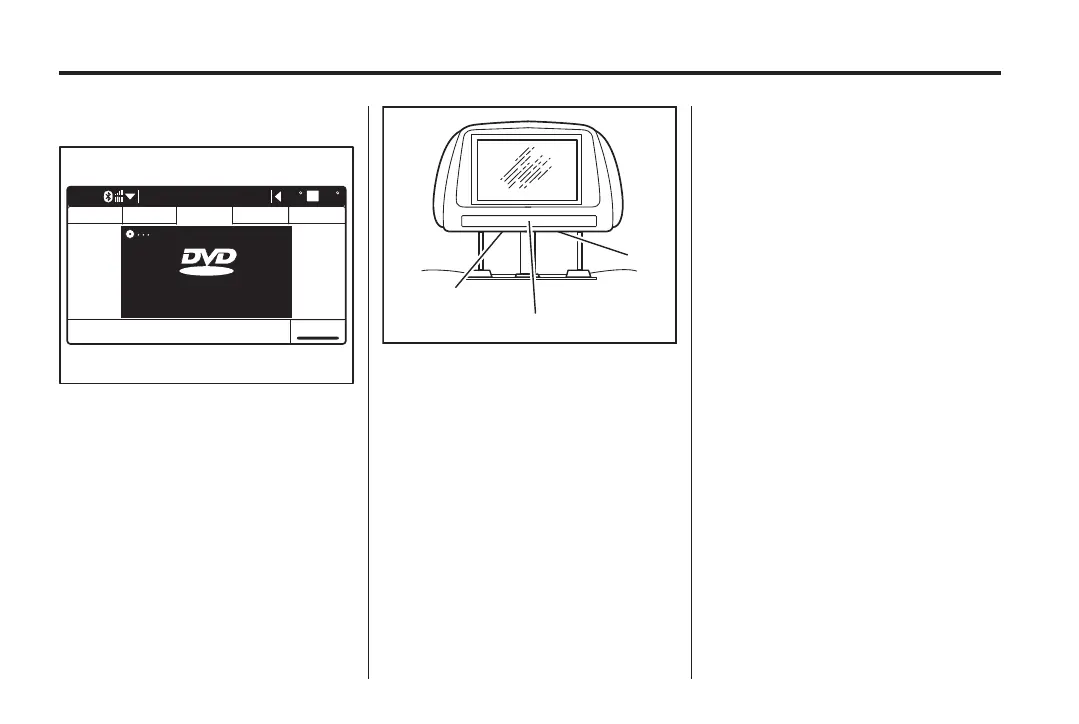
Video screen(s)
The video screen(s) are located in
the rear of the front s eat headrests
(Caprice V-Series) or on the DVD
player in the roof pod (Caprice).
B
C
A
Caprice V-Series:
A. Wired headphone socket
B. Infrared receiver window
C. AV AUX input socket (left
headset only)
Caprice: The video screen contains
the infrared receiver for the DVD
remote control and the infrared
transmitter for the wireless
headphones.
1. To lower the video screen, press
o (19) to release, then
pull down.
2. To replace, push up until it locks
into place.
Maintenance
Avoid touching the video screen(s),
as damage may occur.
To clean the video screen(s), wipe
with a soft cloth dampened with
water.
DVD remote control
Aim the DVD remote control at the
video screen(s) while pressing the
required button.
Performance may be affected by:
.
Direct sunlight.
.
Very bright light.
.
Objects blocking the line of
sight.
.
Low battery.
To light up all buttons on the DVD
remote control, p ress
] (24).
The light turns off after a short
period of time.



 To Next Page
 Loading...



