Affirm Breast Biopsy Guidance System Service Manual
Chapter 3: Installation, Verification, and Removal
MAN-05754 Revision 002 Page 21
3.6.2 Attach the Biopsy Guidance Module
You can install the Biopsy Guidance Module with the imaging system power on or off.
Caution:
To prevent damage or alignment problems with the Needle Guidance Stage, be
careful when you move the Biopsy Guidance Module.
Caution:
The Affirm Biopsy Guidance Module weighs 15 pounds. When you move it, be sure
to have a secure grip on the handles.
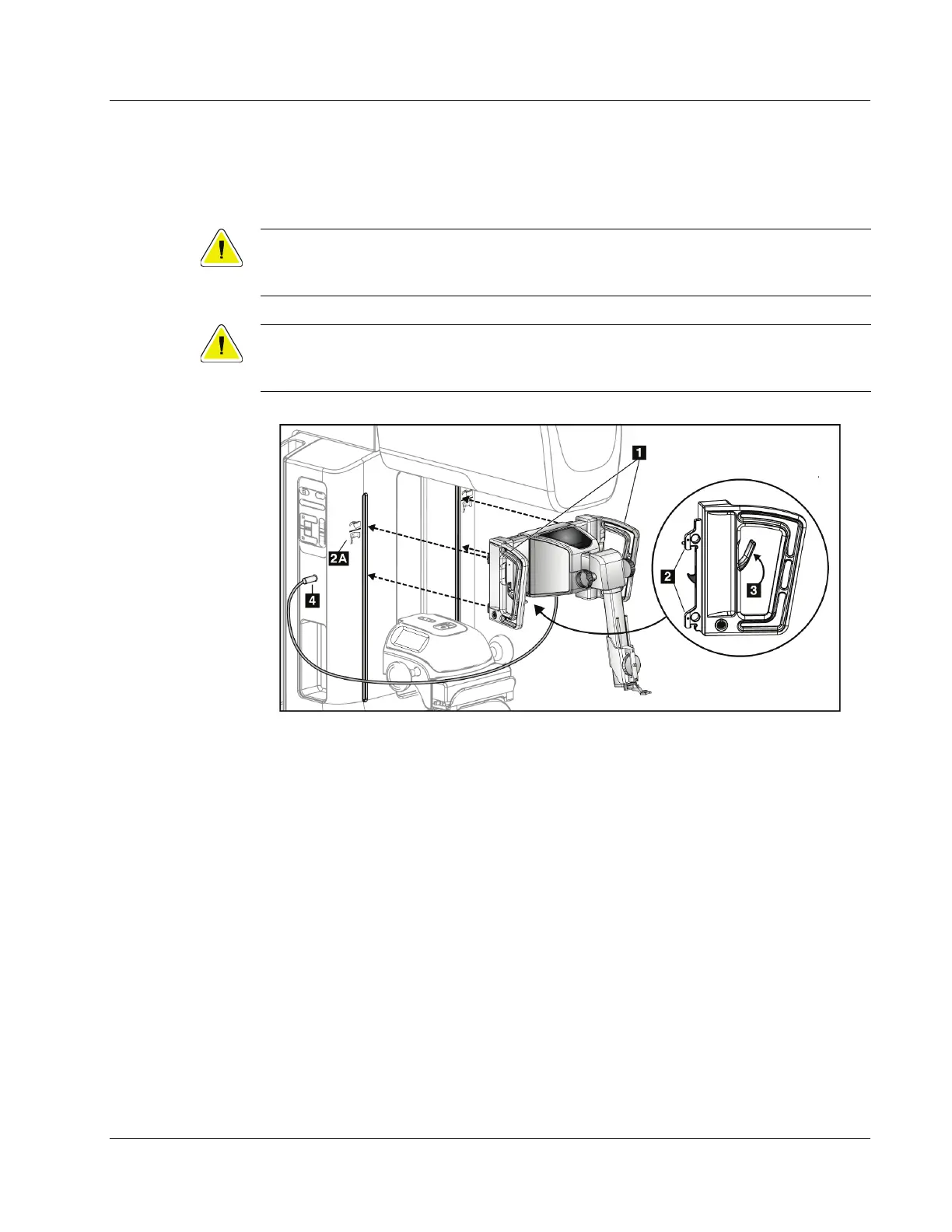
Figure 13: Installation of the Biopsy Guidance Module
1. Move the Compression Device down.
2. Hold the Biopsy Guidance Module by both handles.
3. Slide the top hooks (item 2) of the Biopsy Guidance Module into the slots marked
with the Affirm system icon (item 2A) on the front of the imaging system C-arm.
Make sure the top and bottom hooks attach to the C-arm.
4. Push the Lock Levers (item 3) on the Biopsy Guidance Module into the Up position
to lock the Module against the C-arm.
5. Align the red dot on the Biopsy Guidance Module cable (item 4) with the red dot on
the receptacle on the side of the C-arm. Connect the cable to the receptacle.












 To Next Page