Affirm Breast Biopsy Guidance System Service Manual
Chapter 3: Installation, Verification, and Removal
MAN-05754 Revision 002 Page 29
3.8.6 Lateral Arm and Lateral Arm Accessories
Warning:
Be careful when working with the Lateral Arm. Bumping or jarring the
Lateral Arm can affect system accuracy, cause patient injury, or cause
equipment damage.
Lateral Arm Overview
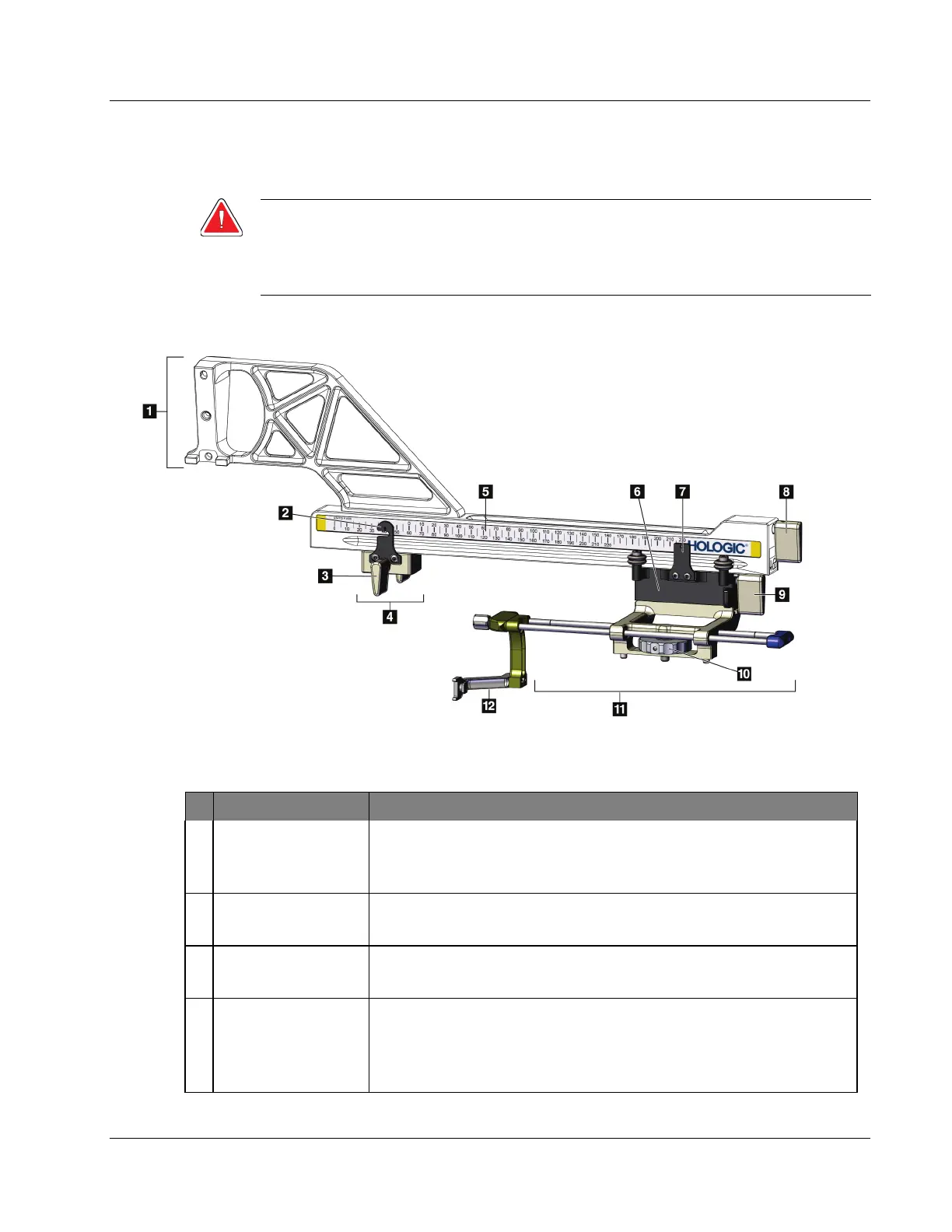
Figure 20: Lateral Arm Components
Table 3: Components of the Lateral Arm
# Name Description
1 Lateral Arm Mount Mounting structure for the Lateral Arm. Attaches to the Standard
Device Mount and holds the Lateral Arm on the Biopsy Guidance
Module.
2 X-Stop Position
Indicator
Shows the X-Stop position on the bottom scale on the Lateral Arm.
3 X-Stop Lever Locking lever that locks and unlocks the X-Stop into position on the
Lateral Arm.
4 X-Stop Stops Carriage movement when locked into position. Set the X-axis
Position Indicator at the Lat X coordinate on the lower scale to keep
the biopsy device from traveling past the Lat X target. Push up while
sliding the X-Stop along the Lateral Arm for smooth movement.












 To Next Page