Affirm Breast Biopsy Guidance System Service Manual
Chapter 3: Installation, Verification, and Removal
Page 24 MAN-05754 Revision 002
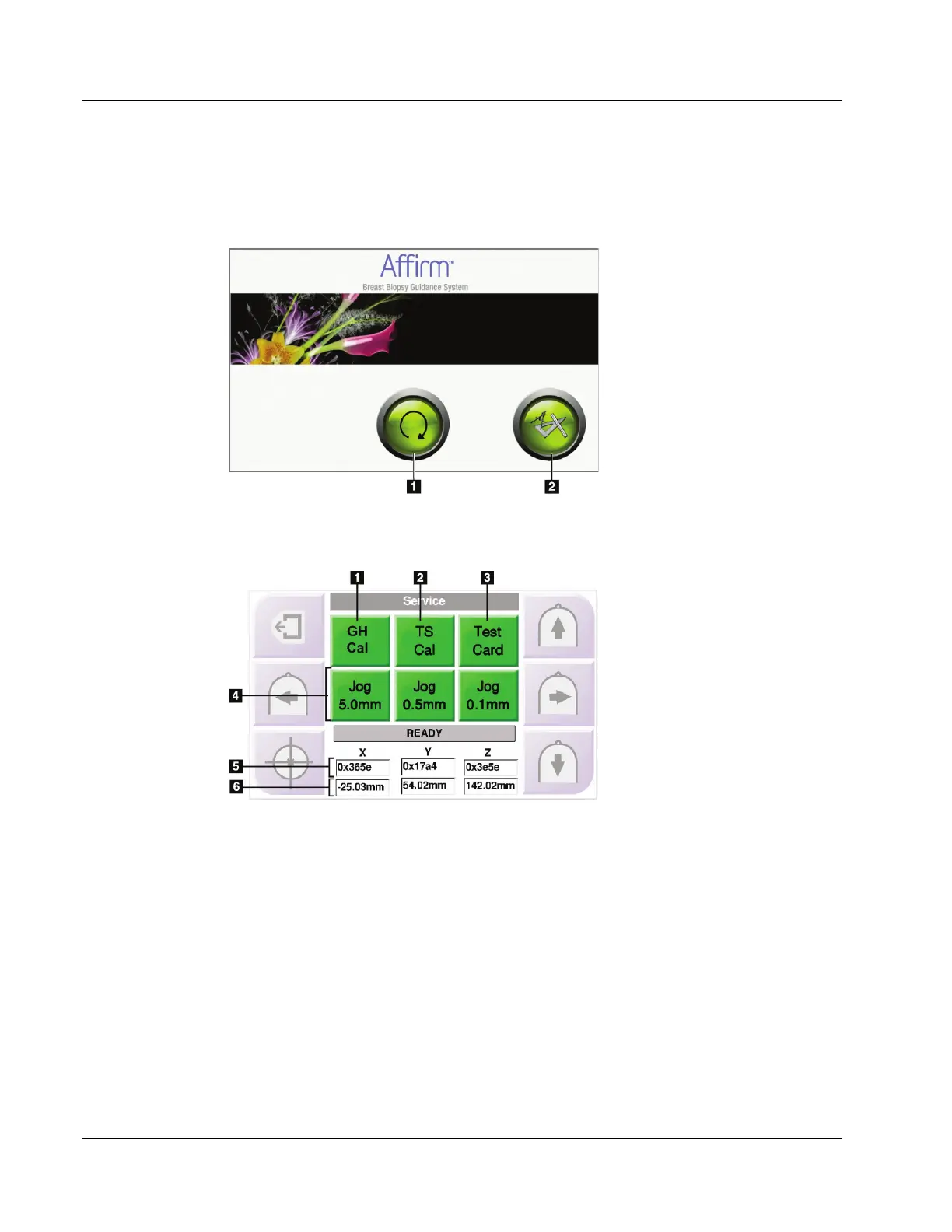
3.7.1 Confirm the Host Connection
When the imaging system is On, logged in as Service, and the Affirm system cable
connections are correct, the Home screen displays on the Biopsy Control Module.
Figure 15: Home Screen
Figure Legend
1. Go to Target Guidance
Button
2. Service Tools Button
(displays only when logged in
as Service)
Select the Service Tools button to display the Service screen.
Figure 16: Service Screen
Figure Legend
1. GH Cal—Guidance
Hardware Calibration
(Configures x, y, and z stage
limits and zero point.)
2. TS Cal—Touchscreen
Calibration Test
3. Test Card—Displays
visual test problems in
LCD configuration
4. Jog buttons—Sets jog
increments (screen only)
5. Raw A/D values
6. Mapped (calculated)
values












 To Next Page