Affirm Breast Biopsy Guidance System Service Manual
Chapter 3: Installation, Verification, and Removal
Page 36 MAN-05754 Revision 002
Installation of the Needle Guide on the Lateral Arm Needle Guide Holder
1. Make sure that the Lateral Arm is attached to the correct side of the Biopsy Guidance
Module for the desired direction of approach. If necessary, refer to the figures Left
(and Right) Approach of Lateral Arm on page 31.
2. Make sure that the device mount is installed on the correct side of the Lateral Arm
for the desired direction of approach. If necessary, refer to Device Mount for Lateral
Arm on page 37.
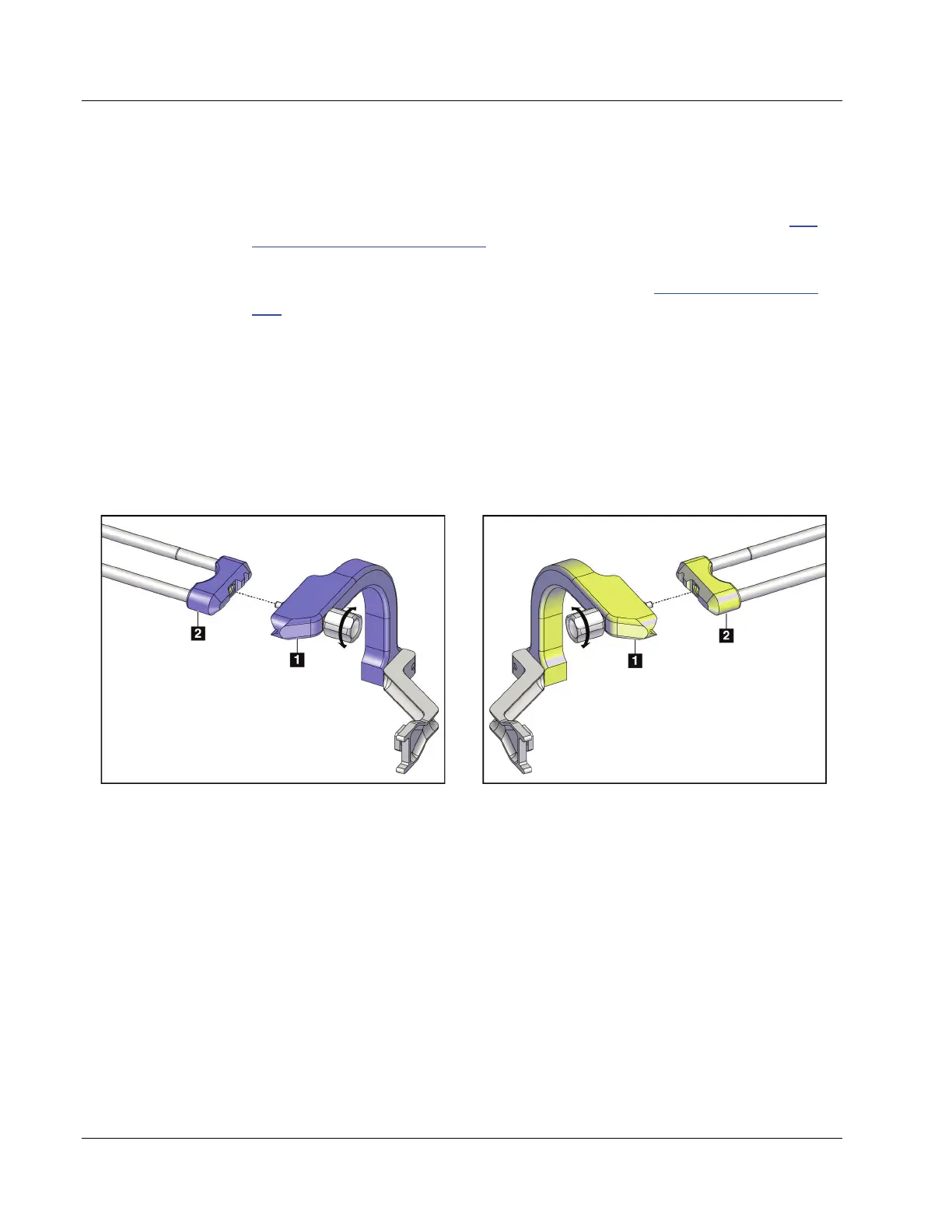
3. Make sure that the correct needle guide holder is installed on the needle guide rods
based on the needle approach (see the following set of figures). If necessary, remove
the existing needle guide holder (item 1) and install the correct one (item 2). Keep in
mind the following:
• The blue end of the needle guide rods receives the blue needle guide holder for
the left approach.
• The yellow end of the needle guide rods receives the yellow needle guide holder
for the right approach.
Figure 27: Attaching Blue Needle Guide Holder to Needle
Guide Rods (Left Needle Approach)
Figure 28: Attaching Yellow Needle Guide Holder to
Needle Guide Rods (Right Needle Approach)












 To Next Page