Affirm Breast Biopsy Guidance System Service Manual
Chapter 3: Installation, Verification, and Removal
MAN-05754 Revision 002 Page 43
3.9.3 Tabletop Stand for the Affirm System
Caution:
The Affirm system Tabletop Stand is not for mobile applications.
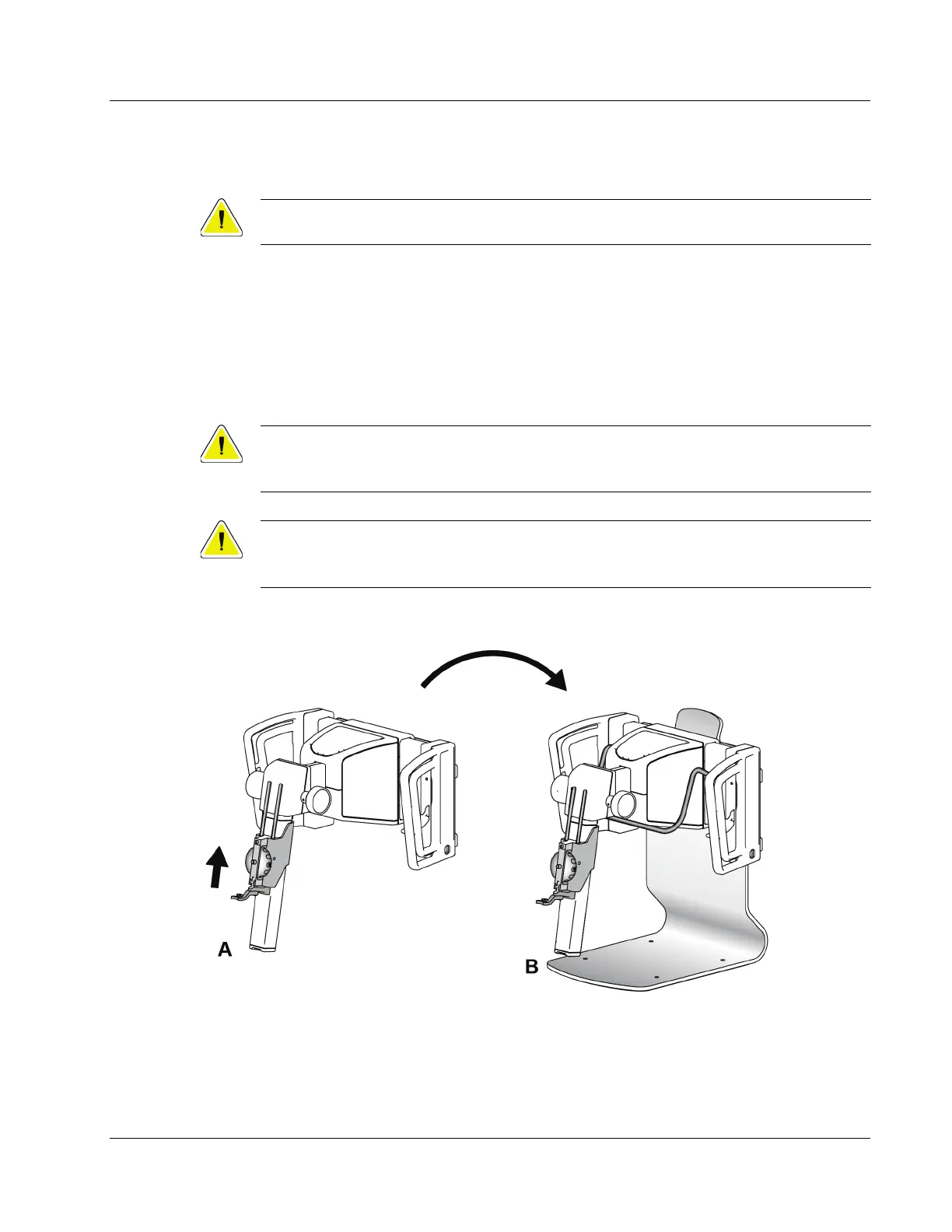
To place the Affirm biopsy system on the optional stand, refer to the following figure.
1. Move the device mount and needle guide to the highest upper position as shown in
A.
2. Disconnect the biopsy guidance module cable from the imaging system C-arm.
3. Remove the Affirm Biopsy Guidance Module along with the Biopsy Control Module,
if present, from the imaging system.
Caution:
To prevent damage or alignment problems with the Needle Guidance Stage, be
careful when you move the Biopsy Guidance Module.
Caution:
The Affirm Biopsy Guidance Module weighs 15 pounds. When you move it, be sure
to have a secure grip on the handles.
4. Place the Affirm system on the Tabletop Stand as shown in B.
Figure 36: Affirm System Tabletop Stand
3.9.4 Storage Case for the Lateral Arm
The Lateral Arm is supplied with a storage case to safely store all the Lateral Arm
components. The Lateral Arm QAS Phantom is also stored in the storage case. To protect












 To Next Page