Affirm Breast Biopsy Guidance System Service Manual
Chapter 3: Installation, Verification, and Removal
Page 34 MAN-05754 Revision 002
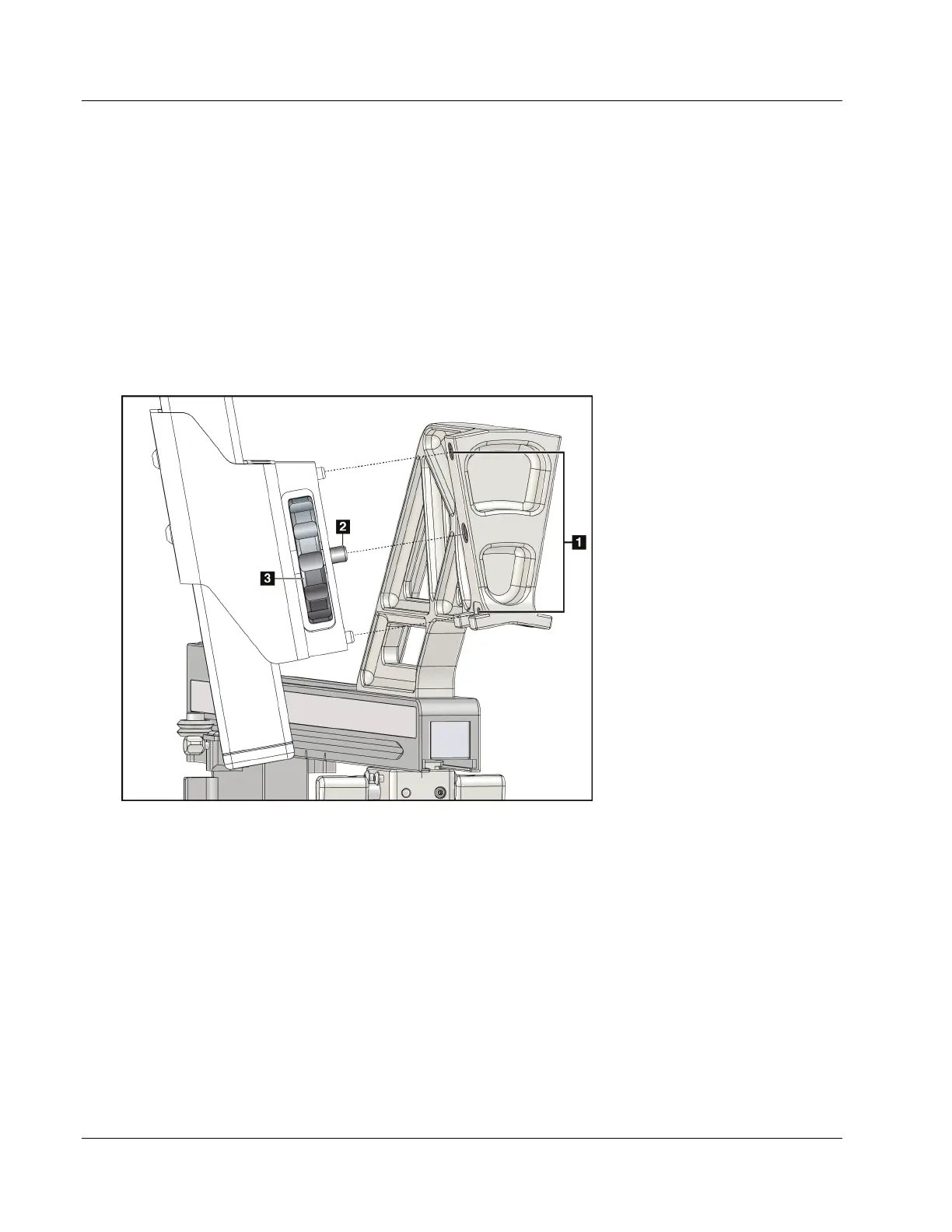
6. Attach the Lateral Arm to the Biopsy Guidance Module (see the following figure).
a. Align the top and bottom guide holes on the Lateral Arm (item 1 in the following
figure) to the top and bottom pins on the device mount on the Biopsy Guidance
Module.
b. Align the center hole of the Lateral Arm (item 2) with the mount screw on the
device mount.
c. Turn the mount knob (item 3) to secure the Lateral Arm to the Biopsy Guidance
Module.
d. Make sure that the two mounting surfaces are aligned correctly.
Figure 25: Installing Lateral Arm to Device Mount
Figure Legend
1. Lateral Arm Mount
Guide Holes
2. Device Mount Screw
3. Device Mount Knob












 To Next Page