● The normal start pressure of the fan is 2.26 MPa which can be read on the LCD of the
outdoor unit rotational speed controller. You can acquire the pressure reading from the
screen of outdoor unit to get the discharge pressure.
● When the outdoor fans are double wind turbines and the outdoor ambient temperature
is below 27°C, one of the fans may not rotate.
Step 8 Adjust the compressor and
humidier input into 0. Exit the diagnostic mode.
Step 9 If high humidity alarm occurs, the following steps are recommended.
1. On the main screen, tap Settings > System Settings > System Control, and
change Heat mode to Dehumid<.
2. On the main screen, tap Settings > System Settings > T/H Sensor, and
change T/H control type to Return-air or Cold aisle.
3. Shut down the fresh air system. In modular datacenter, open the modular
doors and ceilings, or open some false panel on the IT rack.
----End
Follow-up Procedure
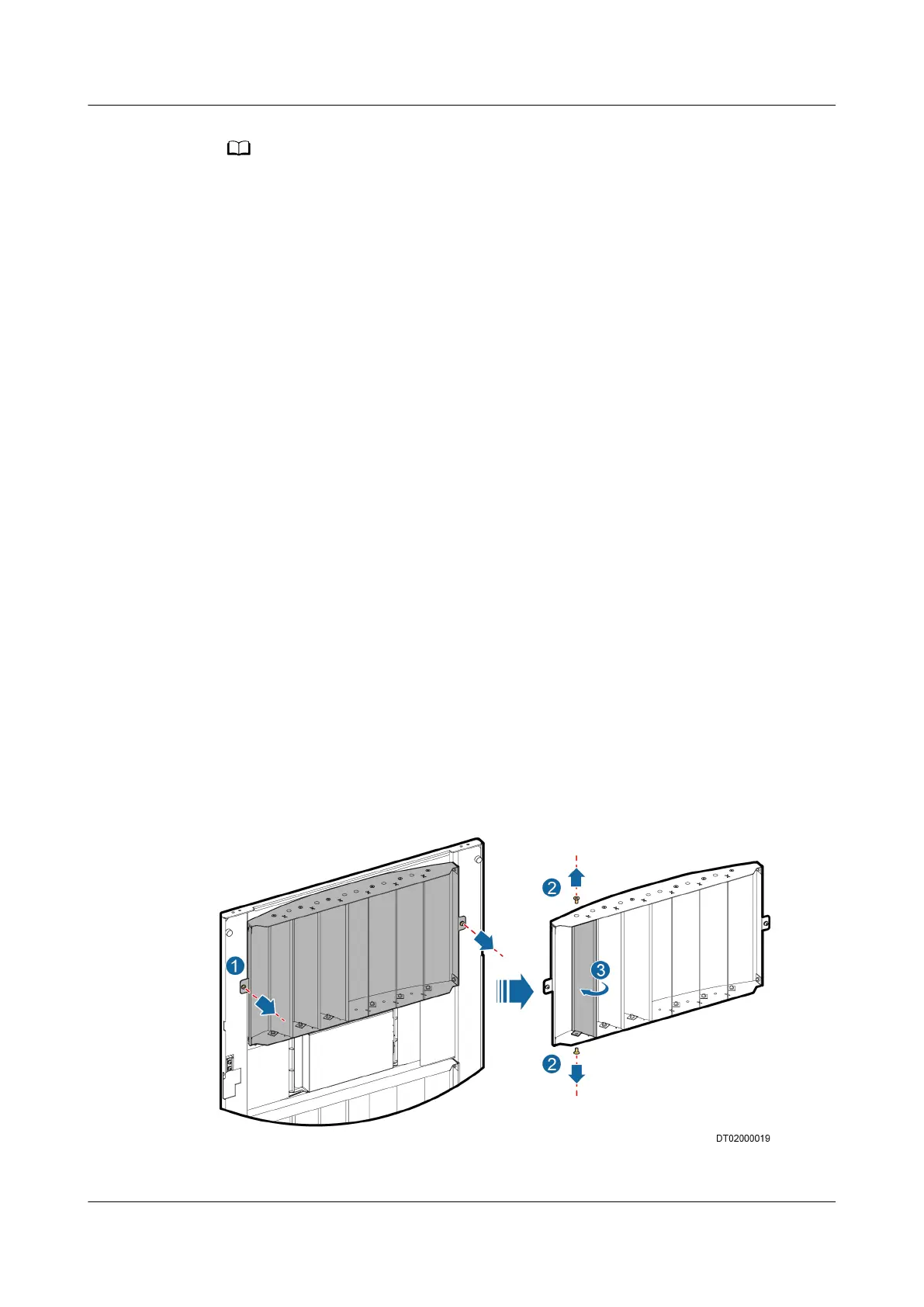
If you need to adjust the air ow direction, adjust the air deector by performing
the following steps:
1. Remove screws from both sides of the air deector to be adjusted using a
Phillips screwdriver and remove the air
deector, as shown by 1 in Figure 5-8.
2. Remove the upper and lower screws from the air deector using a Phillips
screwdriver, as shown by 2 in Figure 5-8.
3. Put the air
deector upside down and rotate it to the opposite direction of the
slot, as shown by 3 in Figure 5-8.
4. Reinstall the air deector using a Phillips screwdriver.
Figure 5-8 Adjusting the air deector
NetCol5000-A(025, 035) In-row Air Cooled Smart
Cooling Product
User Manual (600 mm Width) 5 Power-On Commissioning
Issue 17 (2020-10-22) Copyright © Huawei Technologies Co., Ltd. 149







 To Next Page