● When removing or installing a fan, use a ladder for high-position performance.
Do not step on the protective cover of the converter.
● Install cables for the fan strictly based on the cable labels and the electrical
conceptual diagram.
● Recommended materials: at-head screwdriver, Phillips screwdriver, 10#
socket wrench, 10# solid wrench, diagonal pliers, ties, and new fans.
● Preparations: Switch o the outside main power input.
Procedure
Step 1 Open the rear door. Remove the
lters, and switch o the general power input
breaker QF1 and fan breaker QF6.
Step 2 Open the front door.
Step 3 Use a Phillips screwdriver to open the fan cable protective cover, remove the cable
terminals, and cut the cable tie using diagonal pliers.
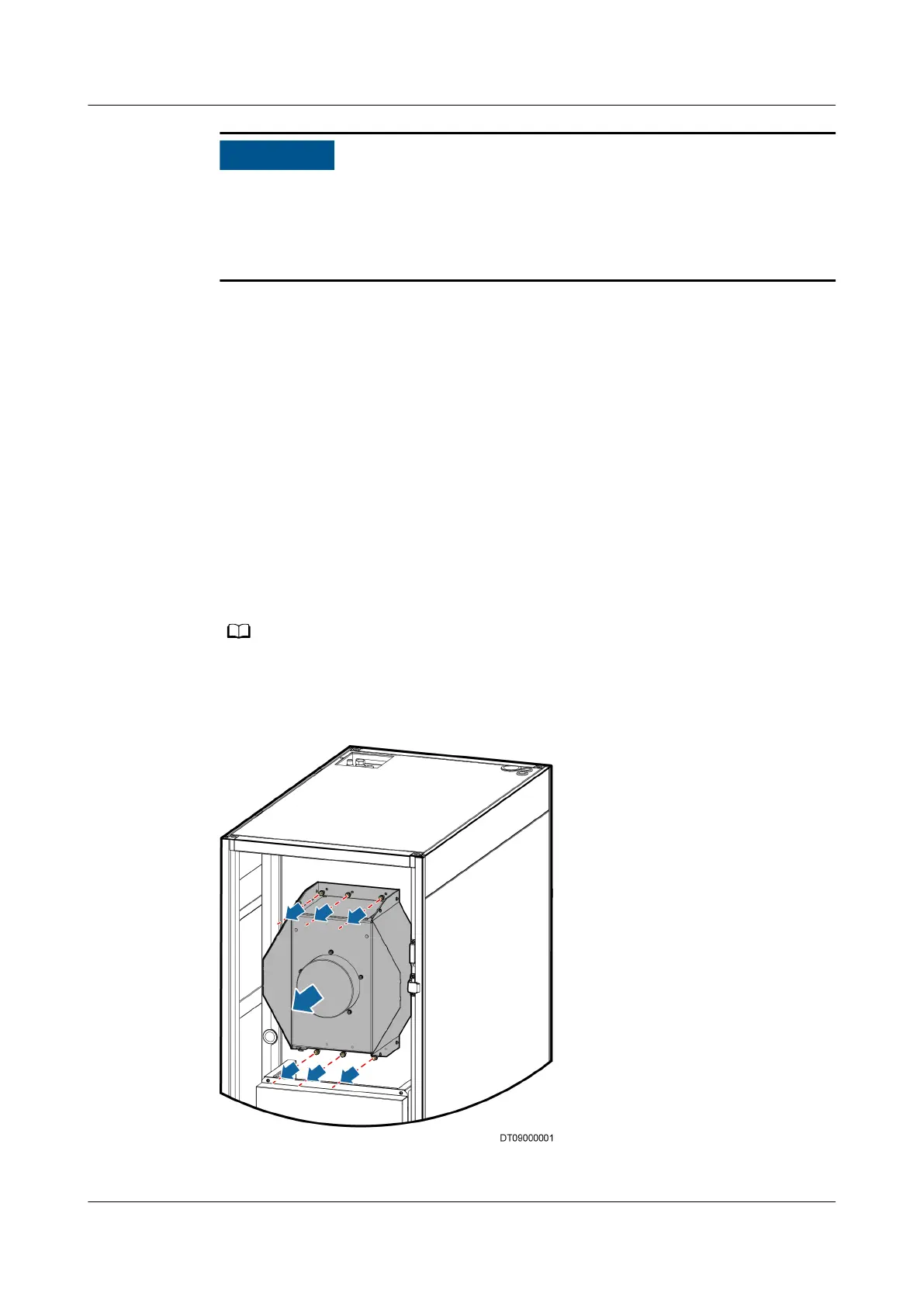
Step 4 Use a 10# socket wrench to remove the bolts that fasten the indoor fan, as shown
in Figure 6-4.
At least two personnel are needed. One removes the bolts and the other rises the fan by
hand.
Figure 6-4 Removing bolts that fasten the indoor fan
NetCol5000-A(025, 035) In-row Air Cooled Smart
Cooling Product
User Manual (600 mm Width) 6 System Operation and Maintenance
Issue 17 (2020-10-22) Copyright © Huawei Technologies Co., Ltd. 206







 To Next Page