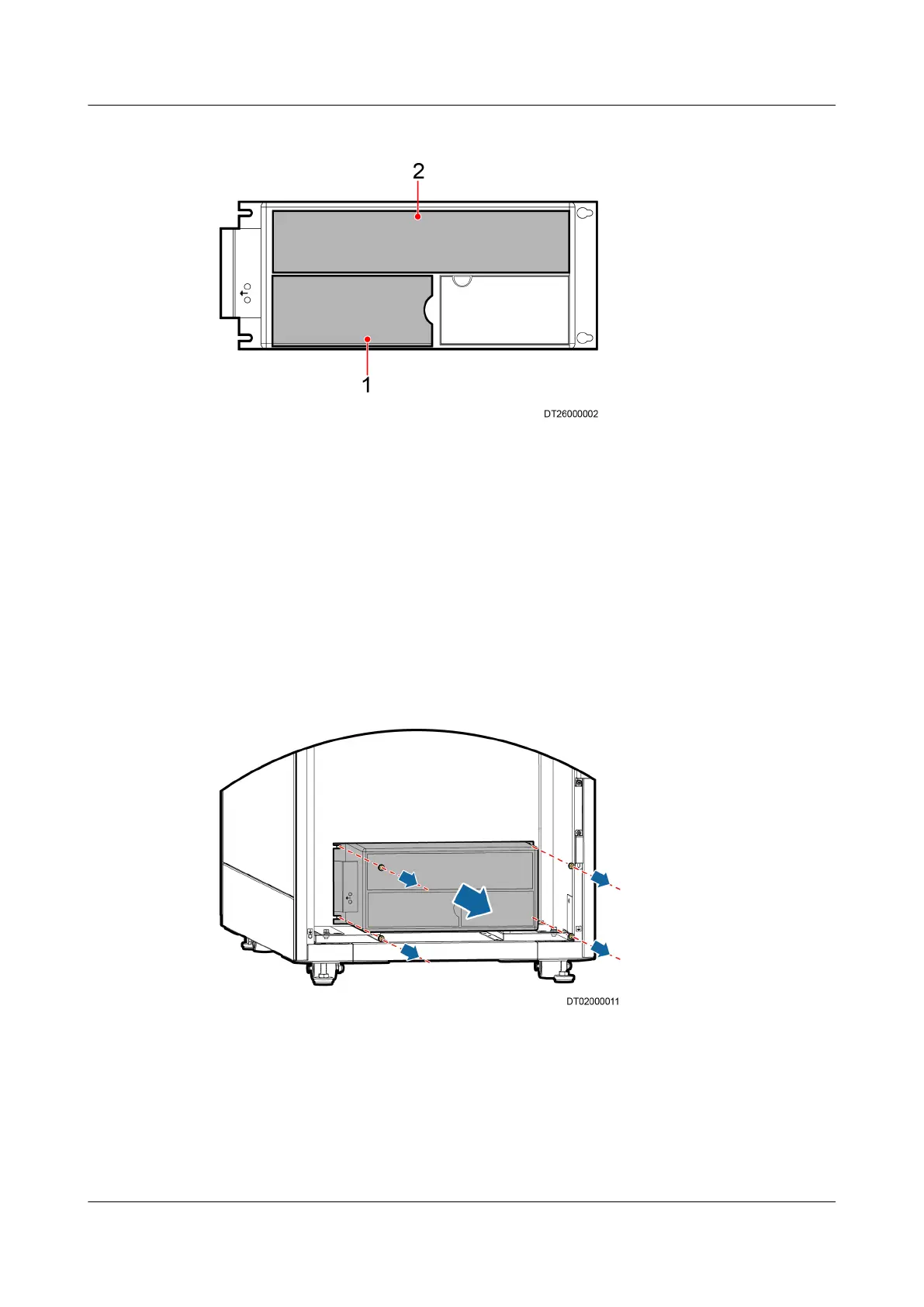
Figure 6-16 Compressor Drive Board
(1) Lower bae plate (2) Upper bae plate
Step 5 Push the buckle of the upper bae plate on the right of the drive inwards using a
at-head screwdriver until the part of the upper bae plate (shown by 2 in
Figure 6-16) on the right is free from the buckle. Then move the bae plate to
the right until it is free from the two buckles on the left. Draw out the
bae plate.
Remove the power cables and output signal cables using a M3 and M6 box-end
hex key.
Step 6 Remove the fastener of the input and output cables of the drive.
Step 7 Remove the screws at the four corners of the compressor drive and drag the
compressor drive out, as shown in Figure 6-17.
Figure 6-17 Removing a compressor drive
Step 8 Install a new compressor drive in an inverse order.
Step 9 Power on the unit and tap Maint > Diagnostic Mode > Enter to set a speed of
the compressor. Make sure the compressor work properly. Exit the diagnostic
mode.
----End
NetCol5000-A(025, 035) In-row Air Cooled Smart
Cooling Product
User Manual (600 mm Width) 6 System Operation and Maintenance
Issue 17 (2020-10-22) Copyright © Huawei Technologies Co., Ltd. 217







 To Next Page