TE20 Videoconferencing Endpoint
Huawei Proprietary and Confidential
Copyright © Huawei Technologies Co., Ltd.
address has not been
added to the list of trusted
sites.
3. In Add this Web site to the zone,
enter your endpoint IP address. Then
click Add.
4. Click OK.
Button text is not
fully displayed.
Internet Explorer is set to
ignore the font styles
specified on web pages.
In this case, the font
specified by your
endpoint cannot be
recognized.
1. From the Internet Explorer menu bar,
choose Tools > Internet Options.
2. Under Appearance on the General
tab, click Accessibility.
3. In the Accessibility dialog box,
deselect all options.
4. Click OK.
The records of
the local address
book cannot be
exported.
The pop-up blocker is
enabled on your browser.
If Internet Explorer is used: On the
Internet Explorer menu bar, choose
Tools > Pop-up Blocker > Turn Off
Pop-up Blocker.
If the Firefox is used: Choose Tools >
Options. On the General tab, select
Show the Downloads window when
downloading a file. On the Privacy
tab, select Accept cookies from sites.
Then click OK to save the settings.
11.2.2 Network
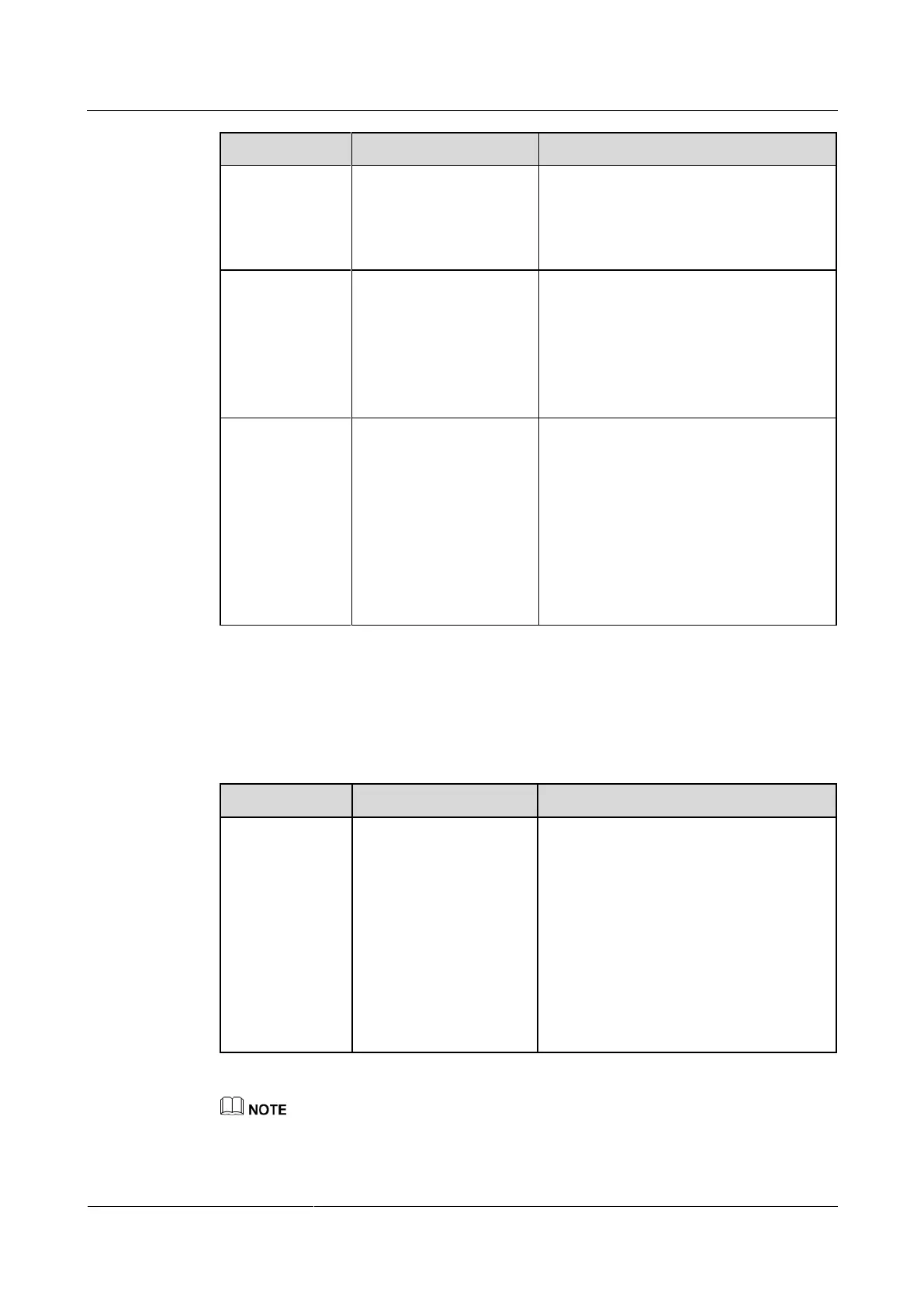
Table 11-6 lists the troubleshooting methods for problems that may arise on the network.
Table 11-6 Methods for troubleshooting common network problems
When you
attempt to use
Telnet to access
the endpoint, a
message is
displayed to
indicate that the
number of
connections to
the endpoint has
reached the limit.
The number of
connections to the
endpoint has reached the
maximum value.
NOTE
A maximum of three
SSH and Telnet
connections to the
endpoint is allowed.
A maximum of three
SSH connections to the
endpoint is allowed.
Disconnect some Telnet connections.
By default, the Telnet service is disabled. The Telnet service is generally used to query system status and
logs and perform specific maintenance. Exercise caution when enabling this service.



 To Next Page