TE20 Videoconferencing Endpoint
A Icons on the Remotely Controlled UI
Huawei Proprietary and Confidential
Copyright © Huawei Technologies Co., Ltd.
A Icons on the Remotely Controlled UI
The icons provided on the user interface indicate the status and settings of the system, helping
you quickly understand system status and complete tasks.
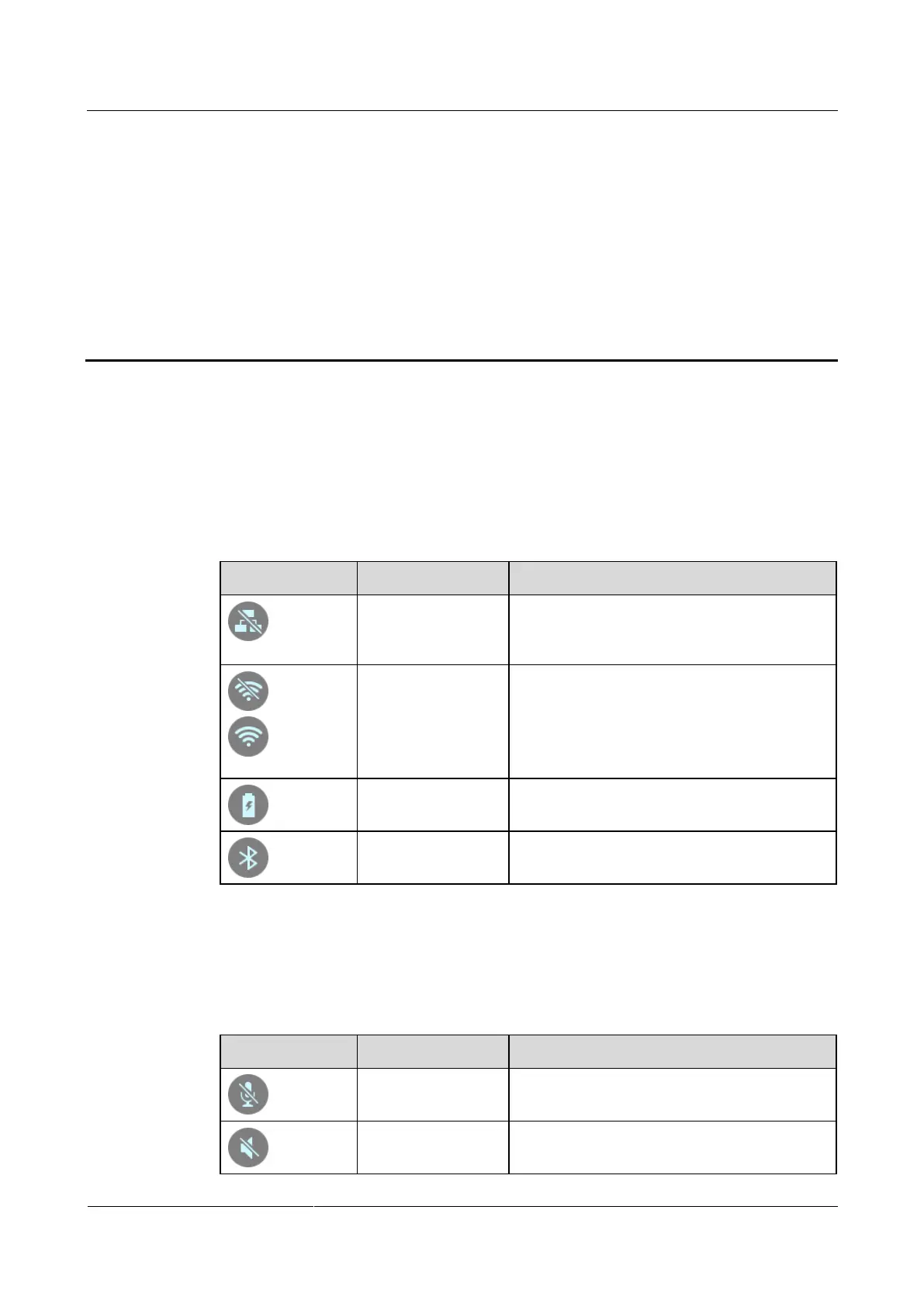
Table A-1 lists concerned icons that display the connection status in the upper right corner of
the remotely controlled UI. Before initiating a conference, check the status of these icons.
Table A-1 Network status icons
The endpoint is disconnected from an IP
network. The network cable may be
disconnected.
The first icon indicates that the Wi-Fi network
has disconnected after the Wi-Fi client is
enabled.
The other icon indicates the signal status of a
connected Wi-Fi network.
Remote control
battery status
The battery of the remote control is
insufficient.
Bluetooth device
connection status
The endpoint is connected with a Bluetooth
device.
When you view a video, the icons listed in Table A-2 are used to indicate the status of certain
operations. During a conference, pay attention to the status of these icons to ensure that the
relevant operations are performed correctly.
Table A-2 Operating status icons
The microphone of the local site is muted.
The speaker of the local site is muted.



 To Next Page