101
INSTALLER
USERMAINTENANCE TECHNICIAN
TECHNICAL DATA
Id
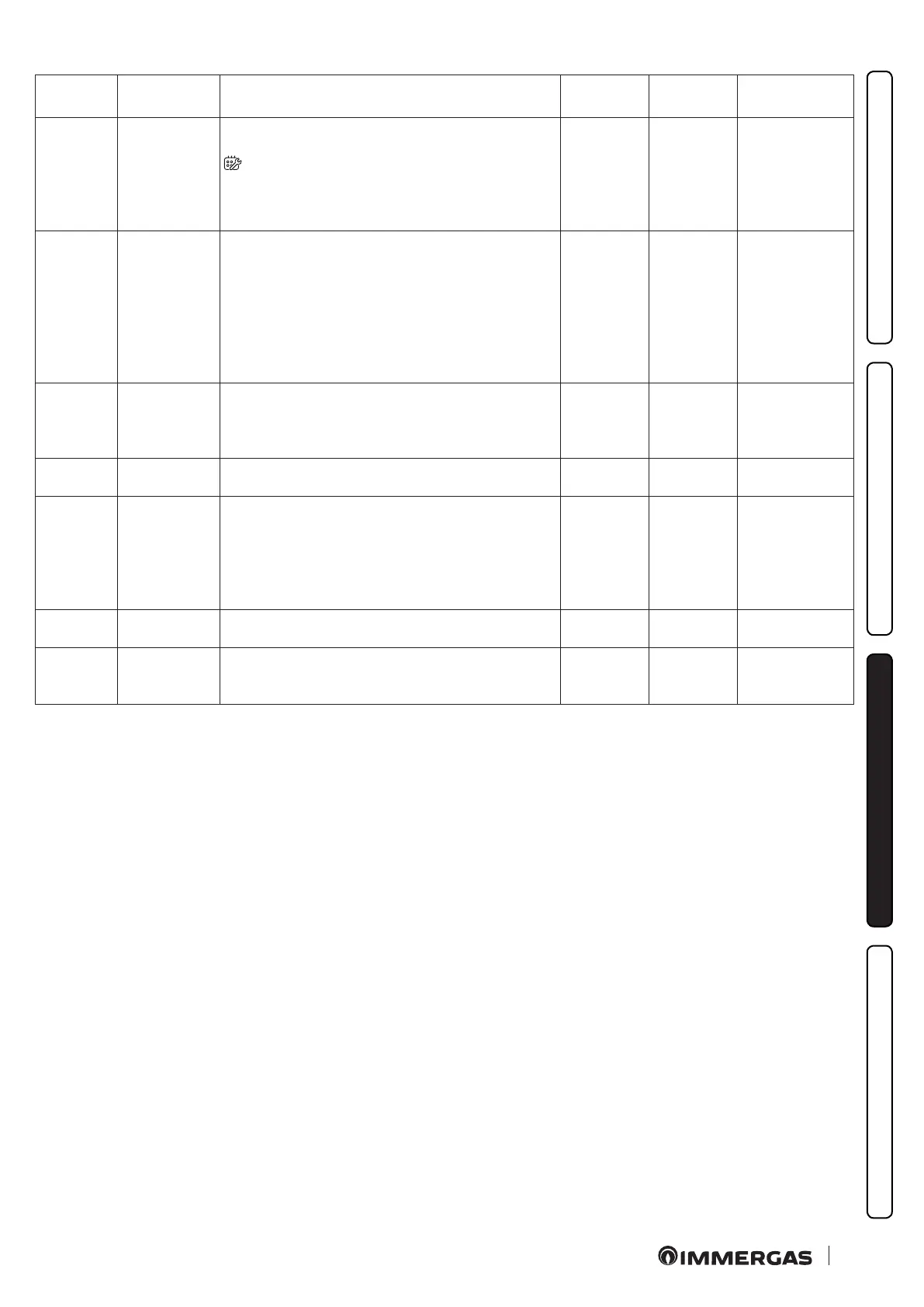
Parameter
Parameter Description Range Default
Value
customized
P.16
Scheduled
maintenance
Service
Set the value in months at scheduled maintenance. When
the months set on the boiler display have expired, the icon (
) appears while error 97 is displayed on the remote
control CAR
V2
. Boiler operation is still guaranteed. To reset
the warning, set parameter P.16 at '0'; then you may set a new
month interval for the next scheduled maintenance.
0-36 0
P.17
Terminals 44-41
communication
protocol
Set the dialogue protocol available on terminals 44-41
0 : IMG BUS/DIM BUS. Select this mode when connecting
an Immergas remote control (e.g.: CAR
V2
or a DIM) to
termina ls 44/41
1 : Select this mode when a commercial remote control is
connected to terminals 44-41 (with this selection, the
control of the domestic hot water adjustments and max set
central heating ow remains available on the boiler panel)
0-1 0
P.18
Modbus
Protocol
(D+/D-)
Modbus port setting
0: O
1: Dominus
2: BMS
0 - 2 0
P.19
Slave Address
(for BMS)
Node id (slave address) 1 ÷ 247 1
P.20
Baud rate (for
BMS)
0: 1200
1: 2400
2: 4800
3: 9600
4: 19200
5: 38400
0 - 5 3
P.21
Stop bits (for
BMS)
Set the number of Stop bits 1 ÷ 2 1
P.22
Parity bit (for
BMS)
0: None
1: Even
2: Odd
0-2 1







 To Next Page