12 Programming peripherals
Anti-intrusion control panels
KEYPAD SETTINGS
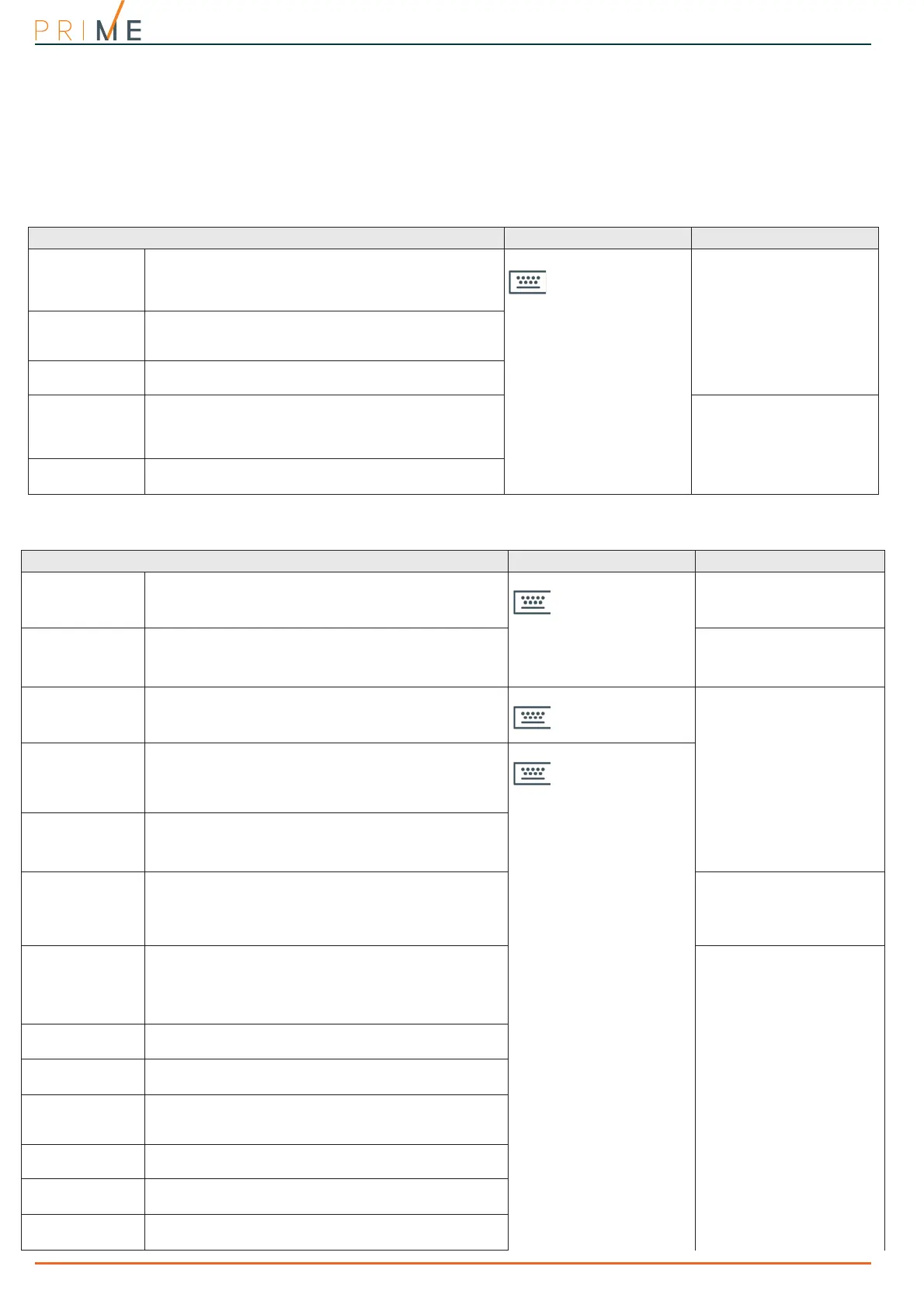
Prime system keypads also provide a section where you can configure the keypad parameters,
for the customization and optimization of their use.
The complete description of the parameters in this section can be found in paragraph 6-6-8
Keypad settings in the user manual.
3-1-3
Keypad parameters
Table 3-1: Parameters common to all keypads
Parameter Software section Installer menu section
Wrong PIN key-
pad lockout
If a wrong code is typed-in at a keypad more than 5
times in succession, the keypad will lock for 10 minutes.
The count restarts from 10 minutes in the case of
control panel reset or entry into programming.
Keypad parameters
Parameters
Keypad lockout
View open zones
The keypad will show the descriptions of any zones not
in standby status when the partitions disarm.
Any auto-bypassable zones will be shown in negative.
View open zones
Show scenario
The second line on the keypad display, on the left side,
will show the description of the active scenario.
Show scenario
Message repeti-
tions on voice
keypad
This refers to the number of times event messages are
played on the keypad (only for keypads with speakers).
The playback phase can be stopped by pressing any
button.
Parameters, Other pa-
rameters,
LocKpadMessTimes
Press key to end
playback
If this option is enabled, message playback can be
interrupted solely by pressing any button.
LocKpadMessTimes, "255"
Table 3-2: Parameters for single keypads
Parameter Software section Installer menu section
Description
Description of the keypad, customizable by the installer.
Configured keypads ,
selected keypad
Keypads, ChoosePeriph-
eral, "keypad"
Keypad type
Checkbox for the selection of the keypad type:
• Keypad with display and keys
• Touch-screen keypad
•Wireless keypad
Not available
Partitions
Section for the selection of the partitions the keypad can
operate on.
Configured keypads ,
selected keypad,
General
Keypads, ChoosePeriph-
eral, "keypad"
Disable exit time
signal
If this option is enabled and the application of an arming
scenario is programmed for the relative shortcut, the
keypad will not sound the exit time when the specific
scenario is applied. This option is disabled by default.
Configured keypads,
selected keypad,
General, Details,
Other parameters
NoExitTimeSignal
Disable entry
time signal
If this option is enabled and the application of an arming
scenario is programmed for the relative shortcut, the
keypad will not sound the entry time when the specific
scenario is applied. This option is disabled by default.
NoEntryTimeSign.
Temperature hys-
teresis
Enter the value of the hysteresis for the “Air
conditioning” function of the selected keypad (if
enabled).
The entered value must be expressed in °C decimals
(from a minimum of 0 to a maximum of 4).
Keypads, ChoosePeriph-
eral, "keypad"
Disable tempera-
ture visualization
If this option is enabled, the room temperature will not
be flashed on the display. This option is valid only for
keypads equipped with thermometers.
Keypads, ChoosePeriph-
eral, "keypad", Op-
tions,
Temperature off
Disable audible
entry-time signal
This option enables/disables the buzzer during partition
entry-time
NoEntryTimeSign.
Disable audible
exit-time signal
This option enables/disables the buzzer during partition
exit-time
NoExitTimeSignal
Audible signal on
terminal T1 out-
put
This option enables/disables the buzzer when the
keypad terminal T1 is activated as an output.
Beep on output
Disable chime
This option enables/disables the buzzer that signals the
violation of the bell zone relative to the keypad.
Disable chime
LED OFF in stand-
by
If enabled, in the event of at least 40 seconds inactivity
on the keypad, the respective LEDs will switch off.
LED OFF in stand-by
Bypass wireless
supervision
If enabled, this option inhibits the monitoring function
the control panel must perform on the wireless keypad.
NO Superv. WLS



 To Next Page