Programming manual
Programming peripherals 13
Note
The “Listen-in” and “Arming status” shortcuts will have no effect if requested at a keypad.
When programming an Alien keypad, the only type of shortcut that functions is “Arm/disarm”.
Bypass tamper
If enabled, this option inhibits signalling on the control
panel of wireless keypad tamper.
Disable tamp. WLS
Enablement of
home-automa-
tion outputs
Section for the selection, from the outputs available, of
outputs for “home-automation” purposes, accessible
without code entry (refer to paragraph 6-2-1 Outputs
activatable without authentication).
Configured keypads ,
selected keypad,
General, Details
Not available
Thermostat on
keypad
This key directly accesses the programming section of
the “Thermostat ON” event
Configured keypads ,
selected keypad
Events, Thermostat ON
Valid code at key-
pad
This key directly accesses the programming section of
the “Valid code at keypad” event
Events, Valid Code
Temperature
adjustment
This parameter allows entry of the effective value of the
room temperature detected by an external thermometer.
This value replaces the one detected by the keypad and
allows the correction of the temperature sensor on the
keypad concerned (valid for keypads with temperature
sensors only).
The entered value must be expressed in °C decimals (for
example, type in 252 if the temperature is 25.2 °C).
Not available
Other parameters, Temp.
adjustment
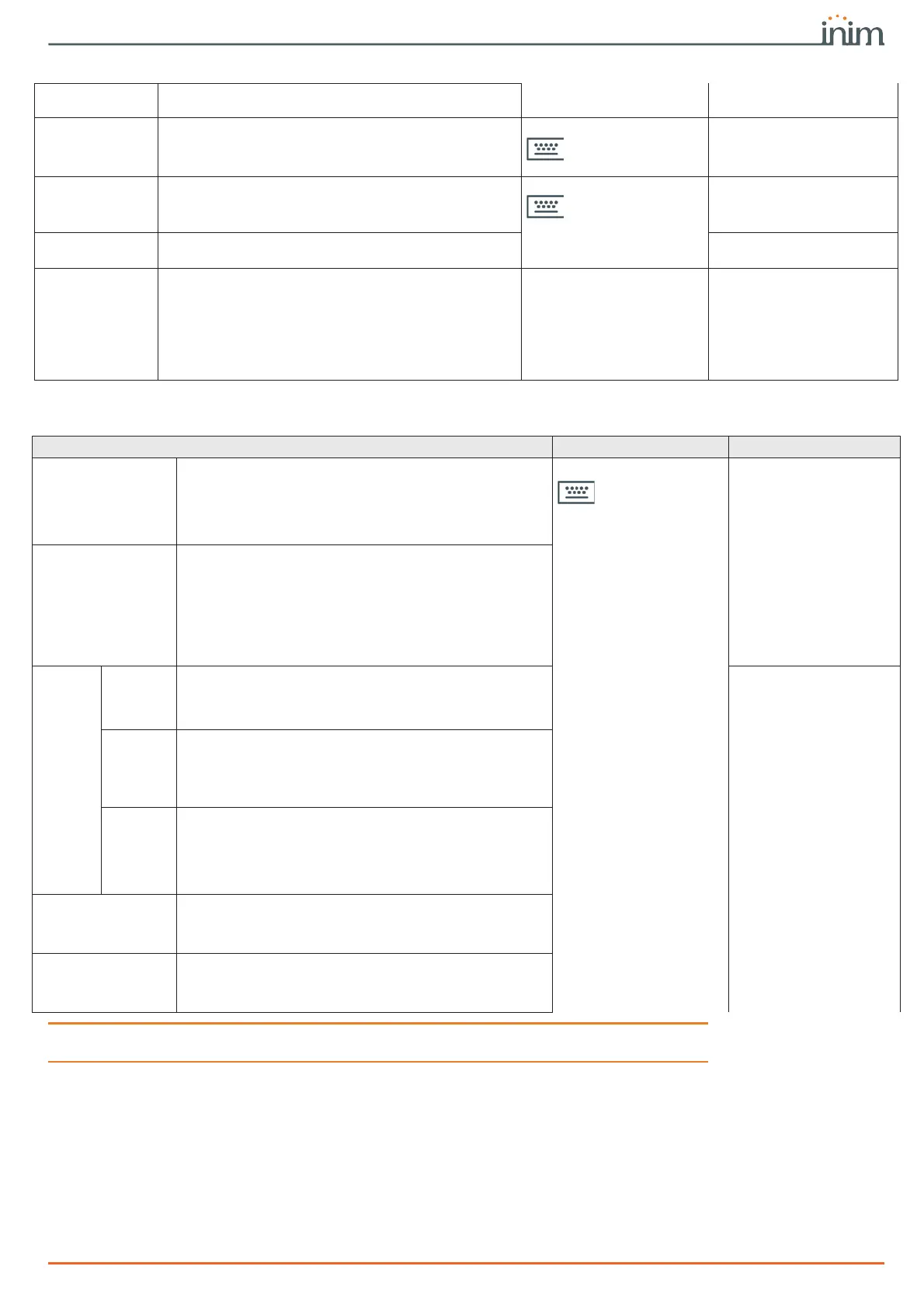
Table 3-2: Parameters for single keypads
Table 3-3: Shortcuts on single keypad
Parameter Software section Installer menu section
Shortcuts
For each key, from F1 to F12, it is possible to program the
type of shortcut selectable from among all the available
shortcuts (refer to Appendix B, Shortcuts by default).
In the case of an Alien keypad, positions F1 - F12 refer to
the available positions in the list in the “Scenarios” section
of the Alien keypad being programmed.
Configured keypads,
selected keypad,
General, Details,
Shortcut
Keypads, ChoosePe-
ripheral, "keypad",
F1/4KeyShortcuts
Shortcut parameter
It is necessary to specify a further parameter for each
shortcut:
• Execute Arm/Disarm, the parameter is one of the
scenarios
• Activate output, the parameter is an output
• Deactivate output, the parameter is an output
• Activate output scenario, the parameter is one of
the scenarios
• Panic, this parameter is one of the panic events
Shortcut Func.keys,
"Fx", Type
Shortcut
options
Requires
code
If this option is enabled and a user selects the shortcut by
pressing the relative function key, before activation of the
shortcut occurs, the system will request entry of a user
code. If the user code is valid the shortcut will be applied.
Shortcut Func.keys,
"Fx", Options,
Authentication
Code
entry in
the event
of security
risk
If this option is enabled and the selected shortcut involves
a scenario that disarms a partition, or switches a partition
from Away mode to Stay mode, the security of the system
will obviously be at risk, therefore, the system will request
entry of a valid code.
SecurityRiskCode
Requires
confirma-
tion
If this option is enabled when the user selects the shortcut
via the relative function key, the system will request
confirmation before actually activating the shortcut,
confirmation is achieved by simply pressing the key. This
option helps the user avoid accidental activations.
This option is not available on Alien keypads.
Confirm
Disable exit time sig-
nal
If this option is enabled and the application of an arming
scenario is programmed for the relative shortcut, the
keypad will not sound the exit time when the specific
scenario is applied. This option is disabled by default.
NoExitTimeSignal
Disable entry time
signal
If this option is enabled and the application of an arming
scenario is programmed for the relative shortcut, the
keypad will not sound the entry time when the specific
scenario is applied. This option is disabled by default.
NoEntryTimeSign.



 To Next Page