123
Alarms, Notications, Communication Errors 1010 Alarms, Notications, Communication Errors
Silencing an Alarm
You can usually silence Pod or PDM alarms by tapping a button on the alarm
screen. If the alarm continues, or if you are discarding a Pod and want to prevent a
future alarm, follow the directions in this section.
Pod alarm
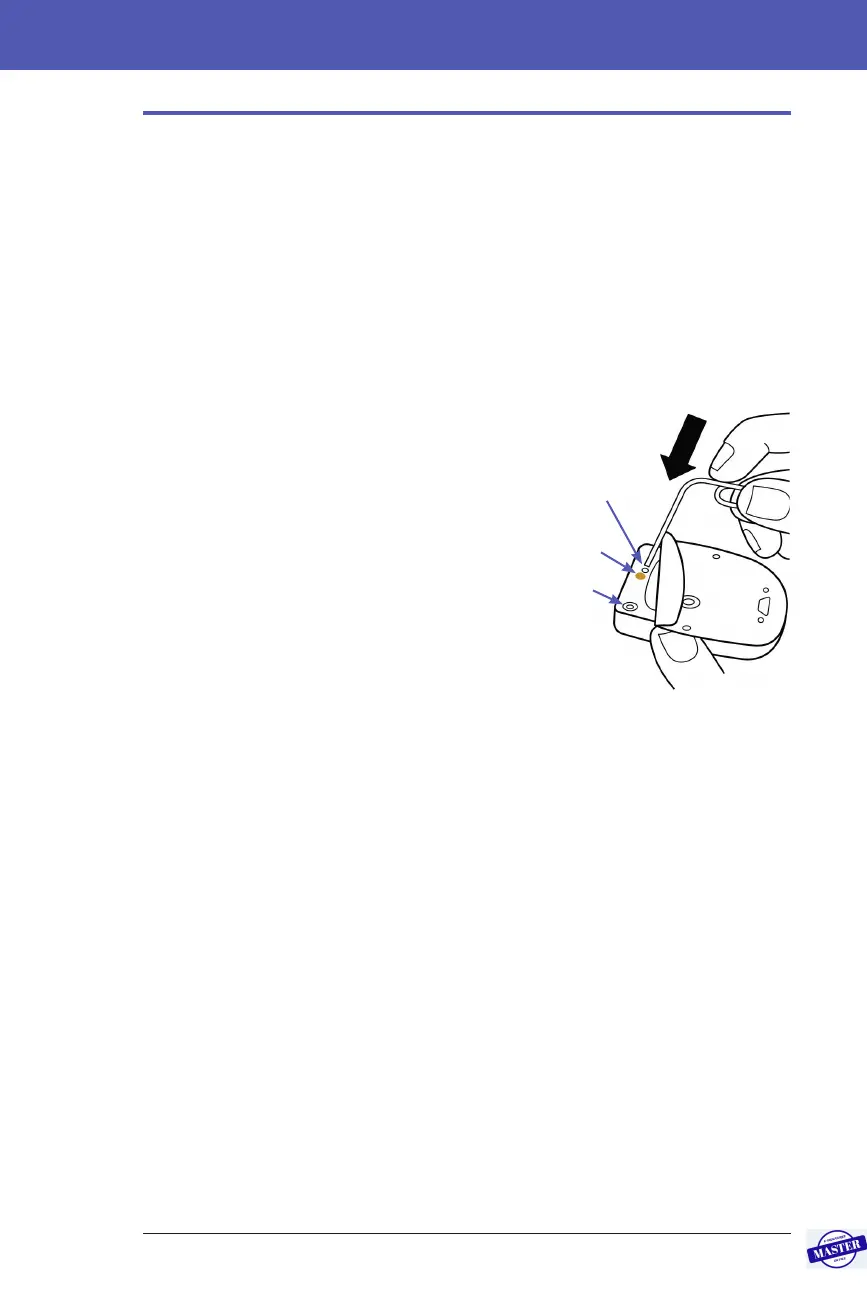
To permanently silence a Pod alarm:
1. If the Pod is on your body, remove it.
2. Peel back a little bit of the adhesive
pad from the bottom of the Pod at the
square end (see gure).
3. Locate the alarm shut-o port to the
right of the gold circle. e alarm shut-
o port can be felt with a ngernail or
paper clip as a so plastic.
4. Firmly press a paper clip or similar
item straight down into the alarm shut-
o port. If an alarm is sounding, the
alarm stops. You need to apply enough
force to break a thin layer of plastic.
PDM alarm
If a PDM alarm is not silenced when you tap the alarm screen’s button:
1. Press and hold the Power button, then tap Power o.
2. Take out and re-insert the PDM’s battery. For instructions on removing and
replacing the PDM battery, see “Inserting or Replacing the PDM Battery” on
page 131.
3. Press and hold the Power button to turn the PDM back on.
is action silences the PDM’s alarm. Your history records and personal settings
are preserved. However, you may have to reset the time and date and change
your Pod. Aer you reset the time, the Bolus Calculator is temporarily disabled.
A PDM message tells you when the Bolus Calculator can be used again. You can
deliver a manually calculated bolus when the Bolus Calculator is disabled.
Fill port
Gold circle
Alarm shut-o
port
Press down rmly.
Effective Date: 27SEP2019, ECO-000240



 To Next Page